Smart Lifter – LC Range www.autochair.co.uk 8 Smart Lifter – LC Range www.autochair.co.uk 9
3. Operation - Loading
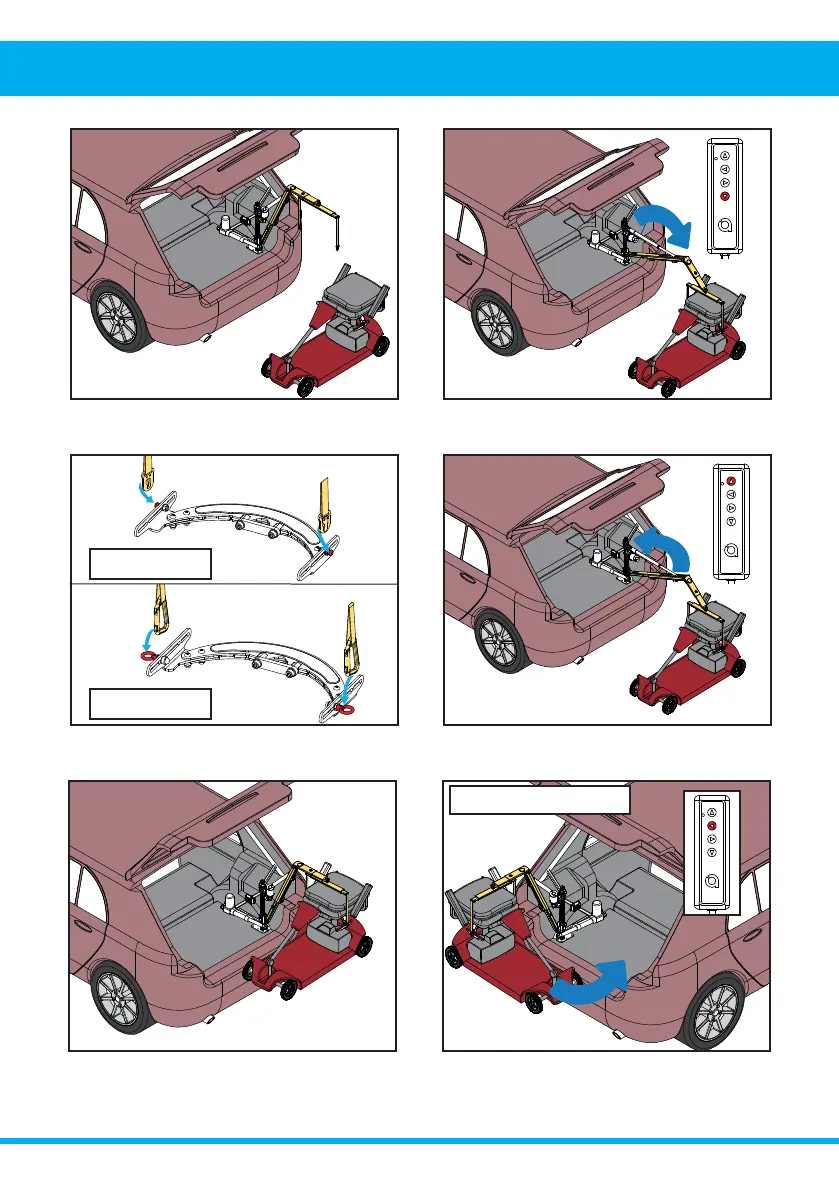
12. Press and hold the LEFT button to move the
mobility device inwards. Rotate the mobility device
as it moves inwards.
11. Release the up button once the mobility device is
DERYHWKHOXJJDJHDUHD˪RRU
9. Engage the keyhole plates/karabiner clips
securely to the lifting bracket. DO NOT attempt to lift
without all lifting straps securely connected.
10. Press and hold the up button to raise the mobility
device from the ground.
8. Press and hold the down button to lower the
boom.
7. Position the mobility device so that the lifting
points align with the spreader bar.
Left Hand Installs
Keyhole Plates
Karabiner Clips



 To Next Page