Smart Lifter – LC Range www.autochair.co.uk 8
3. Operation - Loading
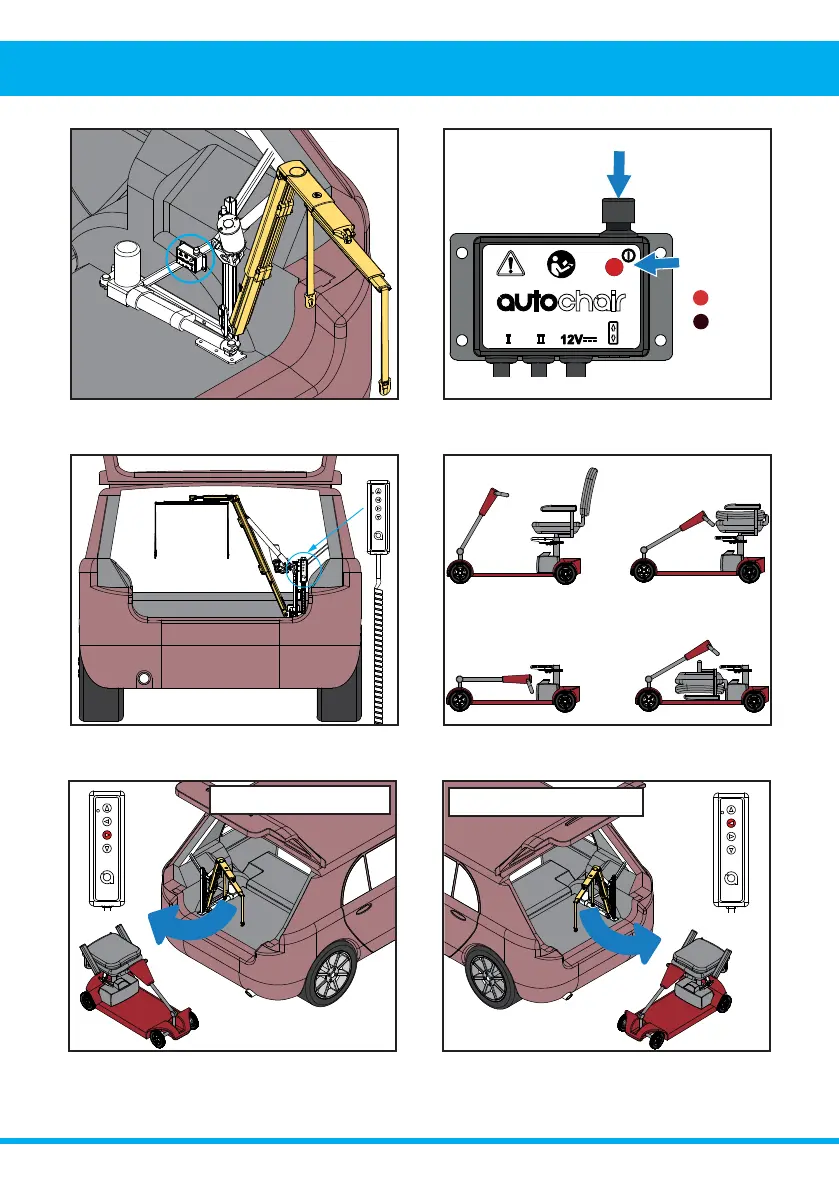
Power Button
Power status
indicator light
Power On
Power O˨
6. Press and hold the LEFT button to swing the
Smart Lifter outwards. Release the button when the
boom is at its outermost position.
5. Press and hold the RIGHT to swing the Smart
Lifter outwards. Release the button when the boom
is at its outermost position.
&RQ˩JXUHWKHPRELOLW\GHYLFHIRUOLIWLQJDV
recommended by the product demonstrator or
installer.
3. Locate and pick up the handset from its stored
position.
2. Press the power button to switch on the unit. This
will be indicated by a red light when switched on.
1. Locate the power control box. This will normally be
mounted on the A-Frame.
LOADING A MOBILITY DEVICE
Left Hand Installs
Right Hand Installs
3. Operation - Loading



 To Next Page