Installation
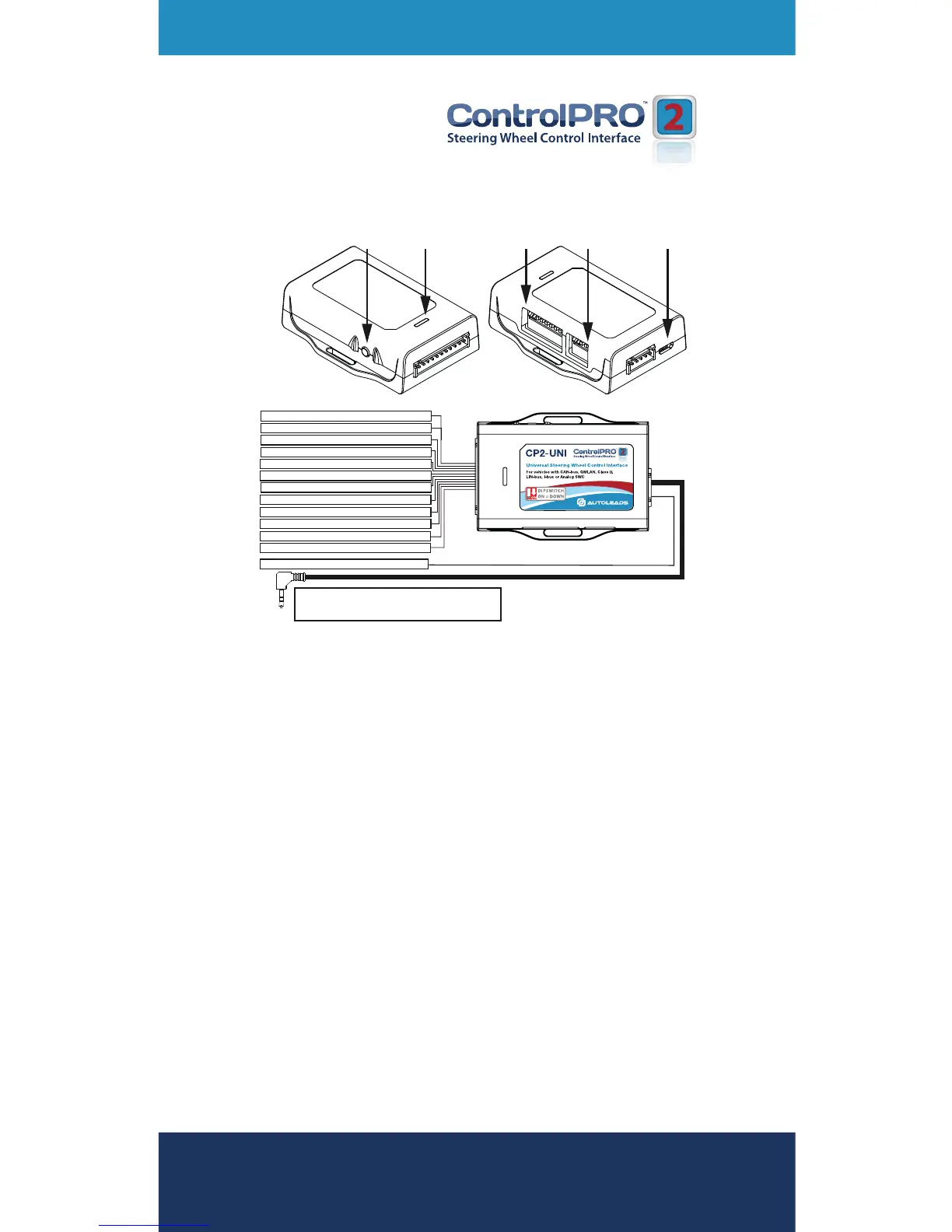
Interface & Wiring Overview (continued)
Please visit www.autoleads.co.uk/controlpro
to download the PC application or phone app that
provides vehicle specic wiring and vehicle dipswitch
congurations
Conguration & Programming
This is the fastest and most convenient way to
program the module. This method only requires you to
look up the dipswitches and wiring via the PC, Android
or Apple application, set the dipswitches and then
connect it to the vehicle/radio for it to function. Both
vehicle and radio dipswitch settings must be set
before the module is connected to the vehicle.
(-) Chassis Ground
(+) Constant 12v Input
White/Red
Pink
White/Black
Red
Red/White
Black
(-) Analog SWC Ground
Black
Yellow
(-) Analog SWC Input 3
Data 1 Input
(LAN, MSCAN, SWCAN, LEFT)
(-) Analog SWC Input 2
(+) Accessory 12v Input
(+) Accessory 12v Output
Blue/Yellow
SWC Output - Kenwood/Newer JVC
Purple
White
Light Green
Data 2 Input
(LIN, IBUS, CLASSII, SERIAL)
(-) Analog SWC Input 1
(+) 12v Analog SWC Input
3.5mm Jack
SWC Output - Alpine, JVC, Clarion,
Pioneer, Sony, Boyo, Dual, Advent,
Lightning Audio or Visteon


 To Next Page