DL06 Micro PLC User Manual, 3rd Edition, Rev. E
3-13
Chapter 3: CPU Specifications and Operation
1
2
3
4
5
6
7
8
9
10
11
12
13
14
A
B
C
D
Program Mode
In Program Mode, the CPU does not execute the application program or update the output
points. The primary use for Program Mode is to enter or change an application program.
You also use program mode to set up the CPU parameters, such as HSIO features, retentive
memory areas, etc.
You can use a programming device, such as DirectSOFT, the D2–HPP (Handheld Programmer)
or the CPU mode switch to place the CPU in Program Mode.
Run Mode
WARNING: Only authorized personnel fully familiar with all aspects of the application should
make changes to the program. Changes during Run Mode become effective immediately. Make
sure you thoroughly consider the impact of any changes to minimize the risk of personal injury or
damage to equipment.
Download
Program
LOGI
C
Koyo
0
6
C0 C4C2X1 X3 X4 X6 X11X13 X14X16 X21X23 N.C.
C1 C3X2 X5 X7 X10X12
X15X17 X20X22X0
N.C.
AC
(
N
)
24V
0V
N.C.
C1 C3Y0 Y15Y12Y10Y17Y7Y5Y2
C0 C2 Y16Y14Y13Y11Y6Y4Y3Y1
LG
G
AC
(
L
)
D0-06DR
2.0AOUTPUT: 6-240V50 - 60Hz 2.0A, 6 - 27V
INPUT: 12 - 24V 3 - 15mA
Y
X
40VA50-60HzPWR: 100-240V
0 123456710 11 12 13 14 15 16 17 20 21 22
23
PORT1PORT2
TERM
RUN STOP
PWR
RUN
CPU
TX1
RX1
TX2
RX2
Read Inputs
Read Inputs from Specialty I/O
Solve the Application Program
Write Outputs
Diagnostics
Service Peripherals
Write Outputs to Specialty I/O
Update Clock, Special Relays
Write Outputs
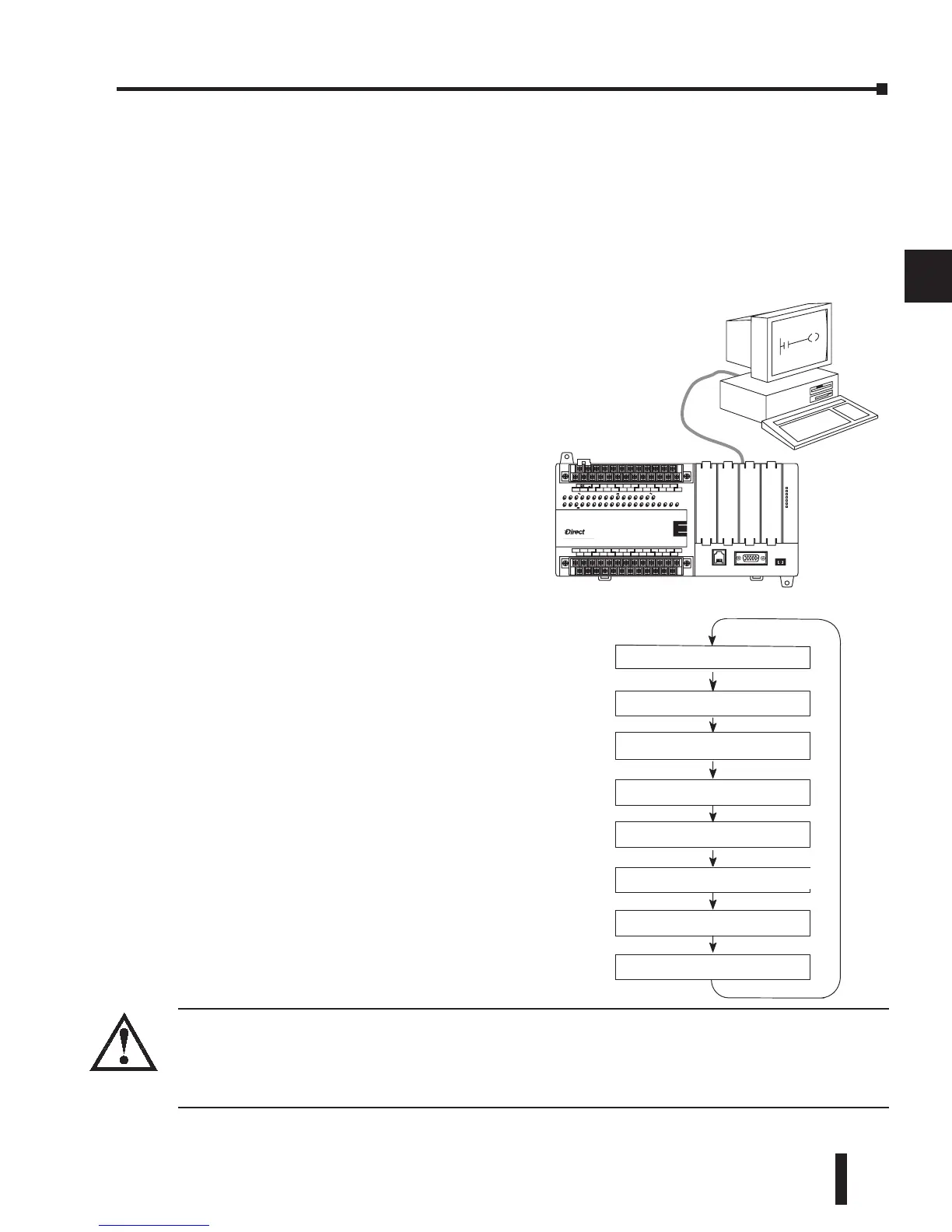
Normal Run mode scan
In Run Mode, the CPU executes the application
program and updates the I/O system. You can
perform many operations during Run Mode.
Some of these include:
• Monitor and change I/O point status
• Change timer/counter preset values
• Change variable memory locations
Run Mode operation can be divided into several
key areas. For the vast majority of applications,
some of these execution segments are more
important than others. For example, you need
to understand how the CPU updates the I/O
points, handles forcing operations, and solves the
application program. The remaining segments
are not that important for most applications.
You can use DirectSOFT, the D2–HPP
(Handheld Programmer) or the CPU mode
switch to place the CPU in Run Mode.
You can also edit the program during Run
Mode. The Run Mode Edits are not bumpless to
the outputs. Instead, the CPU ignores the inputs
and maintains the outputs in their last state
while it accepts the new program information.
If an error is found in the new program, then
the CPU will turn all the outputs off and enter
the Program Mode. This feature is discussed in
more detail in Chapter 9.


 To Next Page
 Loading...