DL06 Micro PLC User Manual, 3rd Edition, Rev. E
5-25
Chapter 5: Standard RLL Instructions
1
2
3
4
5
6
7
8
9
10
11
12
13
14
A
B
C
D
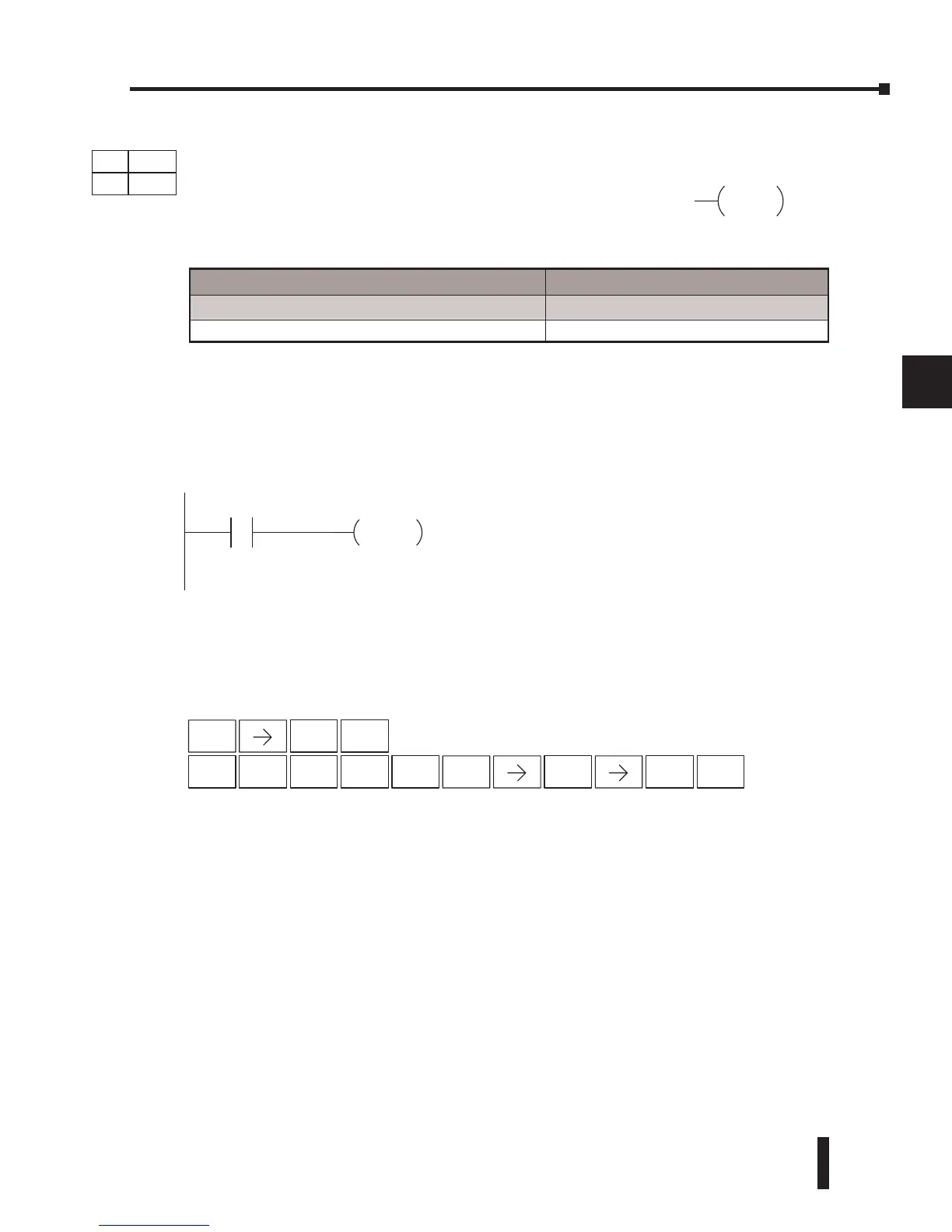
In the following example, when X1 is ON, Y5–Y7 will be turned OFF. The execution of the
ladder program will not be affected.
Since the D2–HPP Handheld Programmer does not have a specific Pause key, you can use the
corresponding instruction number for entry (#960), or type each letter of the command.
In some cases, you may want certain output points in the specified pause range to operate
normally. In that case, use Aux 58 to over-ride the Pause instruction.
DirectSOFT32
P
AUSE
X1
Y5 Y7
STR
$
1
B
ENT
Handheld
Programmer Keystrokes
5
F
ENT
INST#
O
9
J
6
G
0
A
ENT ENT
3
D
Operand Data Type DL06 Range
A
aaa
Outputs Y 0–777
DS Used
HPP Used
DirectSOFT
Pause (PAUSE)
The Pause instruction disables the output update on a range
of outputs. The ladder program will continue to run and
update the image register. However, the outputs in the range
specified in the Pause instruction will be turned off at the
output points.
aaaaaaY
PAUSE



 To Next Page