DL06 Micro PLC User Manual, 3rd Edition, Rev. E
5-103
Chapter 5: Standard RLL Instructions
1
2
3
4
5
6
7
8
9
10
11
12
13
14
A
B
C
D
NOTE: Status flags are valid only until another instruction uses the same flag.
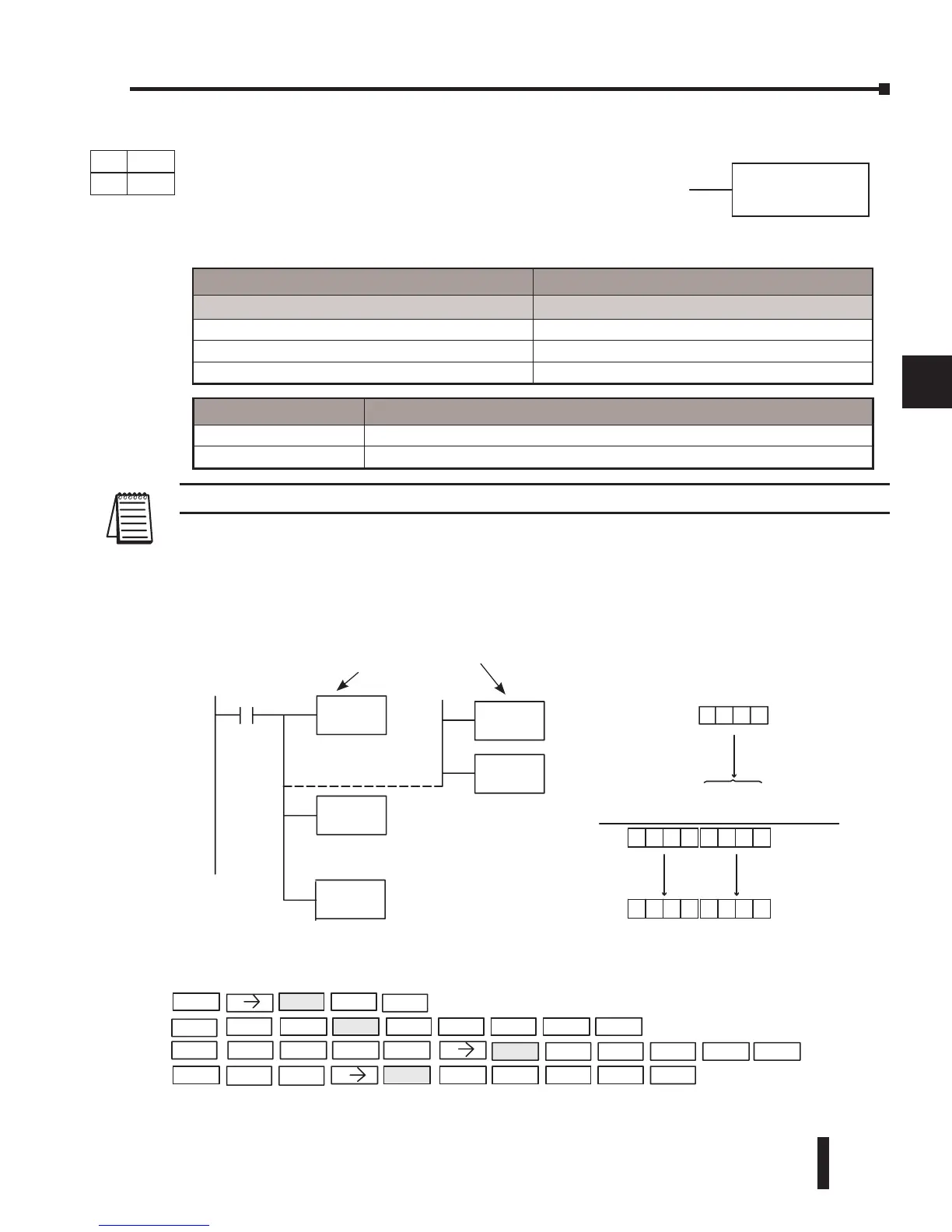
In the following example, when X1 is on, the value in V1400 will be loaded into the accumulator
using the Load instruction. The binary value in V1420 is multiplied by the binary value in the
accumulator using the Multiply Binary instruction. The value in the accumulator is copied to
V1500 using the Out instruction.
MULB
A aaa
DirectSOFT32 Display
HandheldProgrammerKeystrokes
LD
V1400
X1
MULB
V1420
Thebinaryvalue in V1420 is
multipliedbythe binary
valueinthe accumulator
OUTD
V1500
0
(Accumulator)
0
0
0
(V1420)
V1400
A01
000 A0 1
02 E
The unused accumulator
bits areset to zero
2E0001 C
C
C
V1500
C2 E
V1501
0001
Acc.
STR
X1
D V 1400
O
UT V1500
V140
M
2
SHFT
B
SHFT D
ENT
SHFT
L ENT
UL
ENT
ENT
Copy the value of the accumulator
to V1500 and V1501
Use either OR Constant
V-memory
LD
BIN
K2561
Load the value in V1400
into the lower 16 bits of
the accumulator
x
Operand Data Type DL06 Range
A
aaa
V-memory V See memory map
Pointer P See memory map
Constant K 0-FFFF
Discrete Bit Flags Description
SP63 On when the result of the instruction causes the value in the accumulator to be zero.
SP70 On anytime the value in the accumulator is negative.
DS Used
HPP Used
DirectSOFT
Multiply Binary (MULB)
Multiply Binary is a 16-bit instruction that multiplies the
binary value (Aaaa), which is either a V-memory location or
a 4-digit (max.) binary constant, by the binary value in the
accumulator. The result can be up to 32 bits and resides in the
accumulator.



 To Next Page