DL06 Micro PLC User Manual, 3rd Edition, Rev. E
5-137
Chapter 5: Standard RLL Instructions
1
2
3
4
5
6
7
8
9
10
11
12
13
14
A
B
C
D
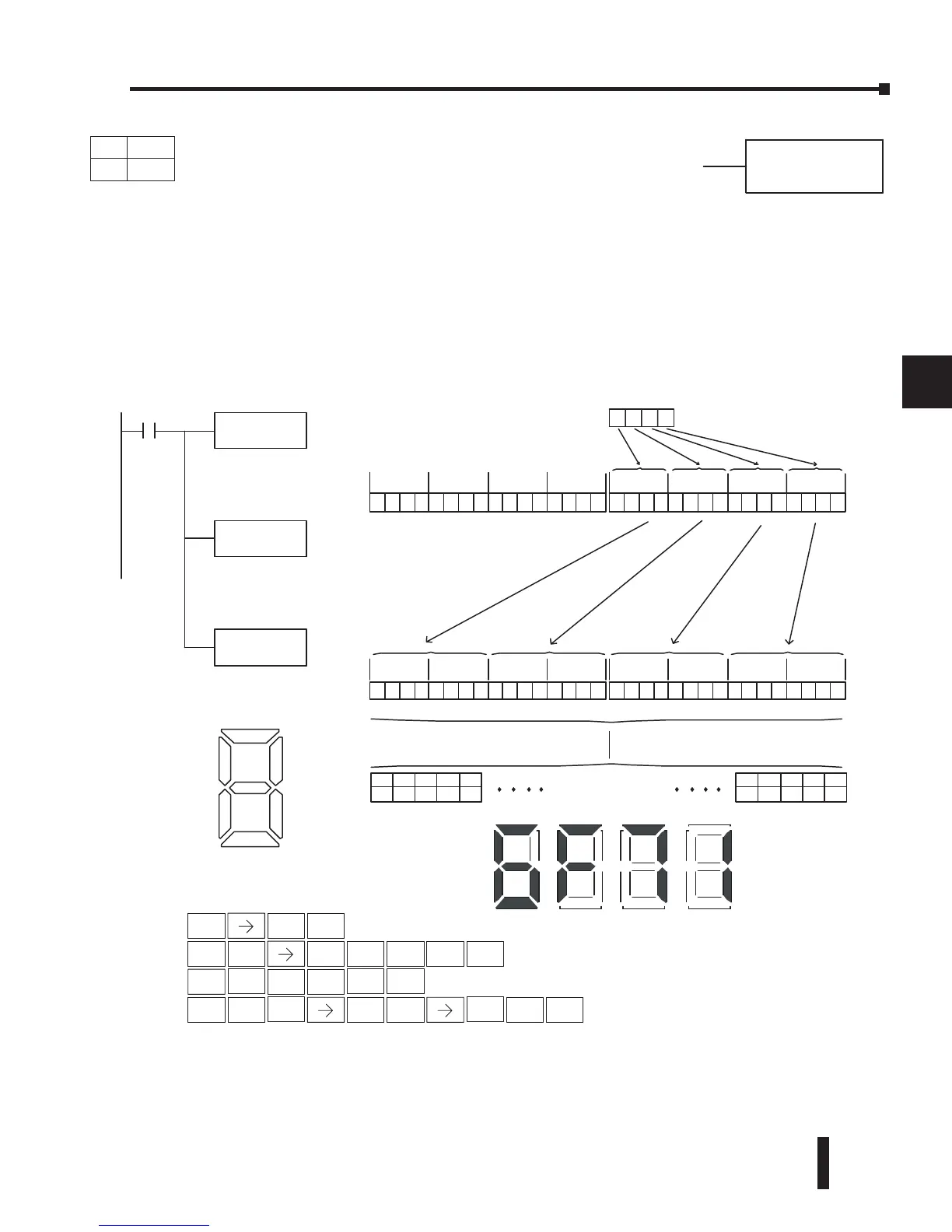
Segment (SEG)
The BCD / Segment instruction converts a four digit HEX value in
the accumulator to seven segment display format. The result resides
in the accumulator.
In the following example, when X1 is on, the value in V1400 is loaded into the lower 16 bits
of the accumulator using the Load instruction. The HEX value in the accumulator is converted
to seven segment format using the Segment instruction. The bit pattern in the accumulator is
copied to Y20–Y57 using the Out Formatted instruction.
SEG
--gf edcba--gfedc ba --gfedc ba
Dir
Display
SEG
X1
Conver tthe binary(HEX)
valueinthe accumulatorto
sevensegm ent display
format
OUTF Y20
K32
Copy thevalue in the
accumulatortoY20--Y5
7
LD
V1400
Load thevalue in V1400 ntothe
lower16bitsofthe accumulator
01101111011100010000000000000000
15 14 13 12 11 10 9876543210
31 30 29 28 27 26 25 24 23 22 21 20 19 18 17 1631 30 29 28 27 26 25 24 23 22 21 20 19 18 17 16
Acc.
6F7 1
V1400
00000111000001100111110101110001
15 14 13 12 11 10 987654321031 30 29 28 27 26 25 24 23 22 21 20 19 18 17 1631 30 29 28 27 26 25 24 23 22 21 20 19 18 17 16
Acc.
Y20Y21Y22Y23
OFFONONOFF
Y24
OFF
Y53Y54Y55Y56
ONONONON
Y57
OFF
--gf edcb a
Segmen



 To Next Page