DL06 Micro PLC User Manual, 3rd Edition, Rev. E
5-190
Chapter 5: Standard RLL Instructions
1
2
3
4
5
6
7
8
9
10
11
12
13
14
A
B
C
D
You may recall, from the CPU specifications in Chapter 3, that the DL06’s ports are capable
of several protocols. Port 1 cannot be configured for the non-sequence protocol. To configure
port 2 using the Handheld Programmer, use AUX 56 and follow the prompts, making the same
choices as indicated below on this page. To configure a port in DirectSOFT, choose the PLC
menu, then Setup, then Setup Secondary Comm Port.
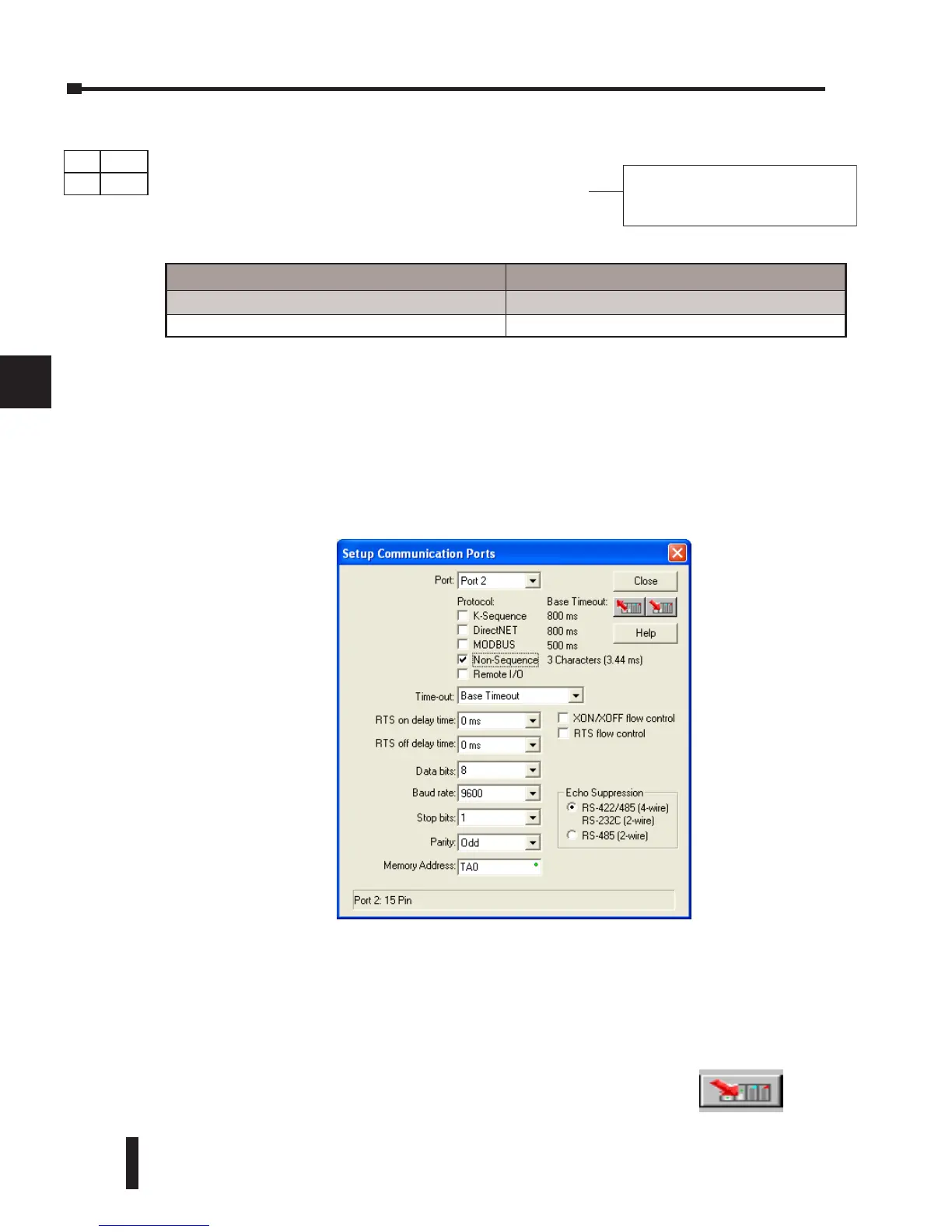
• Port: From the port number list box at the top, choose Port 2.
• Protocol: Click the check box to the left of Non-sequence, and then you’ll see the dialog box shown
below.
• Baud Rate: Choose the baud rate that matches your printer.
• Stop Bits, Parity: Choose number of stop bits and parity setting to match your printer.
• Memory Address: Choose a V-memory address for DirectSOFT to use to store the port setup
information. You will need to reserve 66 contiguous words in V-memory for this purpose.
PRINT A aaa
“Hello, this is a PLC message”
Operand Data Type DL06 Range
aaa
Constant K 2
DS Used
HPP
N/A
Before ending the setup, click the button indicated to send Port 2
configuration to the CPU, and click Close. See Chapter 3 for port
wiring information, in order to connect your printer to the DL06.
Print Message (PRINT)
The Print Message instruction prints the embedded
text or text/data variable message (maximum 128
characters) to the specified communications port
(Port 2 on the DL06 CPU), which must have the
communications port configured.



 To Next Page