DL06 Micro PLC User Manual, 3rd Edition, Rev. E
5-275
Chapter 5: Standard RLL Instructions
1
2
3
4
5
6
7
8
9
10
11
12
13
14
A
B
C
D
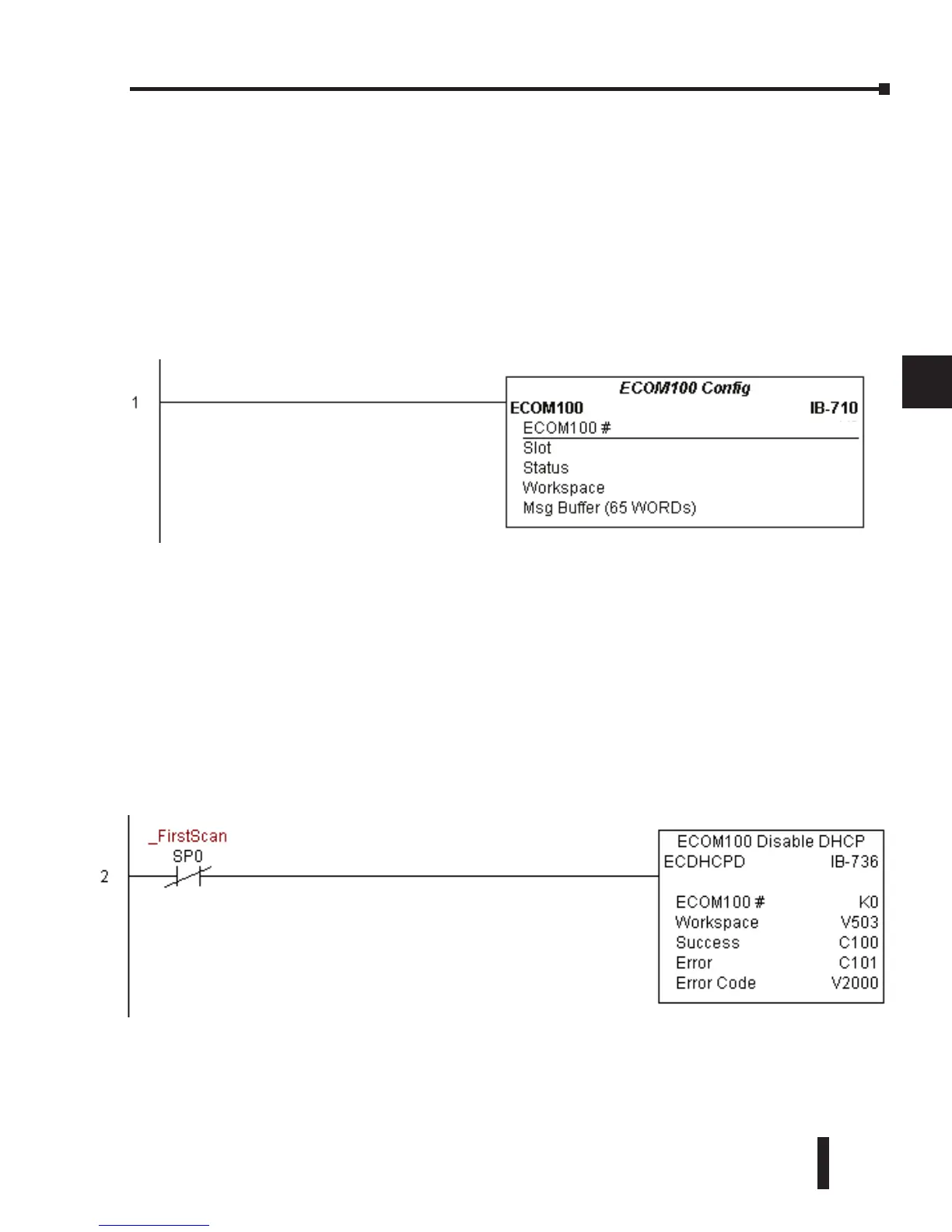
ECDHCPD Example
Rung 1: The ECOM100 Config IBox is responsible for coordination/interlocking of all
ECOM100 type IBoxes for one specific ECOM100 module. Tag the ECOM100 in slot 1 as
ECOM100# K0. All other ECxxxx IBoxes refer to this module # as K0. If you need to move
the module in the base to a different slot, then you only need to change this one IBox. V400 is
used as a global result status register for the other ECxxxx IBoxes using this specific ECOM100
module. V401 is used to coordinate/interlock the logic in all of the other ECxxxx IBoxes using
this specific ECOM100 module. V402-V502 is a common 130 byte buffer available for use by
the other ECxxxx IBoxes using this specific ECOM100 module.
Rung 2: On the 2nd scan, disable DHCP in the ECOM100. DHCP is the same protocol used
by PCs for using a DHCP Server to automatically assign the ECOM100’s IP Address, Gateway
Address, and Subnet Mask. Typically disabling DHCP is done by assigning a hard-coded
IP Address either in NetEdit or using one of the ECOM100 IP Setup IBoxes, but this IBox
allows you to disable DHCP in the ECOM100 using your ladder program. The ECDHCPD
is leading edge triggered, not power-flow driven (similar to a counter input leg). The command
to disable DHCP will be sent to the ECOM100 whenever the power flow into the IBox goes
from OFF to ON. If successful, turn on C100. If there is a failure, turn on C101. If it fails, you
can look at V2000 for the specific error code.
K1
K0
V400
V401
V402 - V502



 To Next Page