Need help?
Do you have a question about the Autonics CN-6000 Series and is the answer not in the manual?
Essential warnings and cautions for safe operation to prevent injury, death, or product damage.
Guidelines for proper operation, including power supply, wiring, and environmental considerations.
Details on multi-input, display, output options, advanced functions, and sensor power supply.
Guide to selecting and ordering specific CN-6000 series models based on input and output configurations.
Explanation of unit parts, name plates, included components, and physical dimensions.
Instructions on how to select and set the input type for universal input models.
Detailed wiring diagrams for universal and pulse input models (8-pin and 11-pin).
Key technical specifications including model, display, accuracy, power, and environmental ratings.
Explanation of how to navigate and set parameters in RUN, Monitoring, and Program modes.
Configuration parameters for universal input types, covering input settings, display, and transmission.
Comprehensive table detailing universal, analog, and pulse input types with their respective ranges.
Details on alarm output configuration, hold function, reset procedure, and error codes.
Explanations of high/low-limit scales, transmission output scaling, and input correction.
Explanation of digital filters for stabilizing display and output against noise.
Description of LIN, ROOT, SQAR, and TUF functions for signal processing.
Table indicating the meaning of segments displayed on the product.
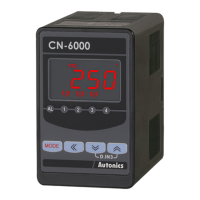
The Autonics CN-6000 Series is a range of isolated converters designed for various industrial applications, offering multi-input capabilities, enhanced visibility, and diverse output options.
The CN-6000 series converters are versatile devices capable of processing a wide array of input signals and converting them into standardized outputs. They support universal inputs, including 12 types of thermocouples, 5 types of RTDs, and 6 types of analog signals (mV, V, mA). For pulse input models (CN-640), they can handle frequencies from 0 to 50.00 kHz. The device's core function is to accurately measure and display these input values, and then provide corresponding alarm, transmission, or voltage outputs based on user-defined parameters.
High/Low-limit Scale Value: This feature allows users to define specific high and low-limit values for the measured input, which are then used for display scaling. The display automatically adjusts to the factory default range when the input range is changed.
High/Low-limit Value of Transmission Output and High/Low-limit Scale Value of Transmission Output: This function enables the setting of output scale and range for transmission outputs. It defines how the input value maps to the transmission output (e.g., 4-20 mA) and the corresponding display scale.
Input Special Function: For analog inputs, the device can display calculated actual values, including square, square root, or a two-unit function (TUF). This is particularly useful for applications like measuring flow by pressure signals (ROOT) or outputting differential pressure by flow signal (SQAR). The TUF function is designed for specific pressure sensor applications, allowing for the display of vacuum in mmHg and positive pressure in kg/cm², with atmospheric pressure set at 0 kg/cm².
Alarm Output: The alarm output system combines various alarm operations and options. Each alarm output operates independently and can be automatically canceled when the current temperature exceeds the alarm operating range. Alarm types include high-limit, low-limit, and sensor break alarms, with options for standard alarm, alarm latch, standby sequence, or a combination of latch and standby sequence.
Alarm Output Hysteresis: A settable hysteresis value can be applied to all alarm outputs (AL1 to AL4) to prevent rapid toggling of the alarm when the input value fluctuates near the alarm setpoint.
Hold Function: This feature allows the device to hold the current display value and control output when an external input signal is applied, providing stability in specific measurement scenarios.
Normal/Moving Average Digital Filter: This function helps to stabilize display and output by filtering noise from input lines and irregular signals. The normal average filter displays the average of 'n' input values periodically, while the moving average filter displays the moving average of 'n' input values in real-time.
Input:
Output:
Power Supply:
Display:
Environmental:
Insulation Resistance: ≥ 100 MΩ (500 VDC megger). Dielectric Strength: 2,000 VAC 50/60 Hz for 1 min.
 General
| Brand | Autonics |
|---|---|
| Model | CN-6000 Series |
| Category | Media Converter |
| Language | English |

 To Next Page