5
Control panel operation
Once connected to the product, the control panel retrieves the op-
erating settings from the product. It is necessary to verify whether the
actual settings correspond to the desired settings.
1. Main screen
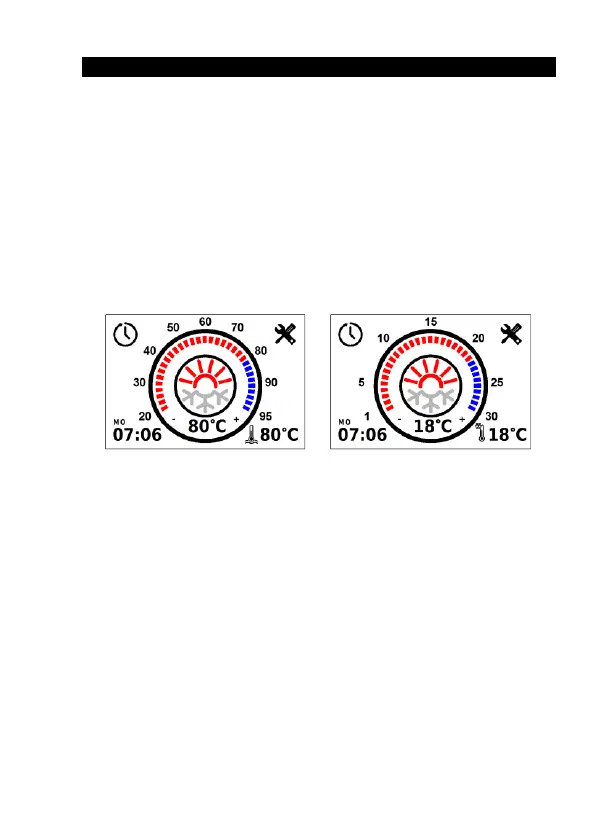
The main screen (Fig. 1) shows the current time in the lower left
corner and the current heating medium/air temperature in the centre.
A short tap in the bottom right corner switches between heating
medium temperature, air temperature, and power supply voltage. A long
tap opens a graph showing changes in the temperature of the heating
medium, air temperature, and power supply voltage over the last 7 days.
To start the product (Fig. 2), tap the centre of the screen or press
mechanically.
Fig. 1. The main screen of a liquid heater and an air heater
After the product has been started up, the countdown of the oper-
ation time in minutes (Fig. 2) will begin at the bottom left of the screen.
Switching between operation time and current time is done by short tap-
ping on the operating time.
Set the temperature limit/set-point by moving the slider along the
circumference of the temperature scale, or by tapping the ‘+’ and ‘-’ next
to the current fluid temperature display (Fig. 3). During adjustment, the
set-point value is also displayed in the centre of the screen.


 To Next Page
 Loading...