Introduction
data only, and output 1.5A current.
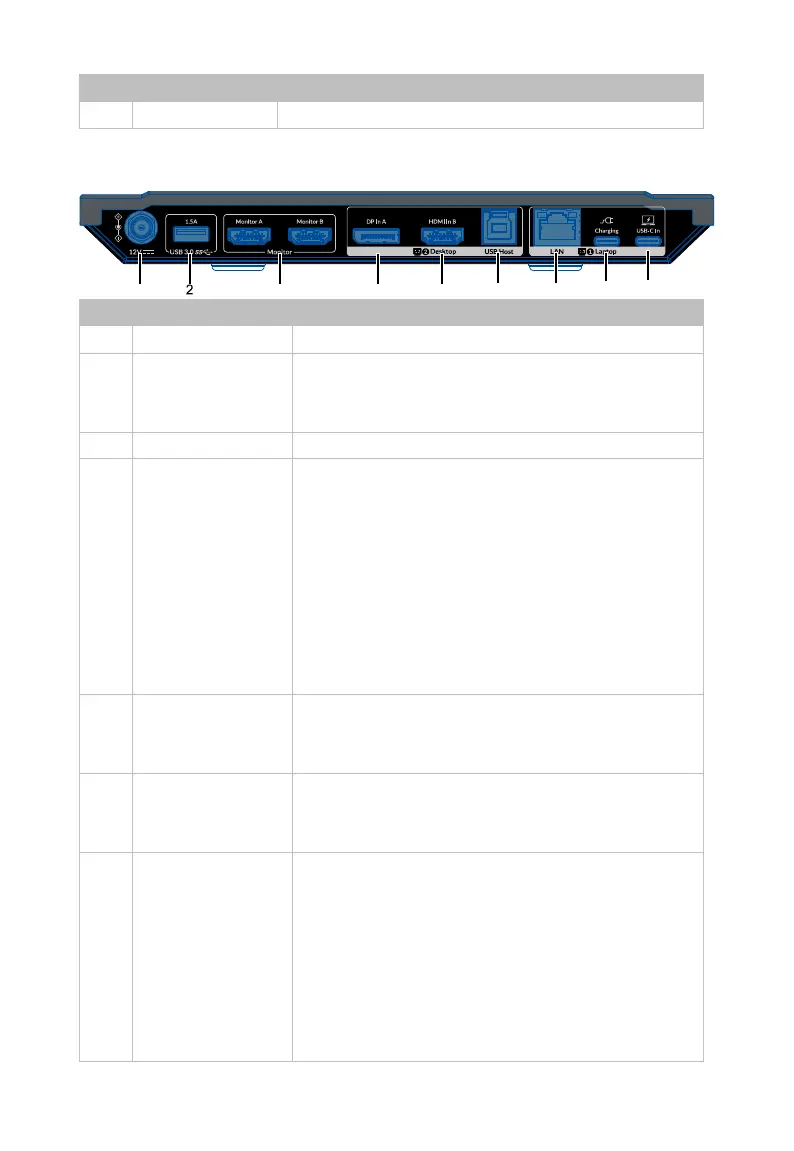
Rear Panel
Connect to the power adapter provided.
2 USB 3.0 (1.5A)
USB 3.0 type-A ports. With 5V 1.5A supported,
it can be used for connecting USB devices with
high power, such as connecting a USB Camera.
Connect to HDMI displays.
4 &
6
Desktop 2
DP In A: Connect to DP out port of the PC.
HDMI In B: Connect to HDMI out port of
the PC.
USB Host: USB 3.0 type-B port. Connect to
the USB type-A port of the PC.
The three ports are in a group, when switch to
this group, all USB peripherals + SDXC card +
Headset will be connected to the PC the three
7 LAN
Connect to a local area network, the laptop
the USB-C In port connected can access to this
8 Charging
Connect to an external power source (up to
100W) when charging the connected laptop
9 USB-C In
USB 3.0 type-C port. Connect to USB-C source
such as laptop. When select to USB-C In as
input source, all peripherals will be connected
to the laptop the USB-C port connected.
Supports the following three functions:
Supports transmitting video, audio, USB
and ethernet signals.
Supports DP MST mode, can output two


 To Next Page