User Manual
4
EN
HT5009
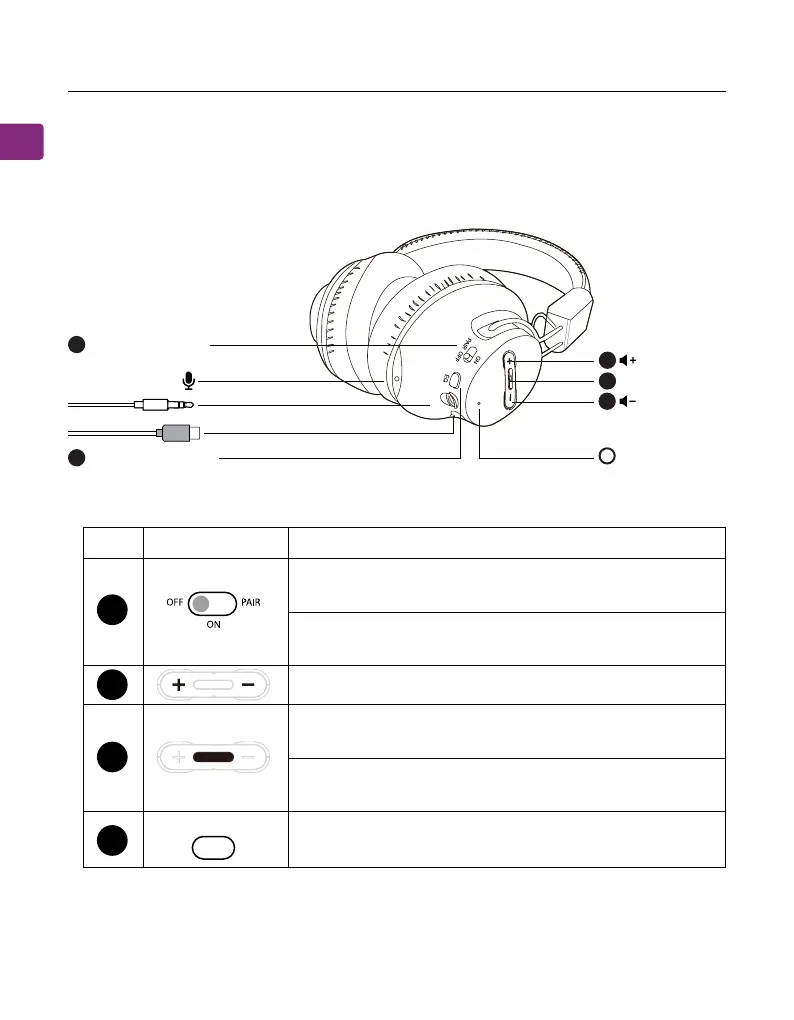
Product Introduction (Headphones)
Product Overview
Button Functions
11
44
22
33
22
OFF / ON / PAIR
EQ mode button
LED indicator
MFB button
A
Switch to “ON / OFF” position to turn the
headphones on / o
Hold in “PAIR” position for 3 seconds to
enter pairing mode
Press once to switch between balanced and
clear voice modes
Press once to play / pause audio (when used
separately with phone / tablet)
Press once to accept / end call (when used
separately with phone / tablet)
Press or hold to adjust volume
1
2
3
4
No. Button Functions
EQ















 To Next Page