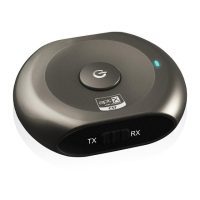
7.2 LED indicator instruction:
Status of Saturn under RX mode
Blue and Red LED Blinks alternately and continuously
Pairing mode, last for 2 minutes
Blue LED flashes once every 1 seconds
Standby mode and not connected with a device
Blue LED flashes twice every 4 seconds
7.3 Get maximum stable range.
Please kindly make sure there is no obstacle (wall corner etc.,) between receiver and transmitter; also make the 2 devices at the same
side.
8. Advanced Usage
8.1 Stream music
When Saturn is used as a receiver, you can connect it to a 3.5mm stereo headset or stereo speaker with a 3.5mm to 3.5mm audio
cable. Now you can listen to music and control pause / play of music
Status of the Saturn under RX mode
Short press MFB button once
Short press MFB button once
8.2 Charging and stream music
When battery is low but you still want to use Saturn either under TX or RX mode, you could be able to charge Saturn and stream
audio sound
8.3 Reconnecting to a Bluetooth device
A. Automatic connecting: Once Saturn is power on, it will automatically connected with the last connected device.
B.Manual connecting: When Saturn is in standby mode and doesn’t connect to any device, short press MFB button once, it will
automatically connected to last connected device.
C. Auto off: Saturn will automatically power off if no devices can be connected within 5 minutes.
D.Clearing pairing list: Ensure Saturn is off, press and hold MFB button for around 10 -12 seconds till red LED is on for 1 second and
then Blue LED is on for 1 second.
9. Product Specification



 To Next Page