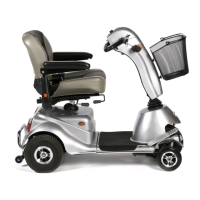
See photographs on page 6
Power Status lamp: For normal use when the ignition is switched on this lamp
will light green. It stays constant unless a fault arises. If this should happen make
a note of the number of flashes as this indicates the problem with the vehicle.
Report this information to the service department when requesting an engineer.
1 flash Battery needs recharging
2 flashes Battery voltage too low
3 flashes Battery voltage too high
4 flashes Current time limit out
5 flashes Brake fault or freewheel engaged
6 flashes Accelerator lever pulled in when ignition switched on
7 flashes Speed pot error
8 flashes Motor volt error
9 flashes Other internal error
Battery Indicator: This instrument shows the level of charge in the batteries.
When in the green area the batteries are fully charged. When in the yellow area
the batteries need recharging and when in the red area the batteries urgently
need recharging. Note: When the vehicle is climbing a steep incline or starting off,
the level may drop momentarily, this is normal.
When checking the level- CAUTION: Choose a large flat hard standing area.
Drive the vehicle on a flat concrete area at full speed and take a reading.
Speed Control Dial: This controls the top speed of your scooter. When the dial
is turned to the left, this is its slowest speed. As the dial is turned to the right the
speed will increase to a maximum, which is the highest speed. Set the speed
before you move off.
Half speed: When this button is depressed the top speed of the vehicle will be
halved. This feature is normally used in a pedestrian area. In some countries this
is the law. Check your local authority.
See photographs on page 6
Accelerator forward/reverse: Pull in the right hand lever (when sitting on the
scooter) and it will move forward. The further the lever is pulled inwards the faster
the scooter goes. Pull in the left hand lever and the scooter will reverse.
Controls- Dashboard page 7



 To Next Page