6
DO NOT DISTURB
Activation of the DND function that inhibits the device’s ringer: press the button to enable/disable the feature. Pressing the button for 5 seconds extends DND on/off status to all indoor
stations in the flat.
LANGUAGE SETTINGS
Select the language of the device from those provided.
DATE AND TIME CONFIGURATION
- Date and Time: select the date and time for the device;
- Automatically synchronise time: if the device is connected to the internet, the date and time are automatically synchronised;
- 12-hour format: activation of time format with AM and PM mode;
- Time zone: selection of the time zone of the area where the device is installed;
- Daylight saving time: activation of summer/winter time;
- NTP Server: enter the server address for automatic time acquisition.
NETWORK
Menu to activate the device's WI-FI connection, to select a network and to enter a security password for that network.
OTHER CONFIGURATIONS
- Automatic opening: automatic activation of the power relay when a call comes in;
- Automatic recording: start of automatic recording when a call comes in;
- Number of associated outdoor stations: the parameter indicates the number of outdoor stations present in the system for their display via the AVE VIDEO V44 APP.
CLOUD INTERCOM SETTINGS
Menu to activate the Cloud service to manage incoming call answering from AVE VIDEO V44 APP;
Add new user:
- Display of the system's unique QR code to pair it with the AVE VIDEO V44 APP;
- Cloud Intercom activation: parameter for activating communication towards the system's remote server; the parameter must be active (default situation) to be able to control the
system via the AVE VIDEO V44 APP;
- Cloud Intercom server address: remote server address. The parameter must not be changed.
Delete APP user: deletion of a user associated with the system.
Note: it is not possible to delete the user who is the owner of the system; if you wish to do so, you must reset the device to its factory settings.
INFO
System information.
- Update APP: allows the device to be updated by means of an SD card (not supplied) inserted in the slot on the side of the device.
PASSWORD SETTINGS
This menu allows you to change the password to access the advanced configuration parameters. Enter the current menu access password: in the window that appears, enter the old
password, the new password and confirm the latter. The default password is 222222.
CONFIGURATION SETTINGS
Enter the security password to access the following parameters:
- Flat number setting: this is the flat number assigned to the device (number corresponding to the call button on the outdoor station)
- Device reset: reset the device to default factory parameters.
7) PAIRING THE AVE VIDEO V44 APP
The device can be paired with a mobile phone to answer incoming calls from an iOS or Android operating system.
Download the AVE VIDEO V44 APP from the APP STORE or GOOGLE PLAY and register the new user.
To pair the mobile phone, simply enter the settings menu and then the “Cloud Intercom Settings” menu. Press "Add new user" and point your device's camera at the QR code.
8) TECHNICAL CHARACTERISTICS
Operating voltage 24Vcc
Maximum operating voltage 32Vcc
Absorption during operation 300 mA max @ 30 VDC
Absorption during stand-by 150 mA max @ 30 VDC
Dimensions (L x H x D) 179 x 179 x 25 mm
LCD size 7 inches 16/9
Resolution 1024 x 600 pixels
Environmental class as per EN 62820-1-1 CLASS III
Operating temperature From -10 °C to +55 °C
Maximum altitude 2000 m a.s.l.
Maximum number of devices that may be installed in each apartment 4 (if more than one device is installed, the local power supply VI2F-ALI600MA must be provided for each of them)
Maximum number of devices that can be installed 128
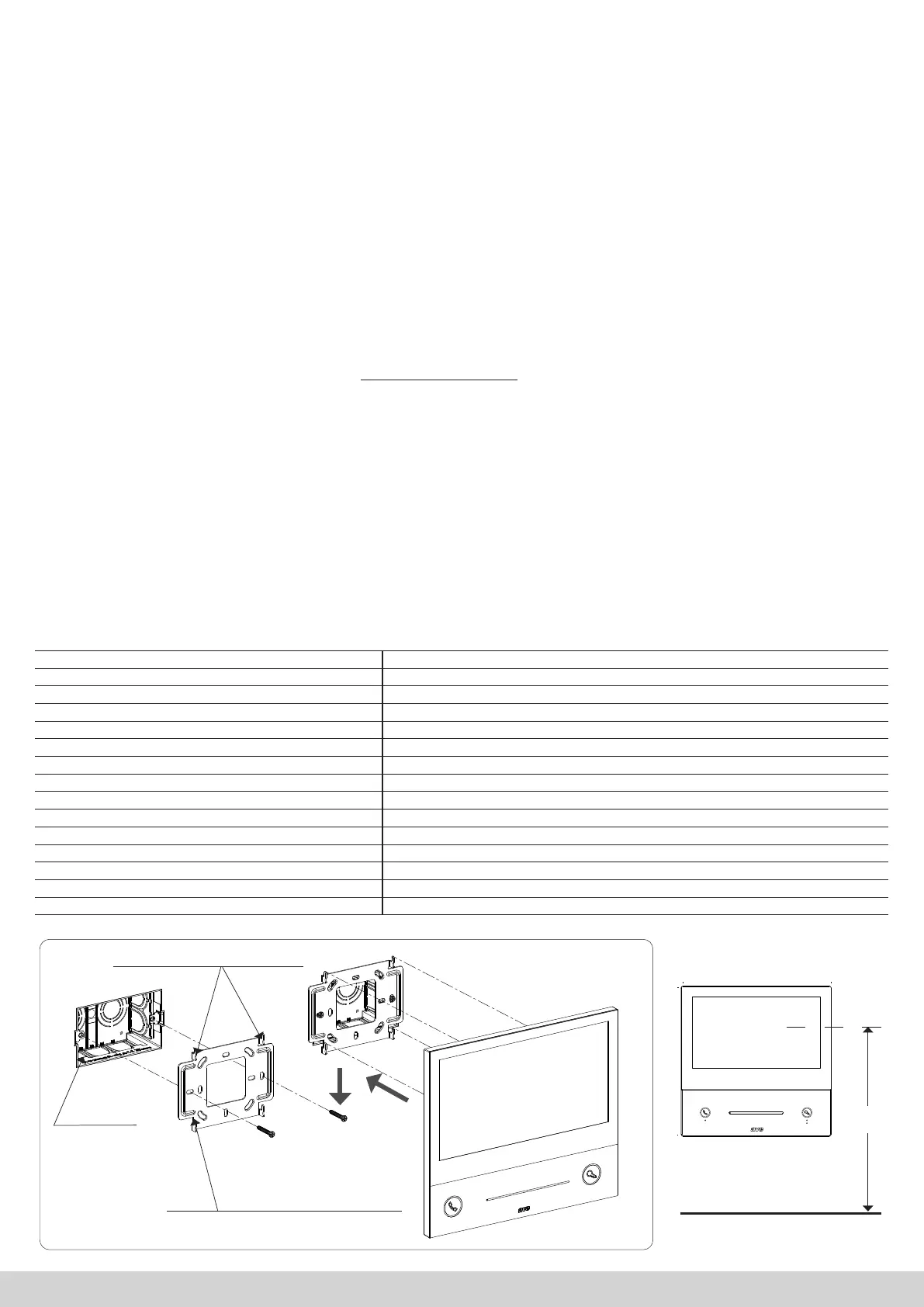
Installation On 3-module boxes, using the bracket provided
Protection rating IP20 (IP40 when installed)
SD card 2 – 32 GB (not supplied)
SCREWS
RECESSED
BOX
ANCHOR HOOKS
SUPPORT PLATE
179 mm
25 mm
179 mm
RC
NC
M
S
1 2
ON
BUS
BUS
DB
DA
GND
RS485
VI2F-PIT7WF
+30V
GND
POWER
1.5 m
GROUND


 To Next Page
 Loading...