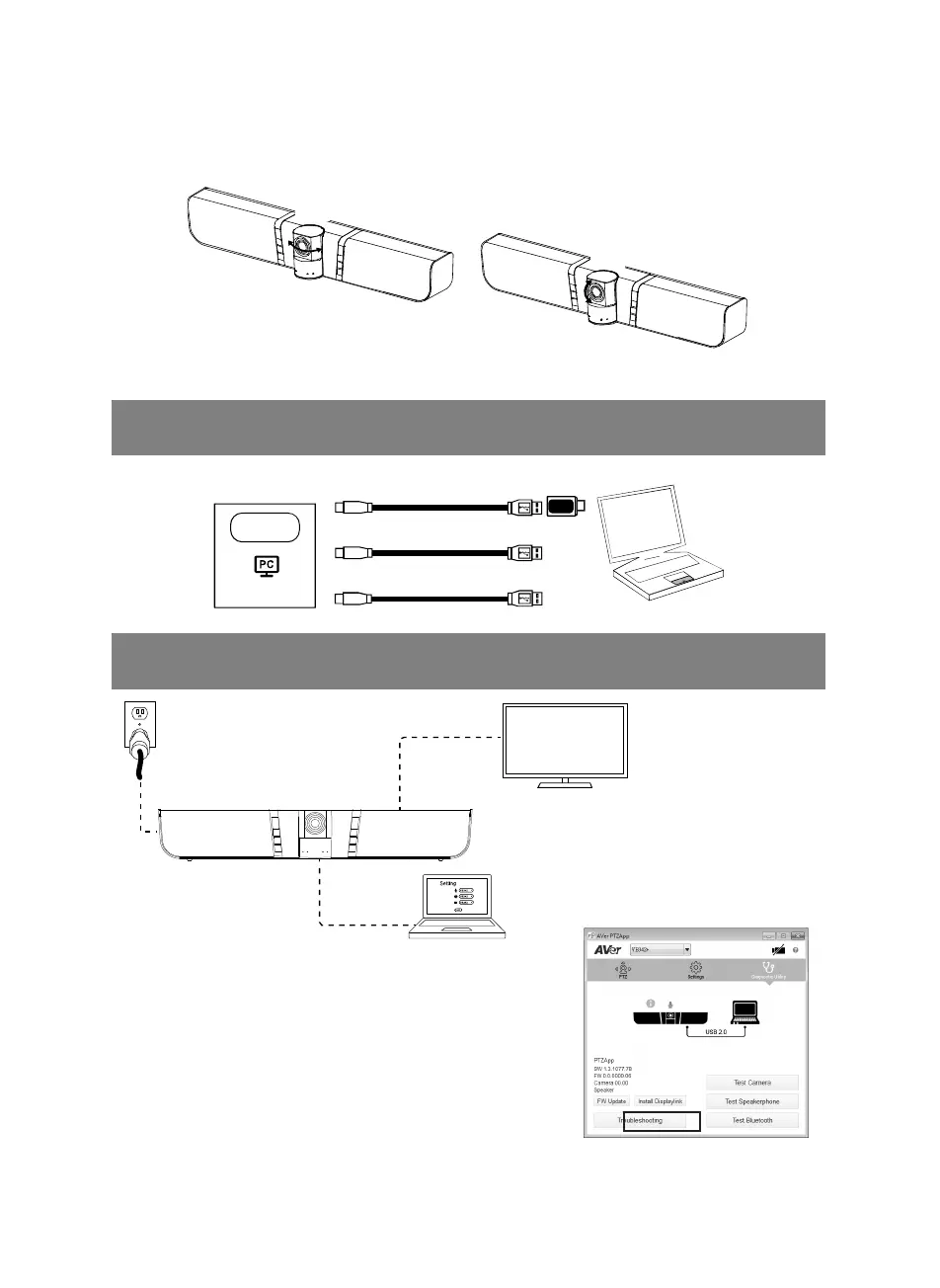
English-4
Pan and Tilt
±35°
±15°
Installation
1. Connect VB342+ to laptop with provided USB cable. Provided type-A to C adapter for
newer PC’s. For 4K output, please use USB 3.0 cable.
Laptop
USB 2.0
USB 3.0
USB 3.0
USB type-A to
type-C adapter
or
or
USB port
2. Connect the TV/HDMI monitor to VB342+ and connect the power to wall outlet and
VB342+. Set the VB342+ as primary camera, speakerphone, and microphone in your app.
USB cable
TV/Monitor
HDMI cable
(not inculded)
Power cable
A Displaylink driver is required for connection. Please install
AVer PTZApp on your laptop and run the AVer PTZApp. In AVer
PTZApp, select “Diagnotics Utility” > “Install Displaylink”.
Follow the on-screen instruction to complete the installation.
[Note] Maximum output is1080p resolution.



 To Next Page