User’s Manual
ENG-7
English Deutsch Français Español Português Nederlands Ελληνική
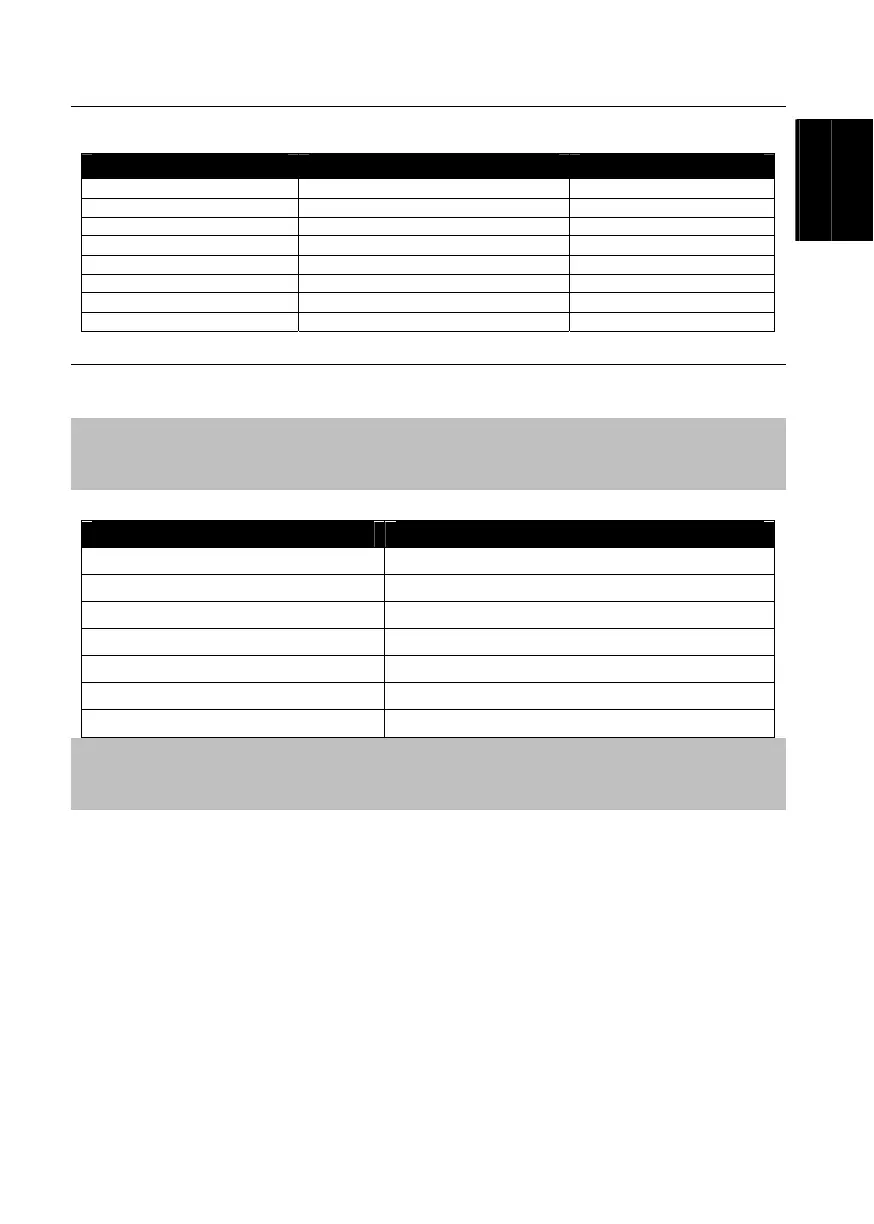
3.4 Supported Display Setting
The reference table below lists the monitor display resolution and refresh rate settings that AVerTV BoxW9 Plus
supports.
Resolution 4:3 and PANORAMA support Refresh Rate (Hz)
1024x768 60
1280x768 O 60
1280x1024 60
1360x768 O 60
1440x900 O 60
1600x1200 60
1680x1050 O 60
1920x1200 O 60
3.5 Supported Display Setting in PIP Mode
The reference table below lists the monitor display resolution and refresh rate settings that AVerTV BoxW9
Plus supports when viewing in PIP mode:
Note:
1. If the monitor does not support or is not set to the following mode listed below, it will switch back to TV/Video
mode.
2. If the computer switches to sleep mode, it will change back to TV/Video mode.
Resolution Refresh Rate (Hz)
1024 x 768 60, 70, 75
1280 x 768 60, 75
1280 x 1024 60, 75
1440 x 900 60, 75
1360 x 768 60
1680 x 1050 60
1600 x1200 60
Note:
YPbPr signal input format supports:
SDTV: 480i, 576i
HDTV: 480p@60Hz, 576p@50Hz, 720p@60Hz, 1080i@60Hz.


 To Next Page