Operators Manual
ALS 230
Release 11/05 Page 61 Connections and signals
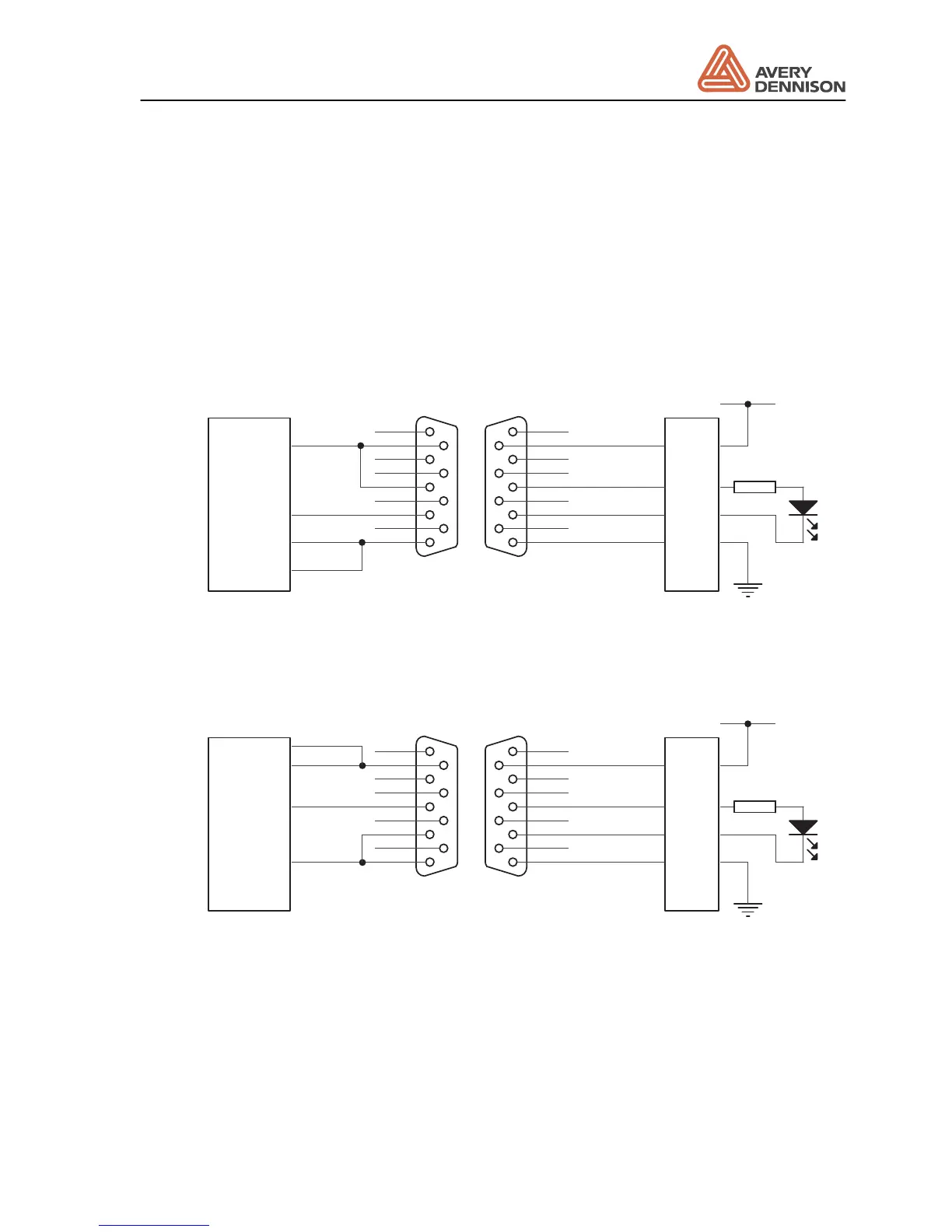
8.3.1 Product sensor
The product sensor starts the labelling. The source of the signal could be a optical sensor, a
switch or a signal from a PLC. The time between start signal and start of dispensing (adjusted
with POS) should be as small as possible. This means that an optical sensor should be placed
10 to 20 mm before the dispensing edge. The minimum distance is necessary for the internal
speed compensation.
The machine is supplied as standard with one socket for connecting the product sensor. You
may either use a NPN or PNP type sensor output.
+24V
GND
13
black
blue
white
red
brown
5
9
4
8
3
7
2
6
1
Signal-
GND
Signal+
Supply
white
black
blue
26
34
27
CN33S5-5-C8-30
NPN-Sensor
5
9
4
8
3
7
2
6
1
Figure 15 Example for connecting an NPN sensor (Datalogic)
+24V
GND
13
black
blue
white
red
brown
5
9
4
8
3
7
2
6
1
Signal-
GND
Signal+
Supply
white
black
blue
26
34
27
CN33S5-5-C8-30
PNP-Sensor
5
9
4
8
3
7
2
6
1
Figure 16 Example for connecting an PNP sensor (Datalogic)







 To Next Page