6-10 Aviat Networks
Chapter 6. Installing the INU and INUe
Plug-in Installation Requirements
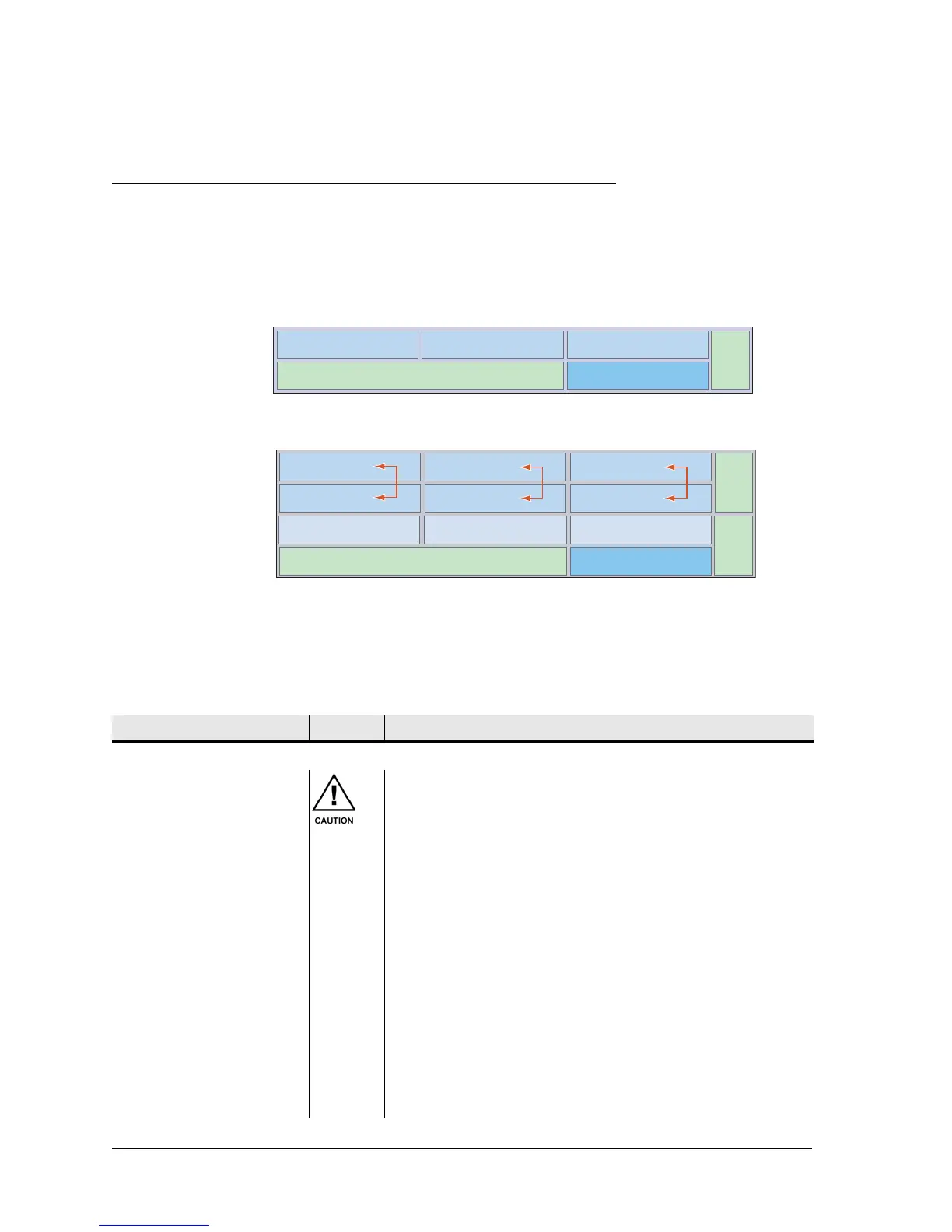
The IDC has four universal slots and two dedicated slots. The IDCe has six universal
slots, three restricted slots and 4 dedicated slots. A populated IDC/IDCe is called an
INU/INUe.
Figure 6-7. Slot Numbering for INU and INUe
Installing or changing out a plug-in is a straightforward process. The requirements are
detailed in Table 6-2.
Unless specified by the customer, plug-ins will not be installed in an INU/INUe at
shipment. Instead, each is individually packed within the shipping box.
Table 6-2. Plug-in Requirements
Fan
Slot 1 Slot 2 Slot 3
NCC Slot 4
Fan
Slot 1 Slot 2 Slot 3
Slot 4
Fan
Slot 7
Slot 5 Slot 6
Slot 9
Slot 8
NCC
Slot 10
Function/Requirement Priority Details
Slot Assignment
All slots filled All slots must be filled with either a plug-in or a blanking
panel. Failure to do so will compromise EMC integrity and
distribution of FAN cooling air.
Universal slots
1-4 on an INU
1-6 on an INUe
RAC, DAC, and AUX plug-ins can be fitted in any universal
slot.
Restricted slots
7-9 on an INUe
DAC, and AUX plug-ins can be fitted in any restricted slot.
The exceptions are the DAC 155oM and AUX, which must
only be installed in slots 1 to 6 when they are to be
configured to carry/access Eclipse NMS, otherwise they can
be installed in slots 7 to 9.
Dedicated slots The NCC, FAN, and NPC plug-ins have dedicated slots.
Protected RACs INUe Protected RACs (or ring-protected RAC with DAC 155oM)
must only be installed in ‘above and below’ slots as
indicated by the red arrows.
AUX Multiple AUX plug-ins can be installed per INU/INUe.


 To Next Page