5
CAUTION:
The safety instructions should be read carefully before operating the tool.
Power supply:
Connect one end of the USB cable to the screwdriver and the other end to the usb
charging port (such as power band, wall charger, notebook or car charger).
After 3-5 hours, three indicated lights will turn on, which represents the tool is full
charged.
LED Battery Capacity Indicator
The battery capacity is indicated by 3 lights:
Red LED is on - <20%
Red & yellow LED's are on - 20-70%
Red & yellow& green 3 LED's are on - >70%
Once only the red LED is lit, the screwdriver must be re-charged.
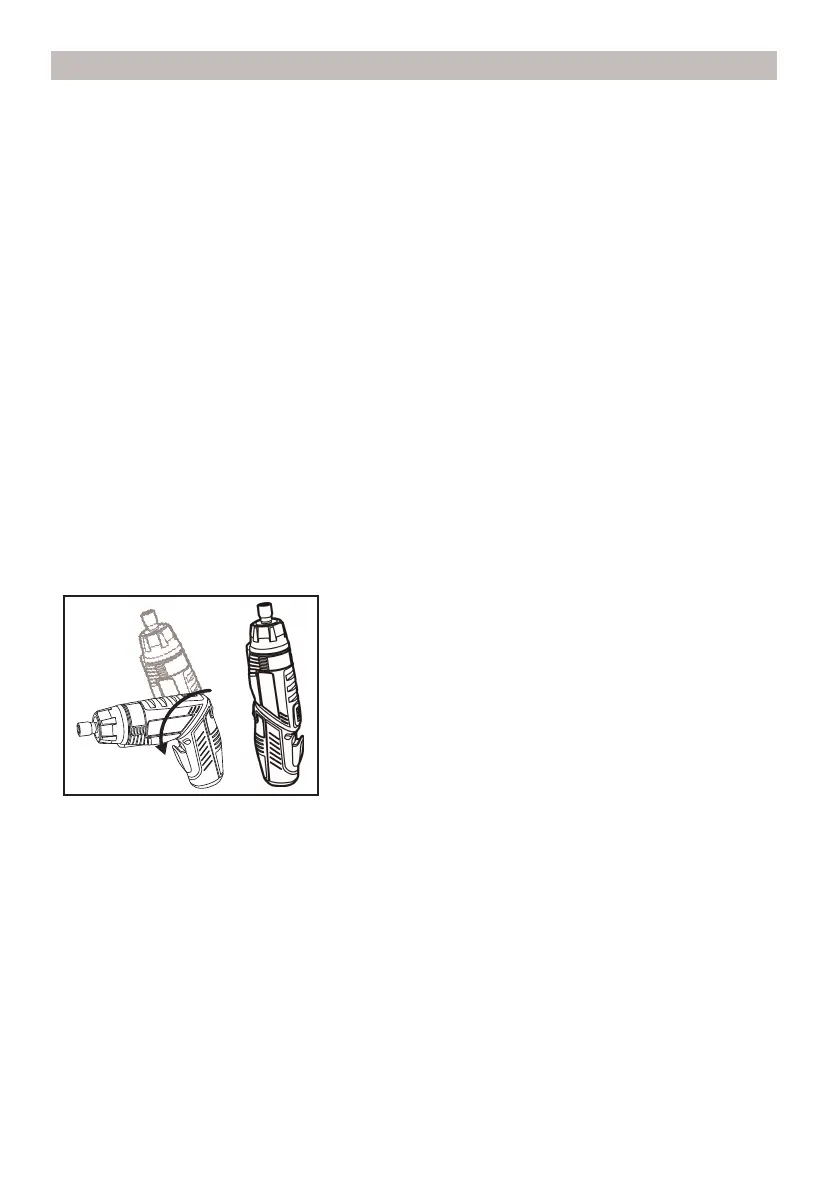
Two Position Adjustment
The driver can be used as one straight driver.
First press the rotation button, turn the front section in an anticlockwise direction and
then release the button when can not turn it again.
NOTICE:
Do not use screwdriver as a pry bar in either position.
CAUTION:
To avoid screwdriver being turned on accidentally, keep switch locked in
center position.
Installing/removing bits:
The 1/4” fast load chuck provides fast, easy one-handed bit loading and ejecting.
OPERATION


 To Next Page