12
EN
d - CONFiGurATiON
INDOOR ROTATING 720P IP WIFI CAMERA
Android
Your camera will appear in the list and you can
accessitsvideoandsettings.
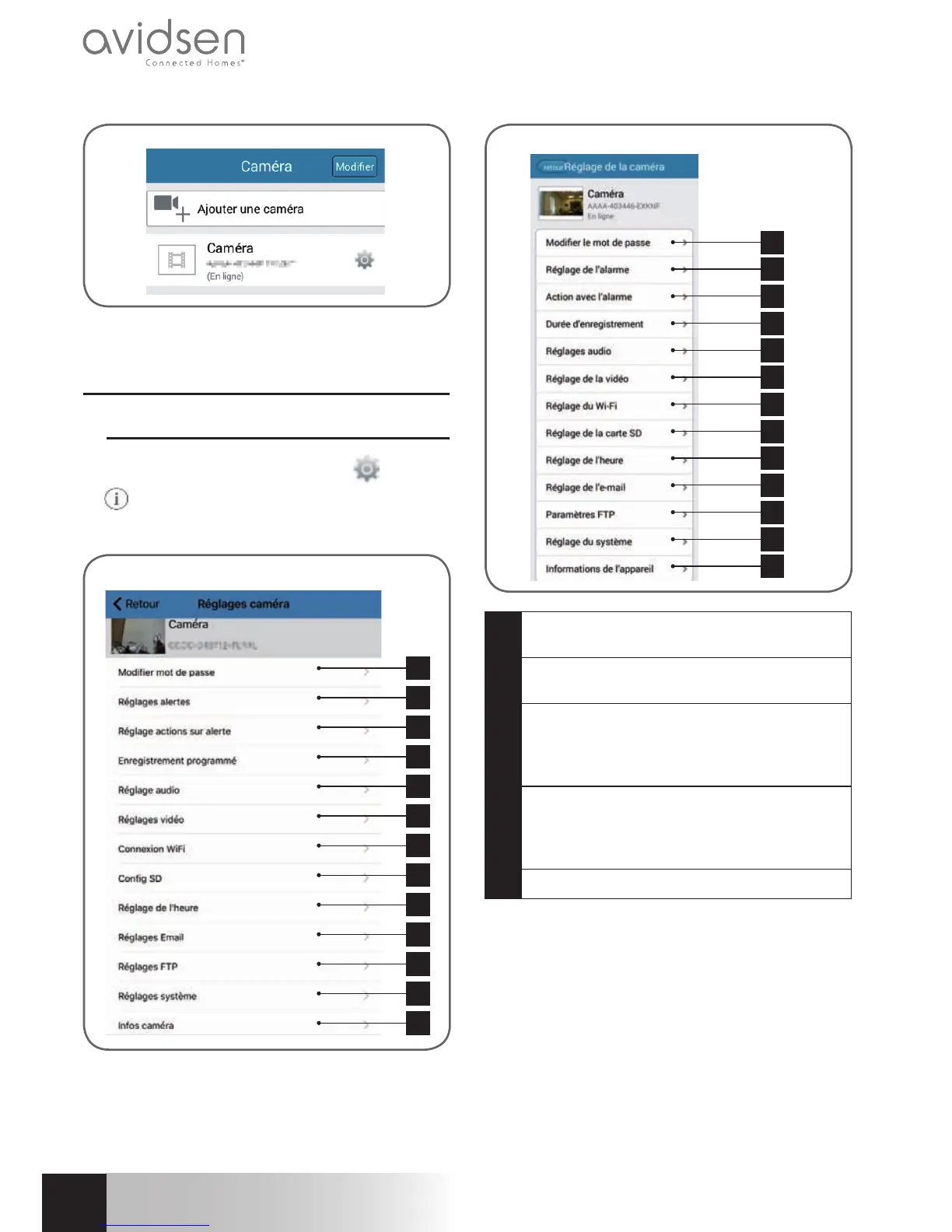
2 - ACCESS TO ALL SETTINGS
2.1-Conguration
Fromthelistofcameras,clickonthe
(Android)
or
(iOs) icon to the right of the name of your
cameratodisplaythecongurationmenus:
1
2
3
4
5
6
7
8
9
10
11
12
13
iOS
1
2
3
4
5
6
7
8
9
10
11
12
13
Android
1
Changing the password to log in to the
camera(“admin”,bydefault)
2
Activation/deactivationandsensitivityofthe
movementdetector
3
Actions to take if movement is detected:
notication,sendanemail,savingaletothe
memorycard(requiresamicroSDcard[not
included]tobeinsertedintothecamera)
4
Activation/deactivation of continuous
recording to the micro SD card and the
length of videos (requires a micro SD card
[notincluded]tobeinsertedintothecamera)
5
Audioandmicrophonevolumesettings



 To Next Page