16
EN
E - OpErATiON
INDOOR ROTATING 720P IP WIFI CAMERA
1 - LIVE VIDEO
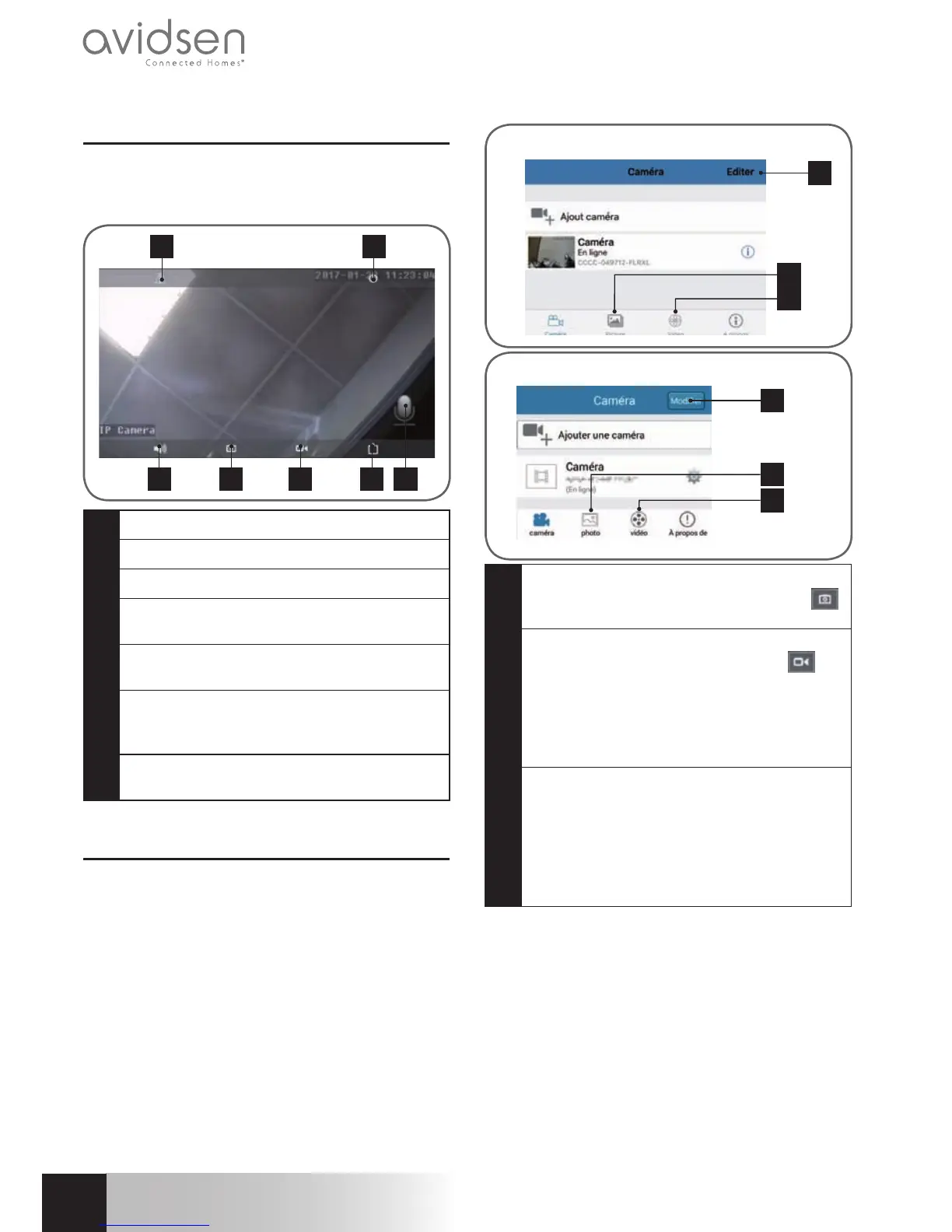
Fromthelistofcameras,clickontheimagetothe
leftofthenameofyourcameratodisplaythelive
video:
3 4 5
1 2
6 7
1
Flipping/invertingtheimage
2
Returntothelistofcameras
3
Activateremotelistening
4
Takeasnapshotandsavetothesmartphone/
tablet
5
Recordavideoandsavetothesmartphone/
tablet
6
Videoqualityselection(usefulifthenetwork
or mobile connection is poor): 2 different
settingsareavailable
7
Activate voice transmission to the camera
(onlyvisibleafterpressing"3")
2 - VIEWING PHOTOS AND VIDEOS TAKEN
BY THE CAMERA
From the list of cameras, you have access to
the photos taken by the camera and saved to
the smartphone or tablet, videos saved to the
smartphone or tablet and videos saved to the
camera'smicroSDcard(notincluded).
Afterreceivinganalert,ifyouhaveactivatedmemory
card recording, you can view the video showing
whatwasdetected.
3
1
2
iOS
3
Android
1
2
1
Viewing photos taken by the camera and
saved to the smartphone or tablet ("
"
icononthecamera'sliveview).
2
Viewingthevideostakenbythecameraand
savedtothesmartphoneortablet("
"on
thecamera'sliveview,"local"buttoninthe
Vidéo[Video]menu)ortothemicroSDcard
inserted into the camera (following an alert
or continuous recording, "en ligne" [online]
buttonintheVidéo[Video]menu).
3
"Editer" (Edit)/"Modifi er" (Change) allows
youtoeditthenameofyourcamera,aswell
as the password (in the event of an error)
or to remove the camera from an Android
device.
ToremovethecamerafromaniOSdevice,
pleasescantotheleftofthecameraname



 To Next Page