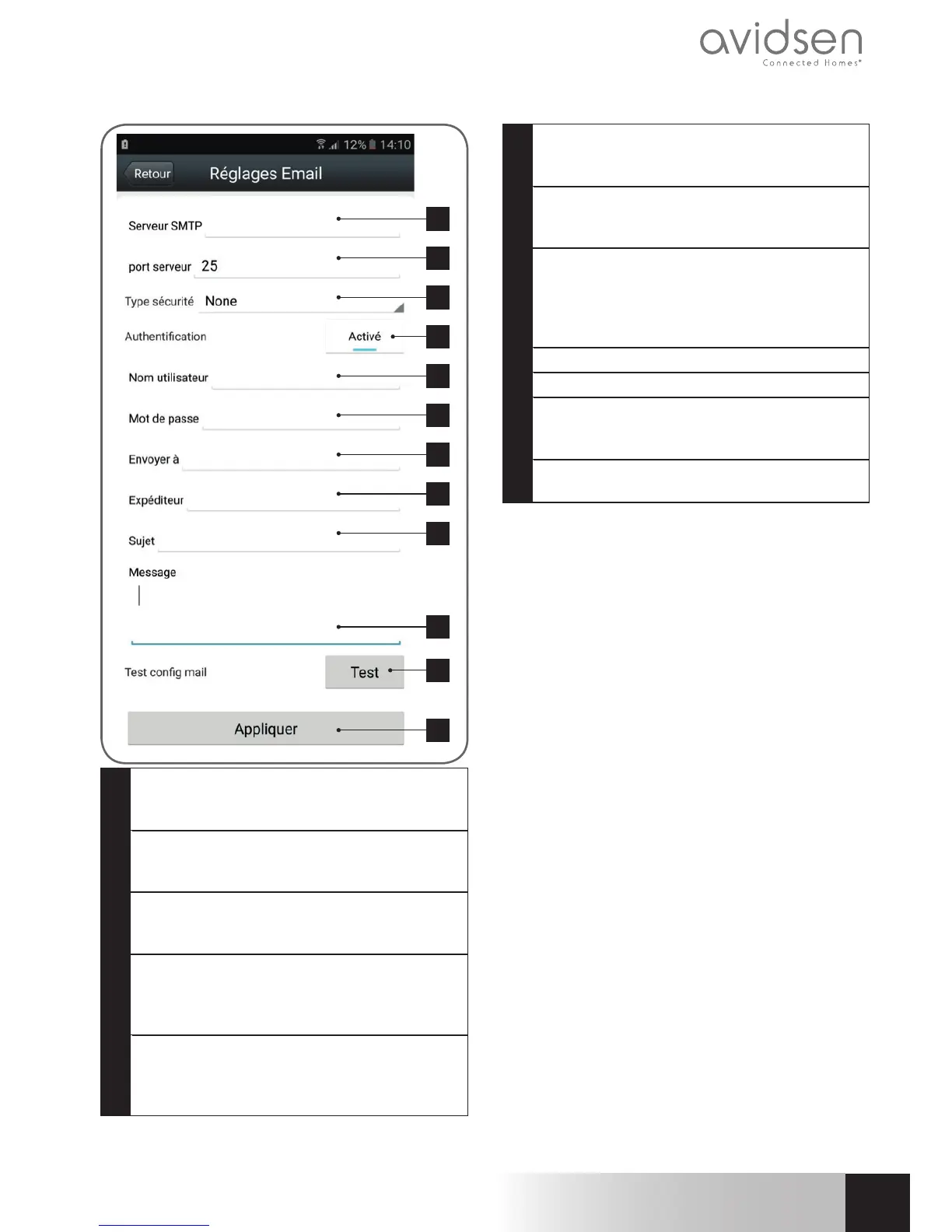
D - CONFIGURATION
1
2
3
4
5
6
7
8
9
10
11
12
1
SMTP server: varies with email provider used
to send the alert. In our example using Gmail,
smtp.gmail.com
2
Server port: depends on the email provider of
the address sending the alert. In
our example using Gmail, 587
3
Security type: security when logging in,
associated with the email provider. In our
example using gmail,STARTTLS
4
Authentication: indicates whether the SMTP
server used requires a username or password
to connect. In our example this must be
activated.
5
Username: Name that you should enter to log
in to the email box which will send the alerts.
In our example using Gmail, this is the sender
address: sender-address@gmail.com
6
Password: The password used to log in
to sender-address@gmail.com, in our
example
7
Send to: Enter the email address here that
will receive the alerts. In our example:
addressee@gmail.com
8
Sender: Name that you must enter to
connect to the mailbox that will send out the
alerts. In our example using Gmail, this is the
sender address: sender-address@gmail.
com
9
Subject: subject of the email alert
10
Message: body of the email
11
Test: allows you to simulate an alert, send
an email and to check that your camera is
correctly configured.
12
Click on “Appliquer ” (Apply) to save your
settings.
Note: it does not matter who the email provider
of the recipient is, as it is the email provider of the
sender that dictates what needs to be entered.
However, you must ensure that the alerts are not
treated as spam by the recipient's inbox.
When you have finished configuring your camera,
it will be able to send emails. Next, it is time to
configure when it does so, in the
“Action sur alerte” (Action upon alert) menu in
the camera settings:



 To Next Page