1 2 3
TAB
avidyne.com | 800.AVIDYNE
4
QuickReference IFD4XX
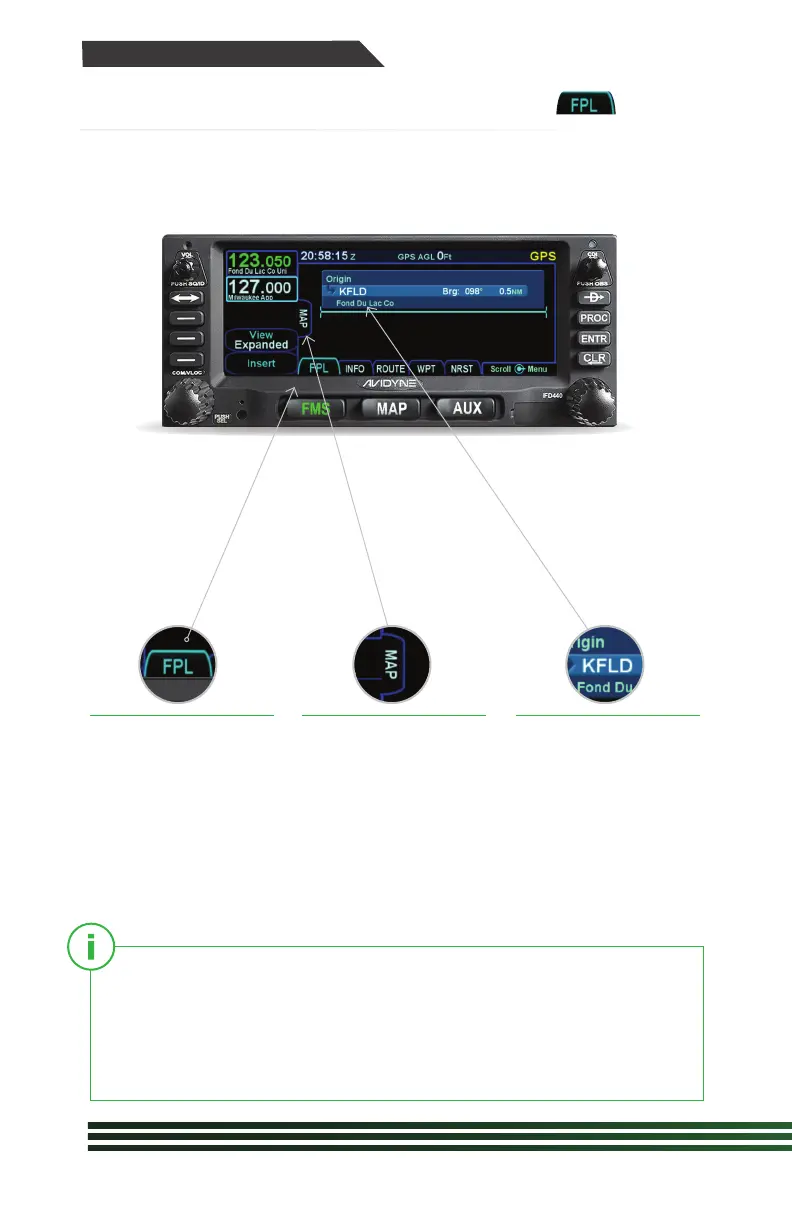
Following power-
on, the first time the
“FPL” tab of the FMS
page is accessed,
an empty flight plan
page is presented with
the origin waypoint
pre-populated.
We recommend to tap
the “Map” side tab to
view the moving Map
display while entering
your flight plan.
The origin will be the
closest airport to the
current GPS position,
or the airport from the
previous power down
if GPS position has
not locked on yet.
This FMS uses a database of published airways to quickly build
long flight plans. Here’s how: When a flight plan waypoint is a valid
airway entry point, a dropdown list of available airways appears.
Scroll to the desired exit point, and all intermediate intersections
along that airway are automatically populated into the flight plan.
FMS Flight Plan Introduction



 To Next Page