2.) * The default IP address of the 9258 is 192.168.1.100. If you cannot get into the webpage of
the 9258, please make sure to set subnet of the IP Power 9258 to match with your PC Subnet
Mask.
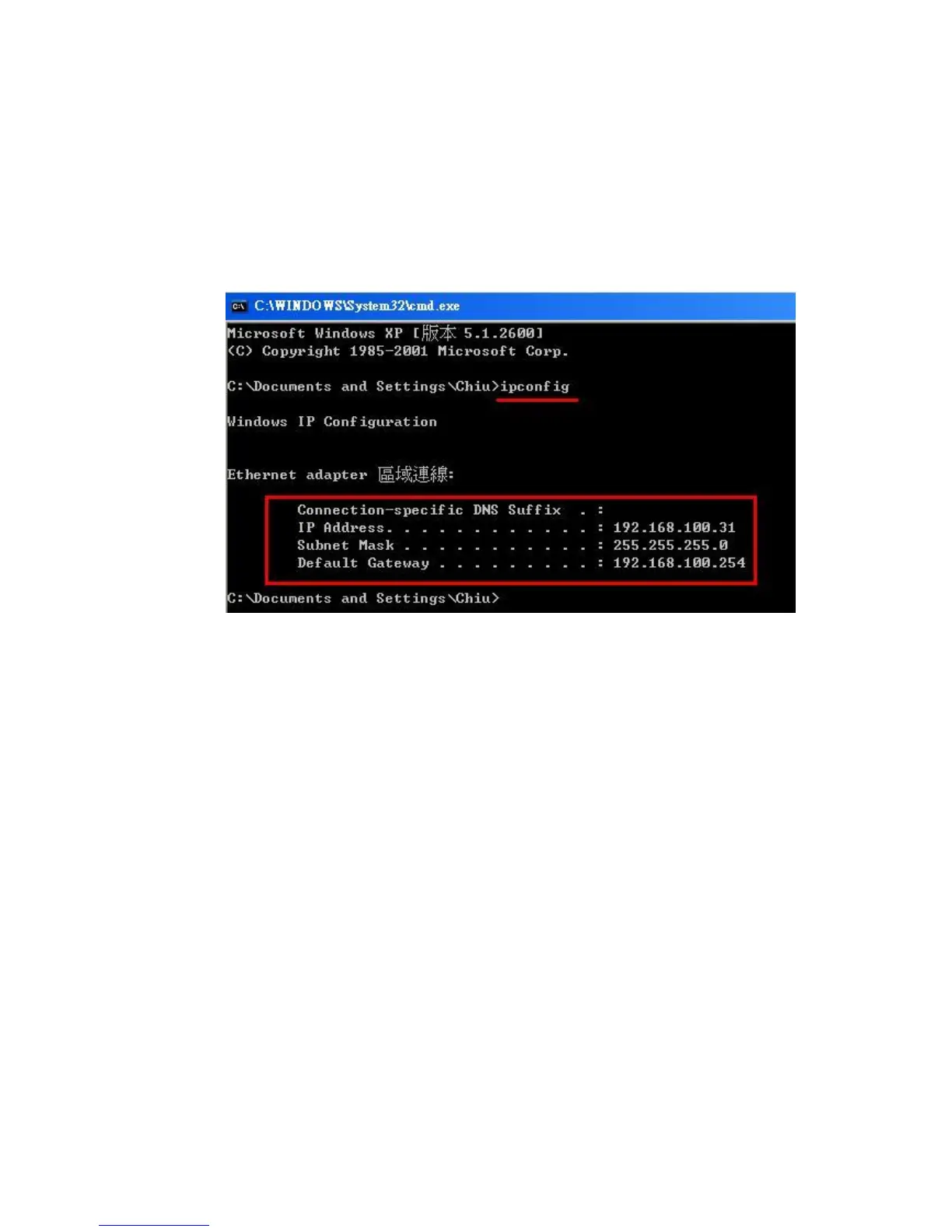
To obtain the IP information manually:
In Windows Go to:
a.) Start --> Run --> type in “cmd” --> Hit enter and the MS –DOS window will open,
b.) Now type in “ipconfig”
The last set of numbers of the IP address can be any number between 1~254, but cannot be
same as your PC, hub, router or any device in the network. Please use “IPDdit.exe “ to get the
IP of IP Power .
* Same SUBNET: The first 3 sections of IP address is same - XXX.XXX.XXX.abc. The part of
XXX must be the same.
(E.g. If IP address is 192.168.1.100 , then another IP address 192.168.1.123 then these IP
Addresses are in same subnet.)
5 .The default username and password of IP Power 9258 are:
Username: admin
Password: 12345678


 To Next Page