3. Interface Description
IP Power 9258
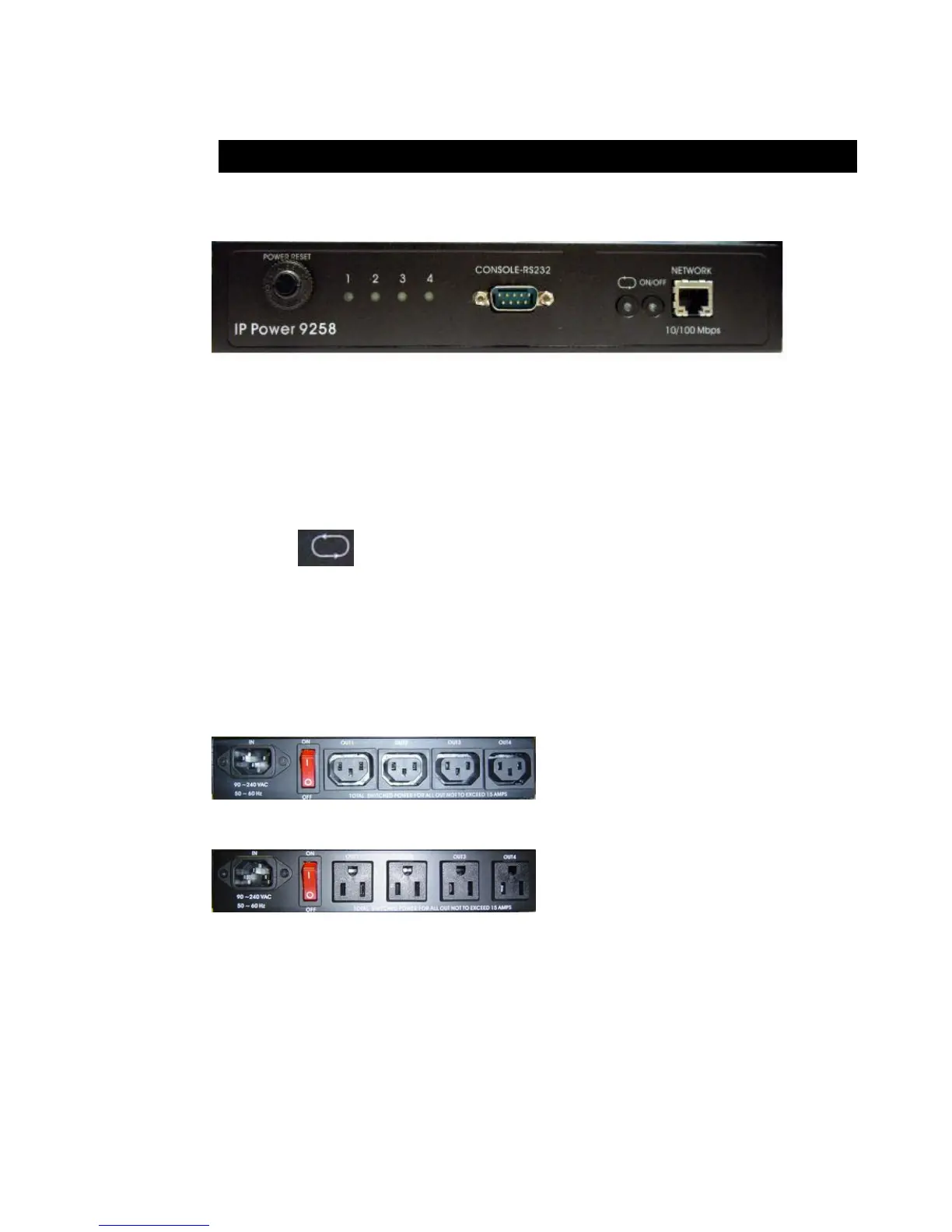
Front interface shown below:
From left to the right
1. RESET: self-protect AC reset button. IP Power 9258 can cut off the power supply of outlets
automatically if there is a shortcut or current overload. After user having solved the problem,
push the reset button, the AC power supply will become normal.
2. LED: 4 LED indicator lights. If the LED is on, means the corresponding outlet is power on.
3. RS232 port: provide the power output state and get IP address to re-update if update fails
4. Circle sign and On & Off: Hardware power ON /OFF setup. Please do o refer page
11 for proper operation.
5. RJ45 Ethernet port: link to the net wire.
Rear interface shown below:
9258S:
9258T:
Port description (from left to the right)
1. 90-240VAC power input port
2. Power switch: the power switch ON /OFF of IP Power 9258.
3. OUT 1- 4: 4 individually switched AC outlets


 To Next Page