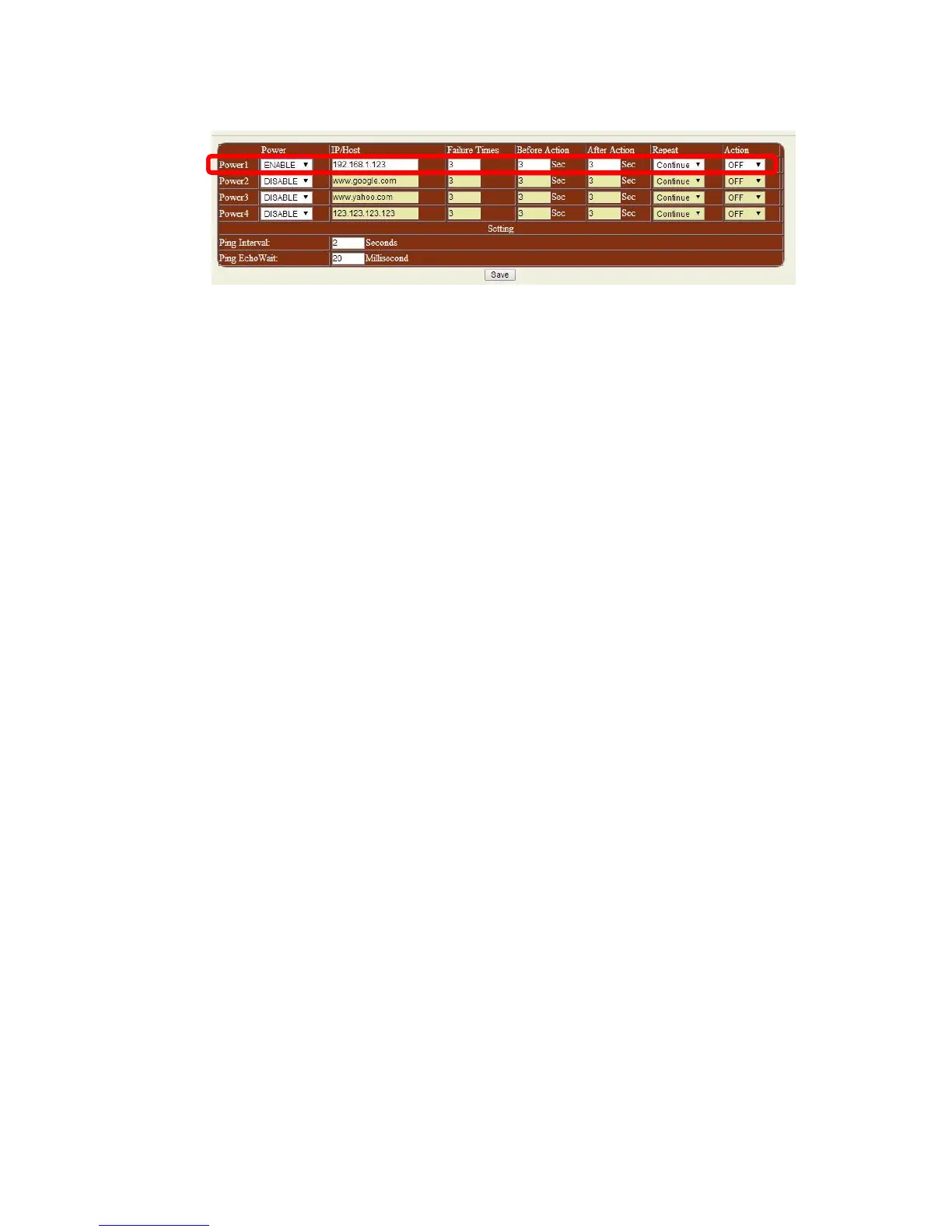
- Power : to enable / disable the ping function
- IP /Host : Enter the IP Address or Host name of the device that you are trying to ping
- Failure Times : The times of Unsuccessful Ping responses.
- Before Action : After “Failure Times” reached its setting number, this is the time (second)
before the “Action “ execute .
- After Action : After the “ Action” execute , this is the number of seconds before the after action
occurs.
*Note: This is also known as the PC or Device Startup Time. Set this to number to 90 or above to
prevent infinite looping of the device.
- Repeat : This is the command to continue ping or to stop ping.
- Action: From here you can Reset, On, Off on the device
- Ping Interval: The number of seconds between each unsuccessful Ping
- Ping EchoWait: The number of Milliseconds that the Ping will wait for a response from
connected device
Note:
1. When the Ping function is enabled, it is possible that user may not receive the e-mail
sent from 9258 to notify the user, due to the bandwidth limit of the IP Address.
2. Do not use the relay delay switch function when the Ping function is enabled. In the
Setup page, the delay switch is not relative with Ping function.


 To Next Page