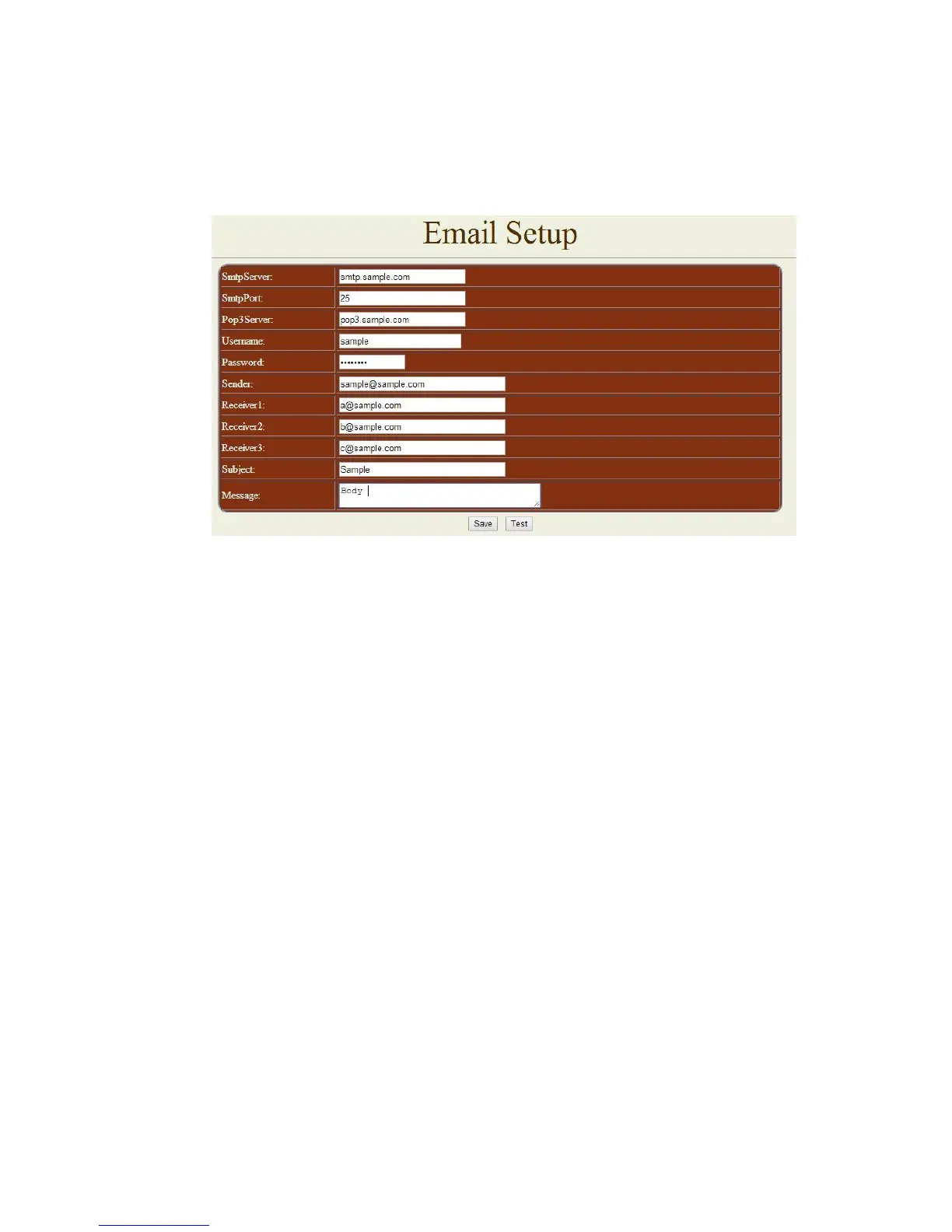
C. EMAIL SETUP:
When you finished the e-mail setup , you can set to let IP Power 9258 send its IP address
automatically.
To send out mail successfully , please do set the DNS correctly . You can check with your ISP
for correct DNS information.
For example:
* Smtp Server : smtp.sample.com
* Smtp Port: 25
* Pop3Server: pop3.sample.com
* Username : sample
* Password: *********** ( do not over 8 digits)
* Sender: Sample@sample.com
* Receiver 1: a@sample.com
* Receiver 2: b@sample.com
* Receiver 3: rc@sample.com
* Subject: This is the subject line
* Message : This is the body of the email
- SmtpSever = Mail Server: Outgoing Mail Server . Please make sure the server is an
available mail server.
- SmtpPort : We suggest to keep port as 25
- Pop3Server: Incoming Mail Server. IP address ( in Internet WAN ) from your ISP
for sending Internet IP address by E-mail when 9258 in Internet.To receive IP address in WAN ,
please fill your ISP e-mail receive server.
- Username : please use the name format that the email server inquire ( if need the
username with words after @ )
- Password: the password of this mailbox is no longer than 8 characters.
- Sender: please fill in the name of sender. The Mail Server must support SMTP and these fields
must be filled in correctly.


 To Next Page