10
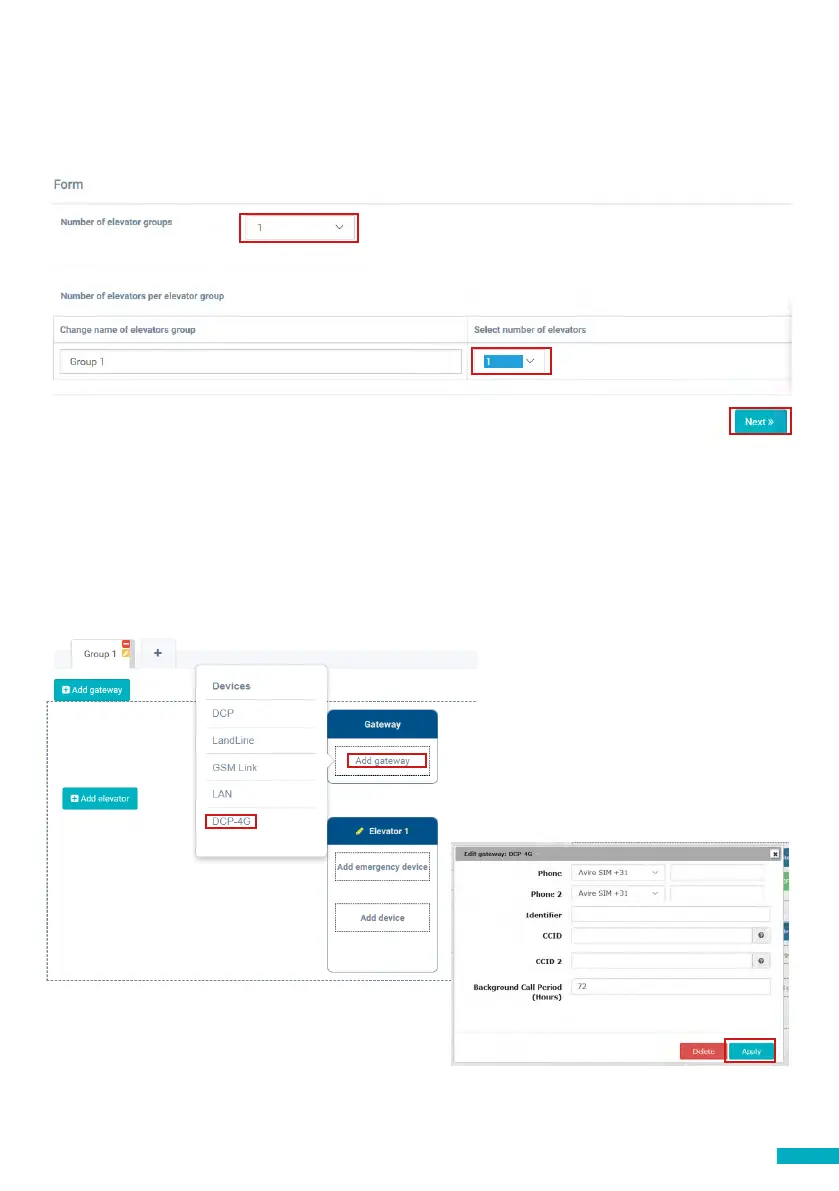
On the other side of the page please enter the number of elevator groups you have in
this installation and how many elevators you have in each group. As an example, if this
is a simplex installation the number of elevator groups will be “1” and the number of
elevators will also be “1”. If it’s a duplex installation it will be “1” and “2” respectively.
You can also edit the group names to easily identify installations. Once all information
is entered click “Next”.
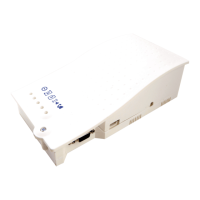
In the new page, you should be able to see Groups and Elevators. Click on “Add
Gateway” under “Gateway” tab and select “DCP 4G”. A pop up window will appear
where you can enter the SIM information (Note: Avire SIMs are (+31), but this doesn’t
aect costs). Enter all required information and then click “Apply”.
Note: The Background Call Period is the frequency of test checks and 72hrs is the
maximum period as per guidance from standards.
Note: if you are
installing a 3G DCP
please select DCP in
the menu


 To Next Page