15
LED INDICATORS
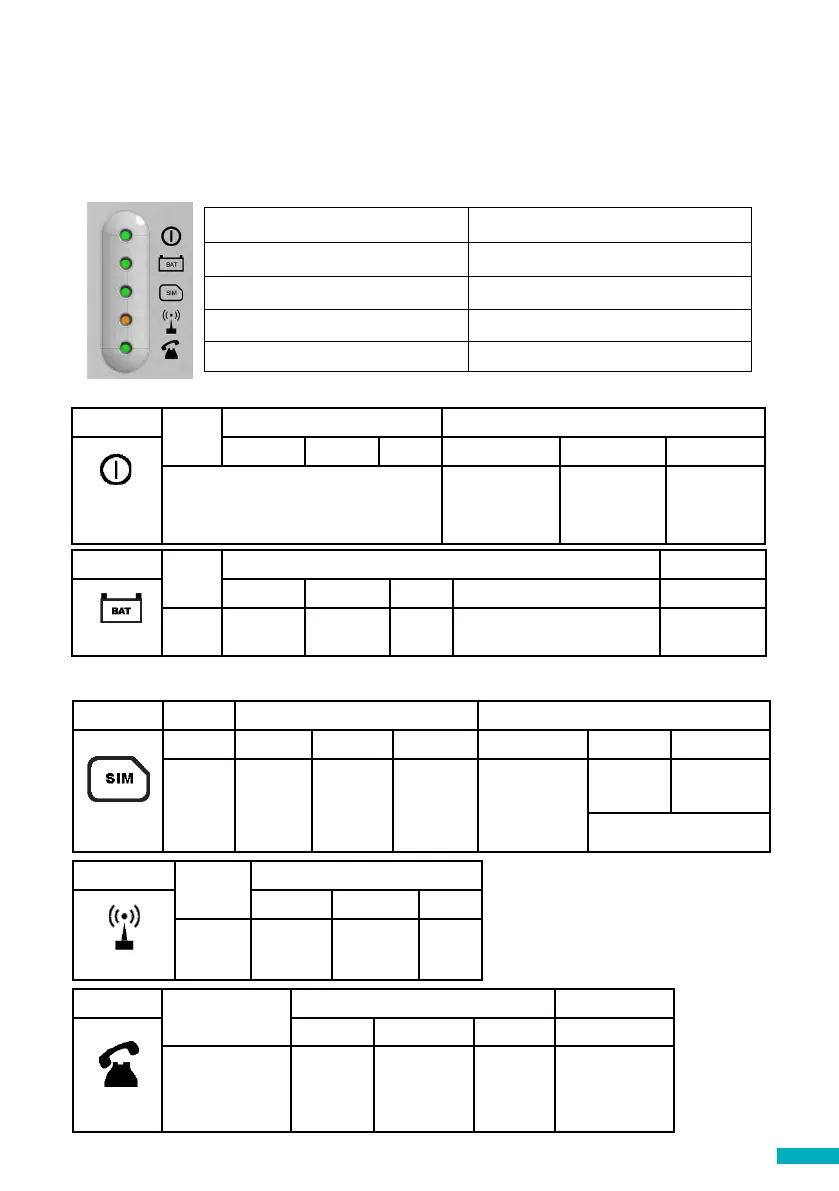
The DCP has ve indicator LEDs that constantly report the device status. The indicators
will be either red, amber or green.
Each indicator will be fully on, fully o or ashing. On start-up, you should see the
following within 2- 5 minutes (this will vary):
RUN LED ashes in green. Power supply is OK
BAT LED is always on Battery is OK
SIM LED is green or amber Device is connected to the network
Coverage LED is green or amber Good coverage
SLIC LED is green Device is in standby
RUN LED
OFF
ON FLASHING
Green Amber Red Green Amber Red
CRITICAL SYSTEM ERROR
Proper
Operation (AC)
Proper
Operation
(BAT)
Restarting
System
BATTERY
OFF
ON FLASHING
Green Amber Red Orange Red
OK Charging Low DAU battery failure Error
SIM OFF ON Flashing
Green Amber Red Green Amber Red
AT
modem
Available
GSM and
GPRS
GSM
available
GPRS not
available
Out of
Service /
Initialising
Ongoing Data
Transmission
Ongoing
voice call
Sim error or
missing pin
Amber/Red Missing PUK
SLIC
OFF
ON Flashing
Green Amber Red Green
RS-232 local
conguration
Local line
ready
Initialising
local line
Local line
out of
service
Local line in use
COVERAGE
OFF
ON
Green Amber Red
AT
modem
OK Medium Low
The below tables provides an overview for what each LED colour means:
Important Note: DCP shows battery status of DCP or battery failure of any attached DAU
units as per EN81-28:2018.


 To Next Page