18
Installation with a Digital Audio Unit
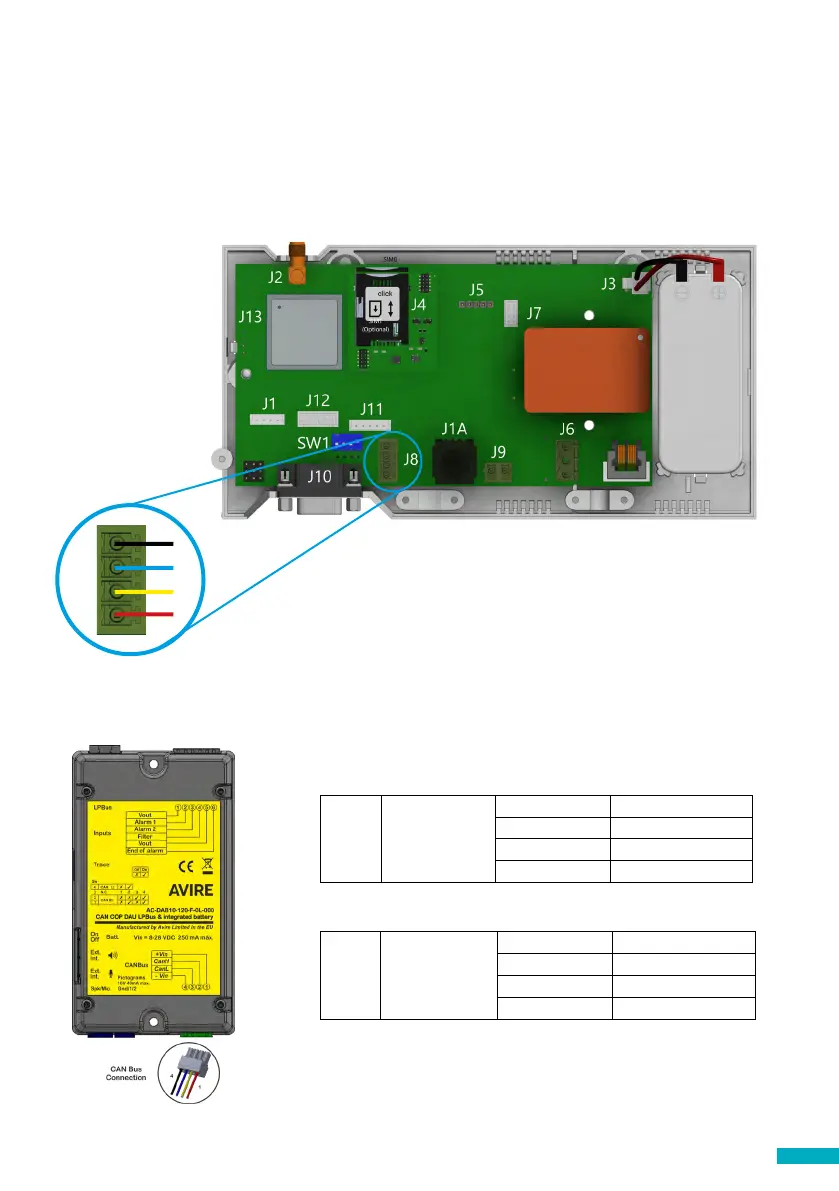
When connecting a Digital Audio Unit (DAU) connect the unit or the CAN Bus Splitter to
J8 using a 4-core cable (2 wires for power and 2 for communication)
+ If only connecting 1 device to the DCP (e.g. DAU) set SW1 dipswitch 4 to ON
+ It is recommended to use shielded twisted pair cables
+ If connecting 2 devices to the DCP (e.g. 1 DAU and 1 PIT unit) set SW1 dipswitch 4 to OFF
+ There are no standard wiring colours for CANBus wiring
Please refer to the DAU Installation guide for full setup of the DAU.
1
4
J8 CAN BUS
4 - Vin
3 CAN L
2 CAN H
1 +Vin
J9
CANBus connection on DCP
CANBus connection on DAU
J9 CAN BUS
1 +Vin (8-28 VDC)
2 CAN H
3 CAN L
4 -Vin (Ground)


 To Next Page