2
ELEVATOR SAFETY
Please follow all Health and Safety rules and take all necessary precautions before
and during installation. This device must be installed by qualied personnel and
always in a restricted area where only such personnel have access.
SETTING UP THE DCP
Avire SIM cards come activated and ready to be installed. If a non-Avire SIM card is
used, please make sure that the SIM card is activated and unlocked.
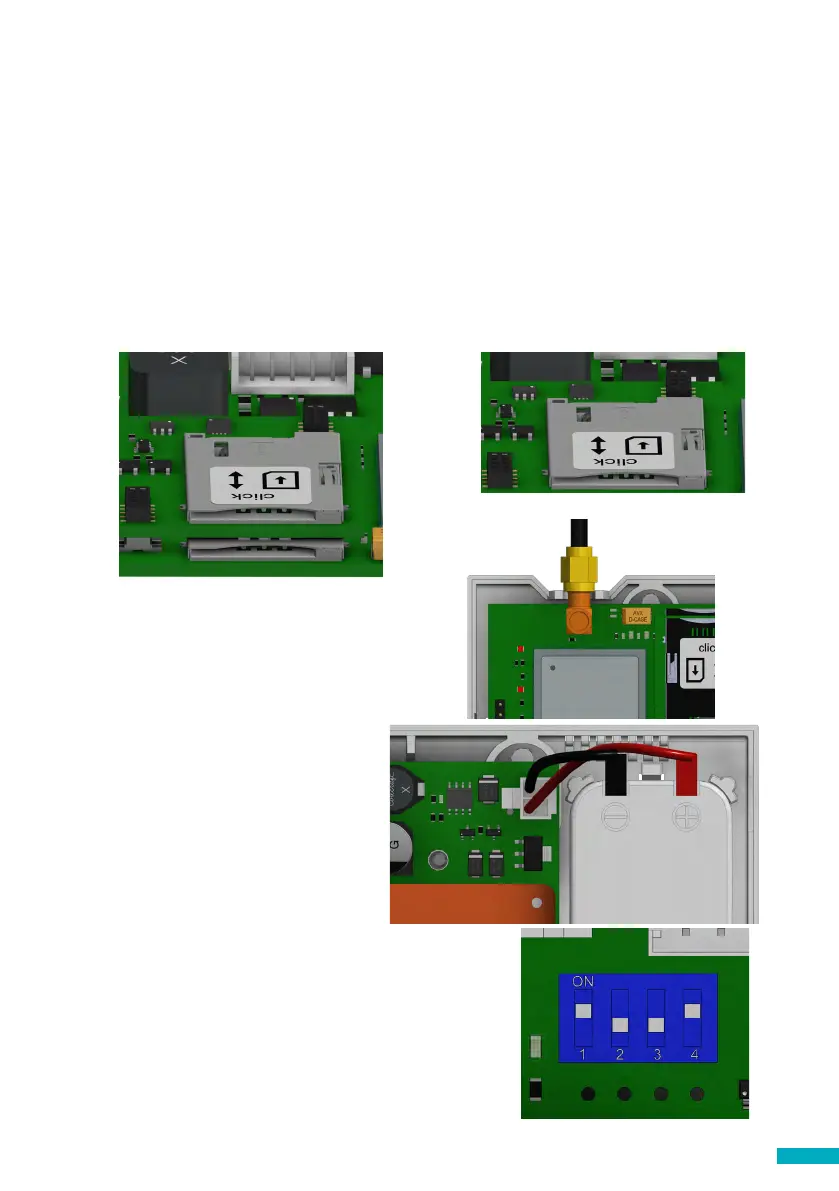
3. Connect the antenna on the DCP to J2 and
ensure it is completely tightened.
NOTE: Only use antennas authorised by Avire.
6. Check the signal strength by using the built-in
network signal strength scanner. To use the signal
scanner function:
+ Turn SW1 dipswitch 1 to ON (check dipswitch 4 is
also ON)
Please refer to pages 13 and 14 for the full picture
and connector information
1. Open the DCP with a PZ1 screwdriver.
2. Depending on the version of DCP insert SIM(s) into the J4, pushing the SIM(s) until it
(they) click(s). The Dual SIM card version will still work with only 1 SIM installed.
SIM0
SIM1
J4
J2
J3
J4
SIM0
Single SIM card
Dual SIM card
SW1
4. Connect the battery to J3.
5. Wait for the LED lights to turn on.
Once the LED’s turn on, the SIM card
will begin to register with the network
which can take 2-5mins. Having
allowed time for the SIM to register,
check the SIM LED to make sure it is
green or amber (check step 10). If it’s
ashing red check it’s been inserted
correctly and then unlock the SIM
card using instructions on page 4.


 To Next Page