6
SETTING PARAMETERS ON NON AVIRE SIMS
OPTION 1
Super settings allow quick and easy conguration of APN settings, depending on the
country and network provider. Congure settings for the DCP based on the tables
below.
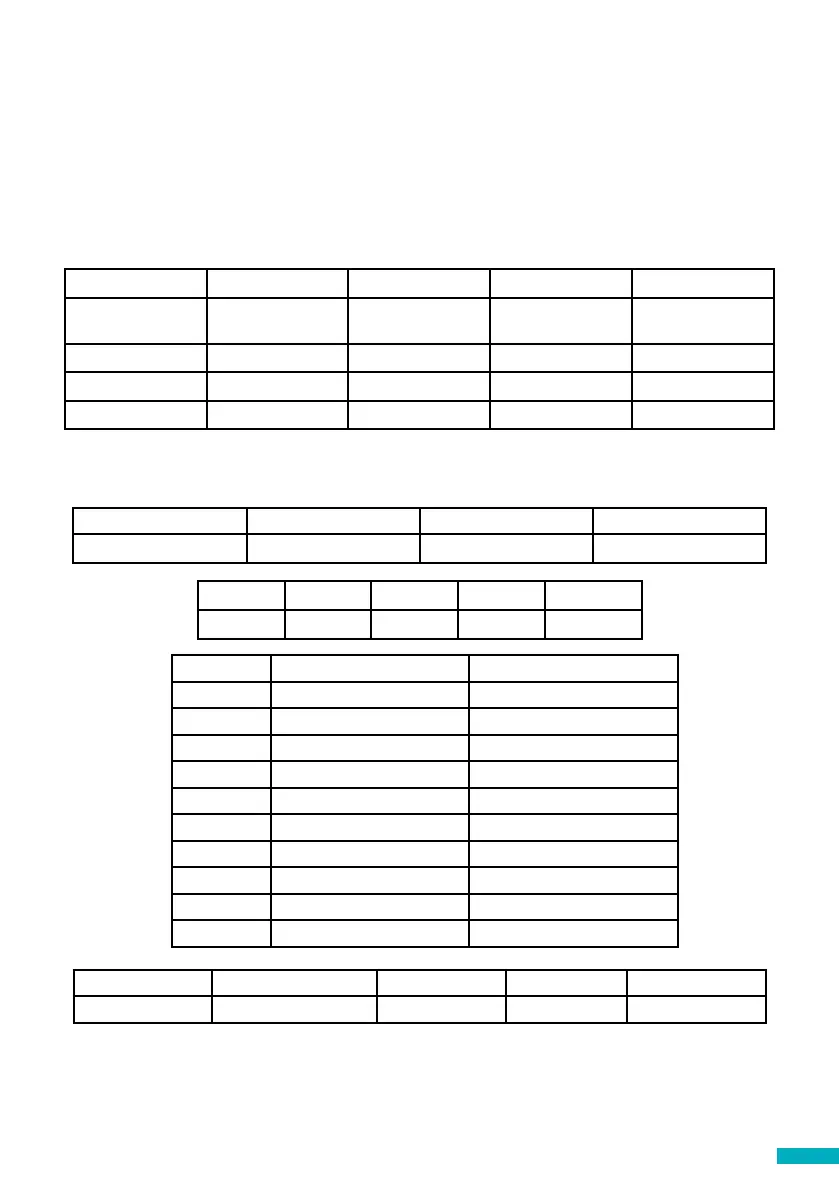
Example:
Digit 1 0 1-6 7 8
Continent Default Europe Americas Australasia
Digit 1 Digit 2 Digit 3 Digit 4
Continent SIM0 Network Type of connection SIM1 Network
Digit 2 & 4 Network Country
0 default default
1 AvireSim -
2 Telstra AUS
3 Optus AUS
4 Vodafone AUS
5 Spark NZ
6 2 degrees NZ
7 Vodafone NZ
8 - -
9 - -
Digit 3 0 1 2 3
Type Transparent Gateway Avire Hub P100 P100 + Avire Hub
The Digital Communications Platform comes pre-congured with factory settings of 0000 (this
conguration doesn’t specify any use case or country).
Digit 1 Digit 2 Digit 3 Digit 4
Country SIM0 Network Type of
Connection
SIM1 Network
Example
Single Sim 8 = (Australia) 2 = (Telstra) 1 = (Avire HUB) 0 = (No SIM)
Dual Sim 8 = (Australia) 2 = (Telstra) 1 = (Avire HUB) 3 = (Optus)


 To Next Page