7
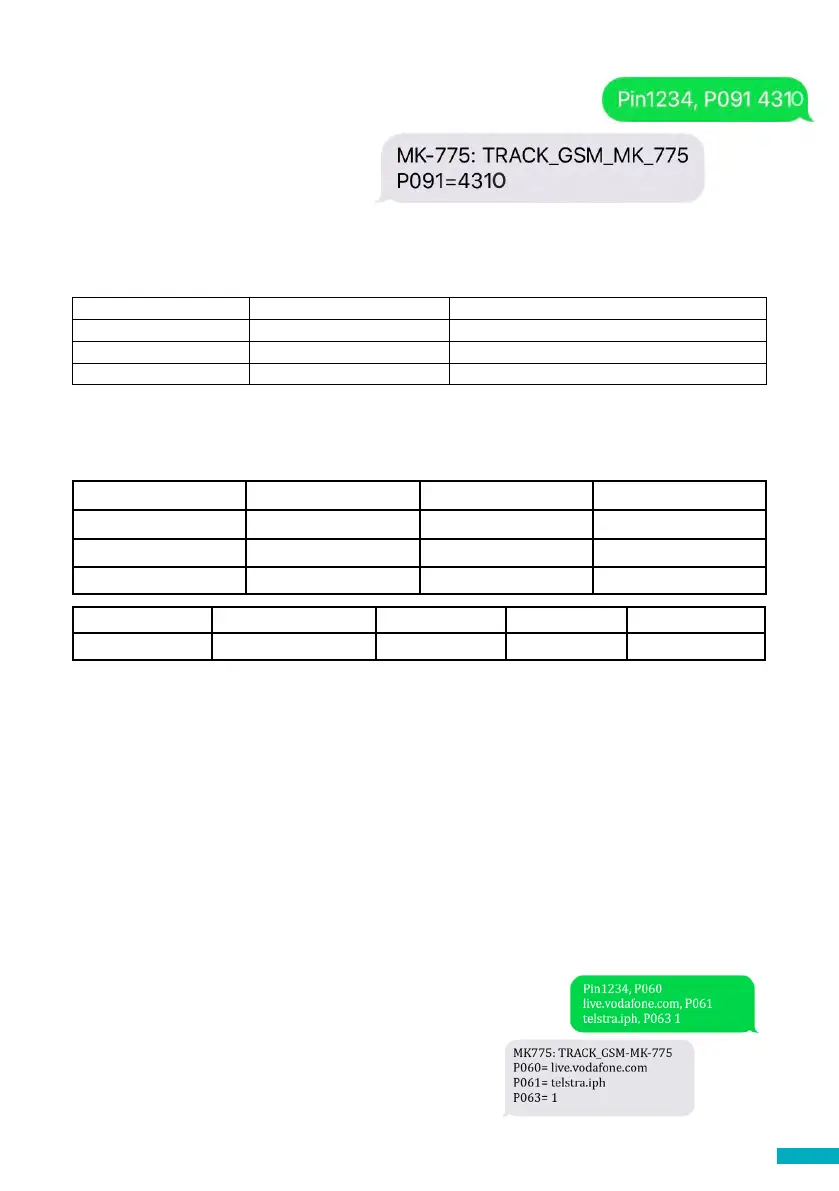
Once all digits are selected, the text
needs to be sent to the SIM card
telephone number along with the
PIN code and command. Response
should show:
OPTION 2
If super settings are not used, then APN settings need to be set up manually:
Command Description Parameters
P060 (P zero six zero) SIM0 congurations APN name ; APN username ; APN password*
P061 (P zero six one) SIM1 congurations APN name ; APN username ; APN password*
P063 (P zero six three) Type of connection Shared by both SIM cards
* Separated by “;”
These parameters must be congured by sending an SMS to the SIM card number.
Examples for various regional providers are shown below:
Carrier APN name APN username APN password
Vodafone AUS live.vodafone.com (blank) (blank)
Telstra AUS telstra.iph (blank) (blank)
Spark NZ internet (blank) (blank)
Other APN settings are available on the web and can be easily found online. If an APN
is incorrect for the provider or is not set up correctly, the DCP will not check into the
Avire HUB.
Important Note: The default PIN code for DCP is always 1234.
If either the APN username and/or APN password are (blank) and the DCP is congured
to be used with the Avire Hub, then the text message will be (example is for Vodafone
AUS):
Pin1234, P060 live.vodafone.com, P063 1
Example for dual SIM card version with SIM cards from Vodafone AUS (SIM0) and
Telstra AUS (SIM1):
Pin1234, P060 live.vodafone.com, P061 telstra.iph, P063 1
P063 0 1 2 3
Type Transparent Gateway Avire Hub P100 P100 + Avire Hub
If everything is congured correctly you will receive a
text within a few minutes:


 To Next Page