EasyManua.ls Logo

AVL 9130 - System Software Flow Charts 9120, 30, 40

AVL 9130
114 pages
Print Icon
To Next Page IconTo Next Page
To Previous Page IconTo Previous Page
Loading...
7
3.1 Software Operation - 9120, 30, 40
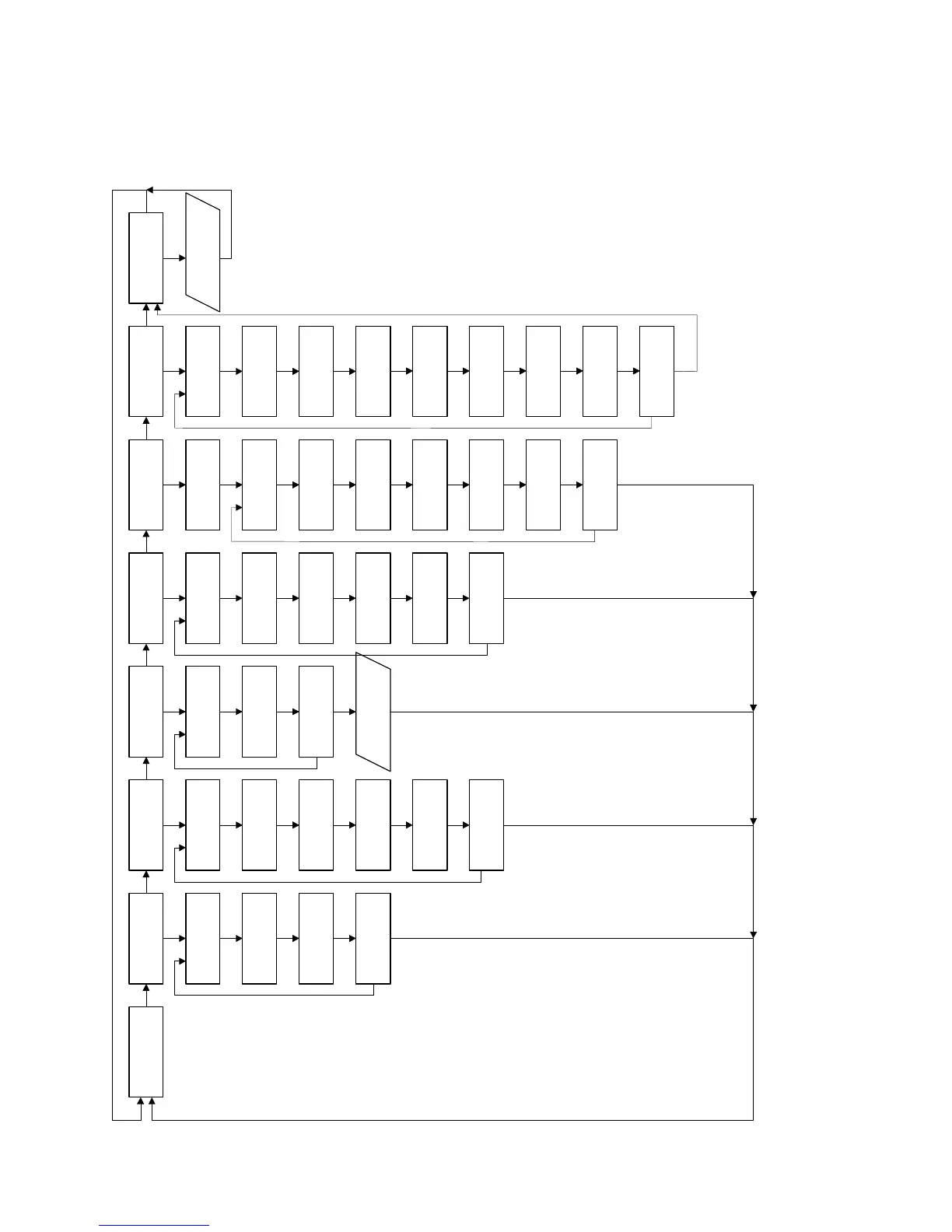
1 Overall Program Operating Flow - 9120, 30, 40
NoNoNoNoNoNoNoNo
Yes
READY 12:45 PRINT
FUNCTIONS?
QC/S T ANDAR D/
URINE SAMPLE?
DAILY
MAINTE NANCE?
OPE R AT OR
FUNCTIONS?
SERVICE
FUNCTIONS?
CALIBRATION?
Test
E lectrodes?
Test
Sample Sensor?
Test
S ample Door?
Test
Pump?
Test
Valves?
Test Interface?
Jump Pins 2 & 3
Test
Amplifier?
Enter
S ervice Code?
R emain in
Service Func.?
P rint last
Sample Report?
Print
Cal. R eport?
Print QC Values
and S tatis tics?
Remain in Print
Functions?
QC Level 1
Sample?
QC Level 2
Sample?
QC Level 3
Sample?
Standard
Sample?
Urine
Sample?
Remain in QC/
Std/Urine Sample?
Daily
Cleaning?
Daily
Conditioning?
R emain in Daily
Maintenance?
CALIBRAT E
Check/Change
SnapPak?
Go to
S tandby Mode?
Set
Time/Date?
Reset
Sample Number?
Take Out of
Operation?
Remain in
Operator Func.?
PROGRAM
INS T RUMENT ?
Enter Code:
AAA
Program QC
Level 1 Ranges?
Program QC
Level 2 Ranges?
Program QC
Level 3 Ranges?
Program
Normal Ranges?
Program
Corr. Factors?
Program
P rinter S etup?
Remain in
Program Func.?
CALIBRAT E..
.
No
Yes
No
No
No
No
No
No
No
No
No
No
No
No
No
No
No
No
No
No
No
No
No
No
No
No
No
No
No
No
No
No
No
No
No
Yes Yes Yes
Yes Yes Yes
Yes
No
Yes
Yes
No
Yes
Yes

Table of Contents

Related product manuals