19
Push the power switch to the ON (I) position. The
unit will automatically begin to operate.
See illustration 2-15.
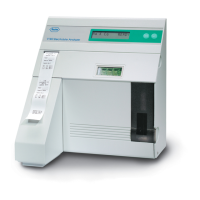
Now that the AVL Electrolyte Analyzer is function-
ing, you will begin using the keypad interface to
communicate with the instrument. Use the NO key to
make changes, the YES key to accept the displayed
values or information.
The analyzer will display a default date and time and
will allow you to input the correct date and time.
Date: 01-JAN -80
Time: 00:00
Enter the correct date as follows:
1. Press the NO key until the correct day is
displayed. Press YES. The cursor will move to
the month.
Note: By keeping the NO key depressed, the analyzer
will automatically scroll through the numbers, first
slowly, then fast.
2. Press NO until the correct month is displayed.
Press YES.
3. Press NO until the correct year is displayed.
Press YES. The correct date should now be
displayed.
4. Follow the same procedure to enter the correct
time.
2-15. Turning power on


 To Next Page
 Loading...