28
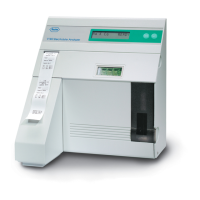
The analyzer will display Enter Code: AAA. To
program your AVL Electrolyte Analyzer, you must
now enter the code K-E-Y as follows:
1. Press NO until the character K is displayed.
2. Press YES and the cursor will advance to the
second position.
3. Press NO until E is displayed, then press YES.
The cursor will advance to the last character.
4. Press NO until Y is displayed.
Note: If you pass the desired letter, continue pressing
NO until the letter is displayed again.
If you have entered the code correctly, press YES.
The analyzer is prepared for operator programming
and will display Program QC Level 1 Ranges?
Note: If you inadvertently enter an incorrect code,
the analyzer will display CODE ERROR! RETRY?
Enter YES and you will be returned to the Enter
Code prompt. To exit this menu, press NO.
Programming QC Level ranges
When you open a new box of AVL ISE-trol Electro-
lyte Controls, the lot number should be entered into
the analyzer, along with the target ranges. Each level
has its own lot number, which is printed on the infor-
mational sheet contained inside the ISE-trol box.


 To Next Page
 Loading...