6
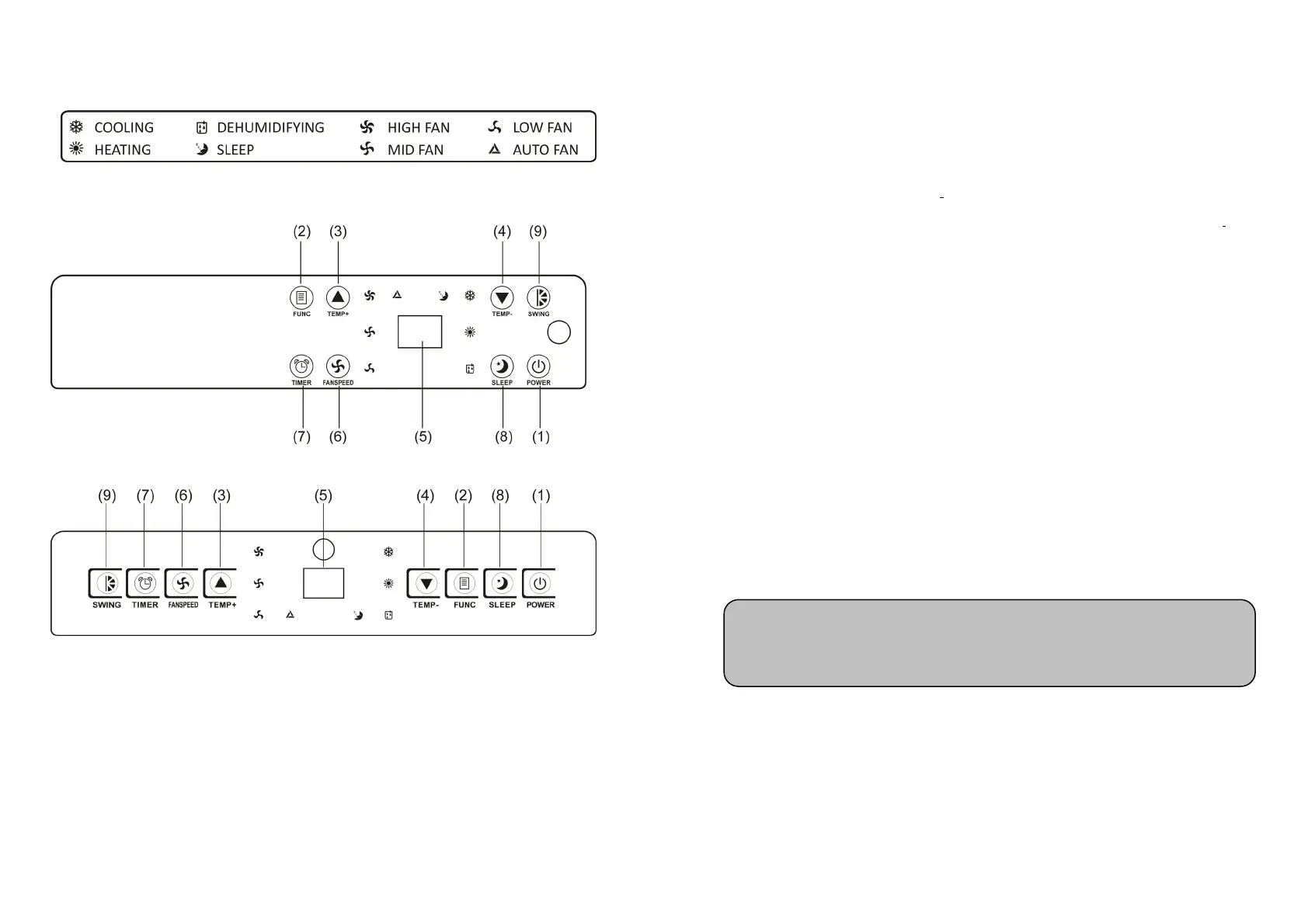
CONTROL PANEL & DESCRIPTION OF FUNCTION
AMFII
AMF
1. POWER KEY
Press to turn unit "ON" or "OFF".
2. FUNCTION
Press this key to select cooling, heating, or dehumidifying.
3. TEMPERATURE REGULATION KEY (UP)
During cooling function:This key raises the preset temperature by 1℃ each time it is
pressed and the maximum limit is 30℃.
7
During heating function:This key raises the preset temperature by 1℃ each time it is
pressed and the maximum limit is 25℃.
4. TEMPERATURE REGULATION KEY (DOWN)
During cooling function:This key lowers the preset temperature by 1℃ each time it is
pressed and the minimum limit is 17℃.
During heating function:This key lowers the preset temperature by 1℃ each time and
the minimum limit is 15℃.
5. L.E.D. DISPLAY
The display indicates the current setting temperature or the timer setting. When the set
temperature or the timer is adjusted, the new setting is shown then the display returns the
current set temperature.
※ The display is also used to show error codes should a fault occur, see ERROR
CODES.
6. SPEED
Press to select either LOW, MEDIUM, HIGH or AUTO fan speed.
If "AUTO" is selected,”HIGH” or "MEDIUM" or “LOW" will be
selected automatically according to the difference between setting temperature and
ambient temperature.
7. PROGRAMMABLE
TIMER
Programmable timer ON/OFF key.
TIMER-ON: The timer-on is used to turn on the unit automatically after the set time is
over.
1. Press the "TIMER" key at stand-by status to set the time you desired.
Note: In heating function and dehumidifying function, this key is invalid because
the unit is defined to be high speed in heating mode and low speed in
dehumidifying mode.



 To Next Page