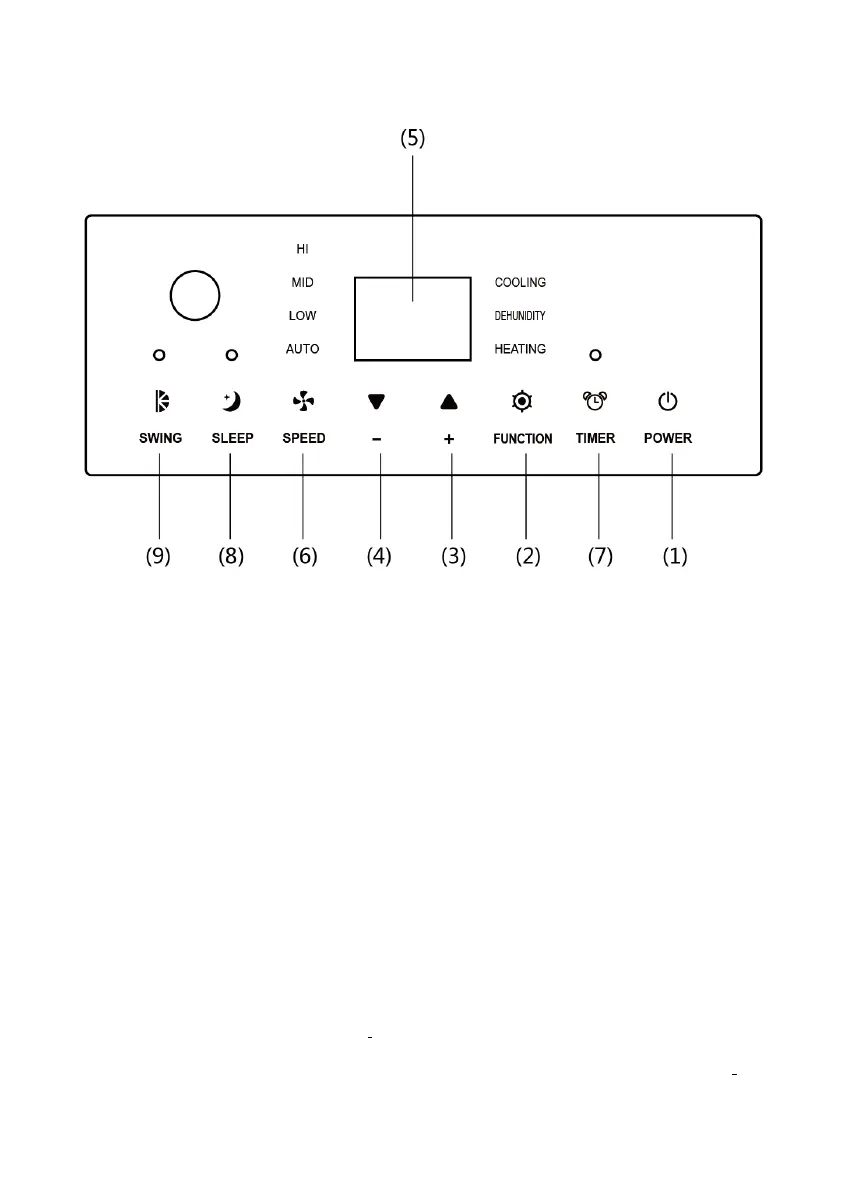
CONTROL PANEL & DESCRIPTION OF FUNCTION
1. POWER KEY
Press to turn unit "ON" or "OFF".
2. FUNCTION
Press this key to select cooling, heating, or dehumidifying.
3. TEMPERATURE REGULATION KEY (UP)
During cooling function:This key raises the preset temperature by 1℃ each time it is
pressed and the maximum limit is 30℃.
During heating function:This key raises the preset temperature by 1℃ each time it is
pressed and the maximum limit is 25℃.
4. TEMPERATURE REGULATION KEY (DOWN)
During cooling function:This key lowers the preset temperature by 1℃ each time it is
pressed and the minimum limit is 17℃.
During heating function:This key lowers the preset temperature by 1℃ each time and
the minimum limit is 15℃.


 To Next Page