■
IR Configuration
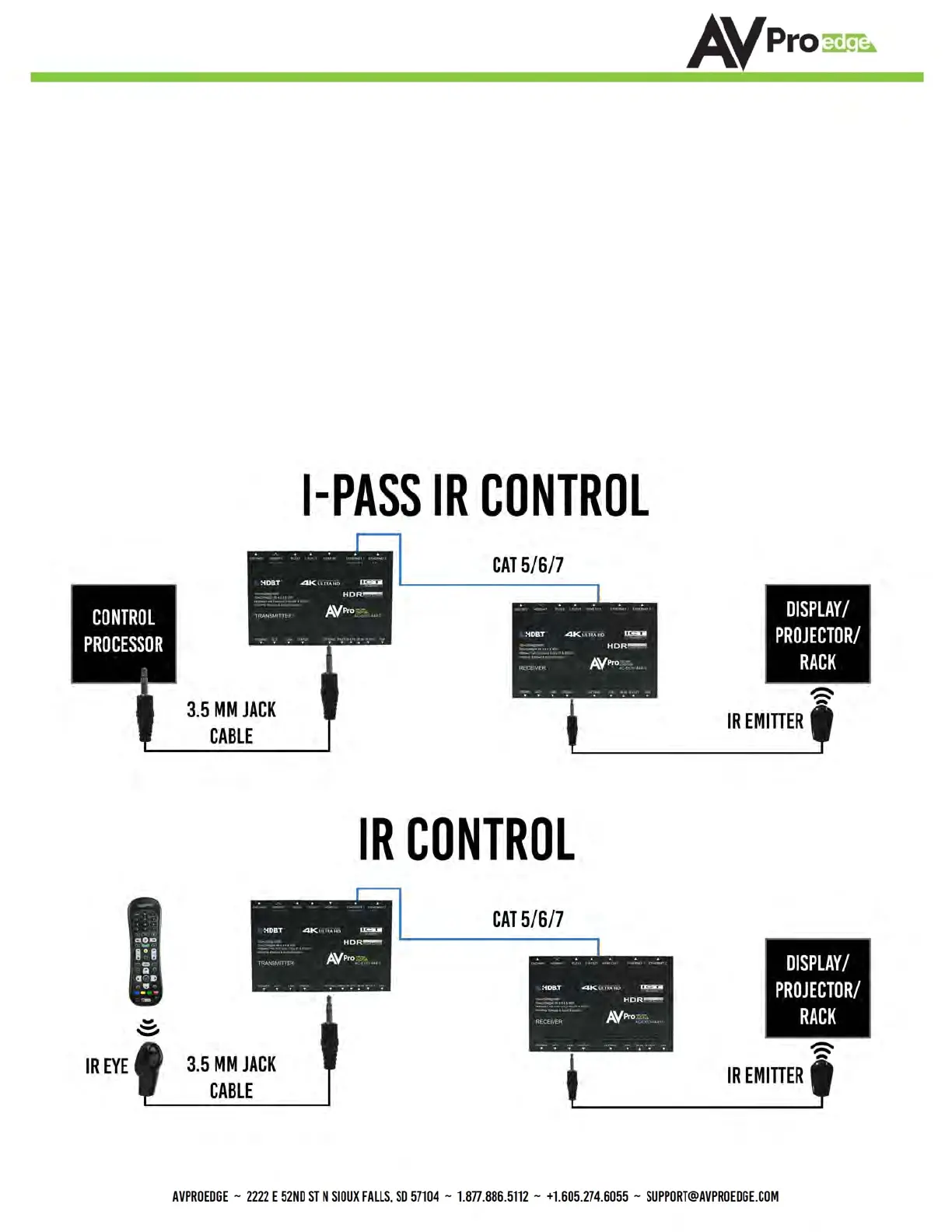
IR can be used in three ways:
1. From Rack (Control System Direct): Plug a MONO 3.5mm cable into an emitter port of any control system directly
into the "IR IN" port on the AC-EX40-444 Transmitter to pass IR signals directly to the remote end. NOTE - Be sure
the IR MODE Slide Switch is set to "I-PASS" on the Transmitter
2. From Rack (Using IR-EYE): Plug an IR-Receiver Eye into the "IR IN" of the AC-EX40-444 Transmitter in order to pass
infrared signals generated from a device or IR Remote. NOTE - Be sure the IR MODE Slide Switch is set to "IR-EYE"
on the Transmitter.
3. From Remote End: Use an IR-Receiver Eye on the AC-EX40-444 Receiver (IR In Port) in order to send IR signals
BACK to the rack and out of the TRANSMITTER IR Out Port with an emitter.


 To Next Page