■
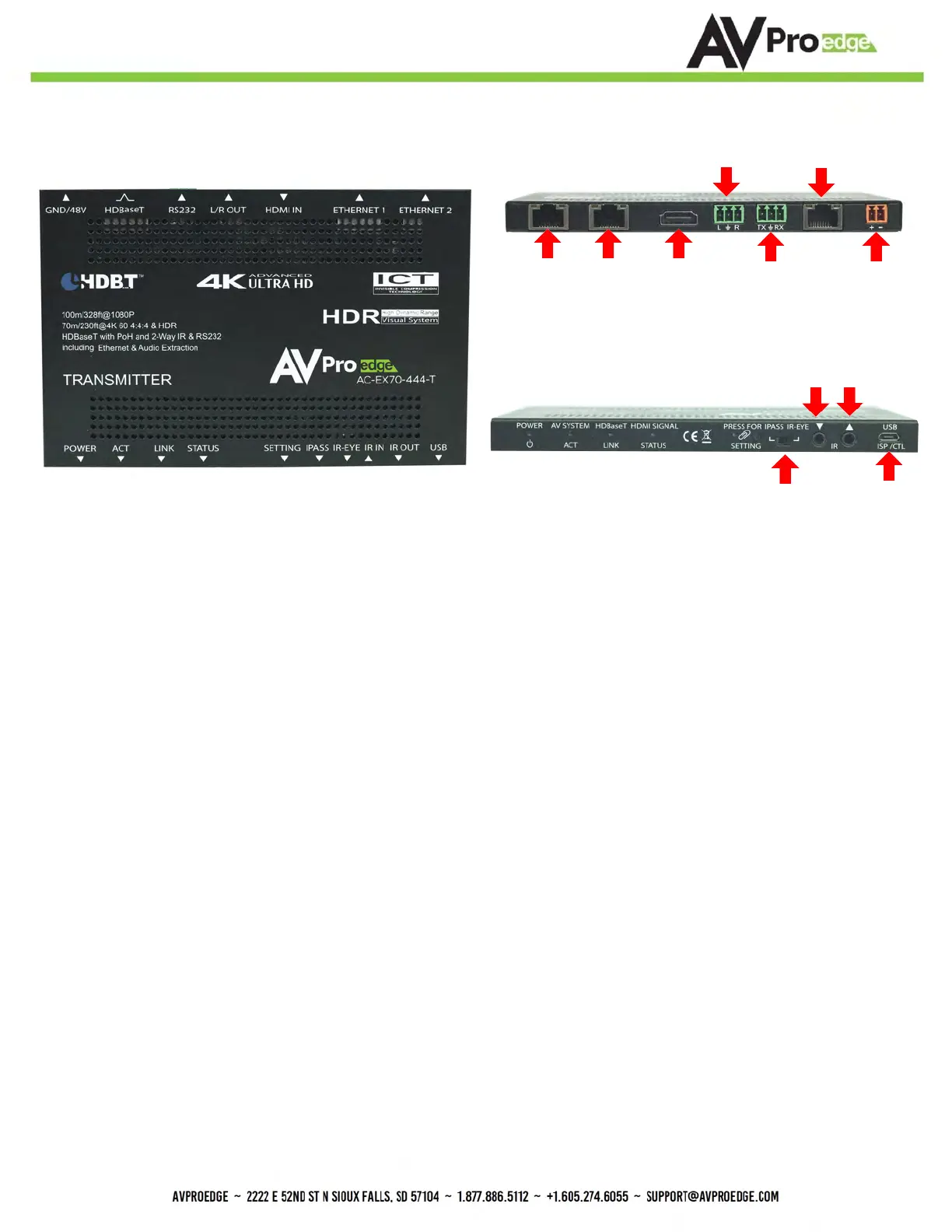
The Transmitter
Back
Front
HDBaseT
IR Mode
RS232
COM & Pass-through)
L/R Out
(PCM Only)
HDMI In
Micro USB
(Firmware)
IR In IR Out
Indicator Troubleshooting Lights on the Transmitter:
POWER - On the front: (Red) This is an indicator that the power is connected. There are only two states for light:
• Light Is On = Power supply is connected and functioning.
• Light Is Off = Power supply is not connected or there is no power present. (In order to have power: check the
power supply, USP, Outlet, etc...)
AV SYSTEM ACT - On the front: (Blue) This is an indicator of activity on the link - this light will blink randomly as data is
sent/received.
HDBaseT LINK - On the front: (Blue) This is an indicator that that the RJ45 HDBaseT Link is stable. This light should
always be SOLID.
HDMI SIGNAL STATUS - On the front: (Blue) This indicator shows that the HDMI source is connected.
The states are:
• Light Is On (Solid) = Sync w/ HDMI source is correct and solid.
• Light Is Flashing = The light flashes during the sync process. If it is flashing continuously, a picture
may not be present.
If the BLUE HDMI SIGNAL STATUS LIGHT is flashing, check the following:
1. The source. Plug it directly into the display to be sure it's functioning properly.
2. Try a longer HDMI cable. Some HDMI cables do not sync well at shorter lengths.
3. Set the EDID to state #1 (See below).
4. If these suggestions do not work, enable the "Test Pattern" (See Below). If you see the pattern, the problem is
between the source and the transmitter, please try a different source.
5. Contact AVProEdge if these suggestions do not work.
48V
Ethernet Ports
10/100


 To Next Page
 Loading...