SM
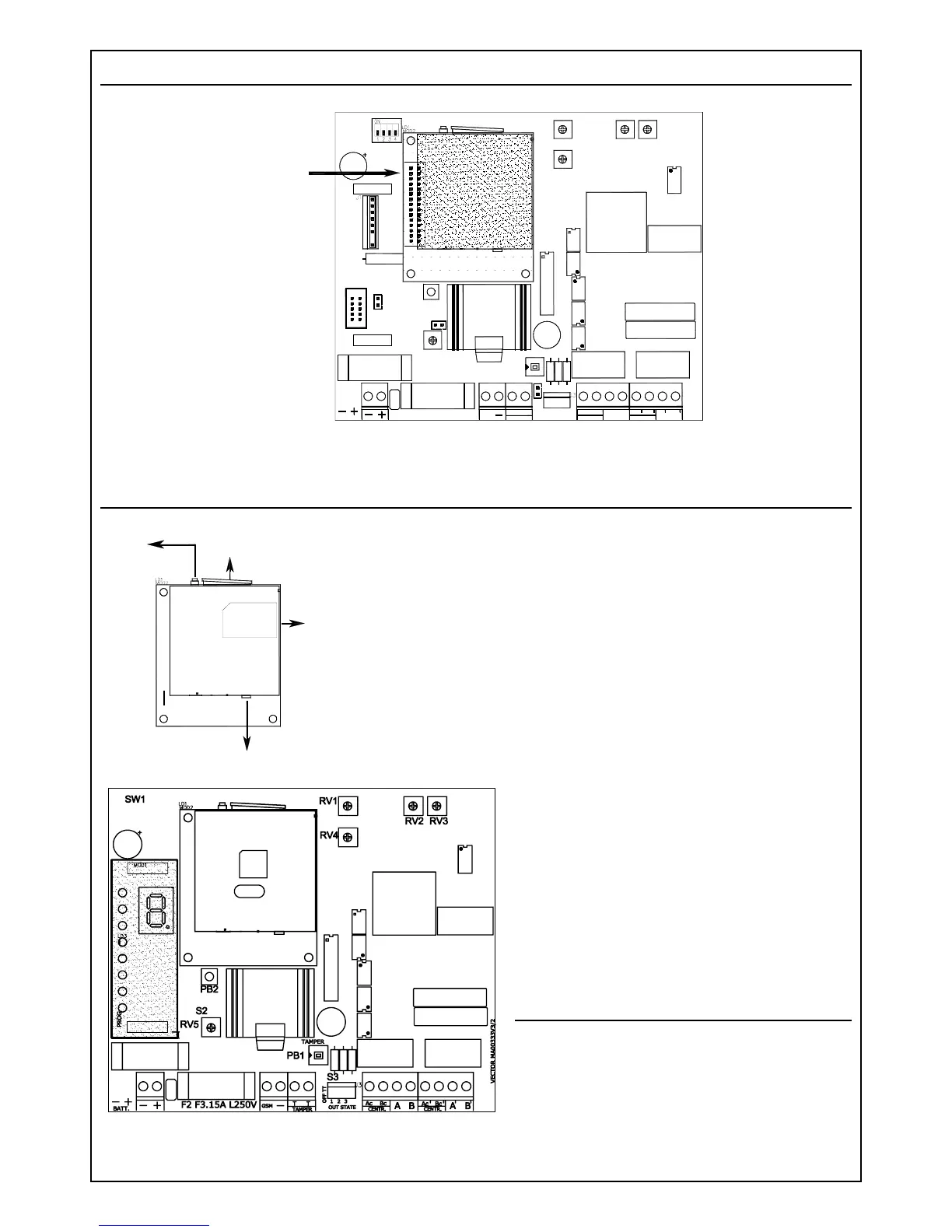
Connect the GSM engine to 30 pin female connector.
Plugging in sim card / antenna jack
GSM engine with upper side SIM Card holder:
1. Press pushbutton A.
2. Extract B holder.
3. Put SIM card on B.
4. Insert B holder all the way long into its receptacle.
GSM engine with right side SIM Card holder:
To insert SIM Card:
1. Insert SIM Card completely into slot C until it clicks inside
the module
To remove SIM Card:
1. Press and release the SIM Card to cause it to be ejected
through the slot.
Antenna jack:
Place the male connector of the antenna
cable into the female one of the module
and apply slight pressure in the axis
direction to click it into the module. Do not
force or bend the cable sideway. To
remove the cable, hold the connector with
the fingertips and pull avoiding bending it
sideway. Do not pull the cable.
Display module connection
Remove power from the interface and
insert the display module into the proper
connectors as indicated in the figure.
7
GSM engine
A
B
C
Ingresso connettore antenna
Input antenna jack



 To Next Page