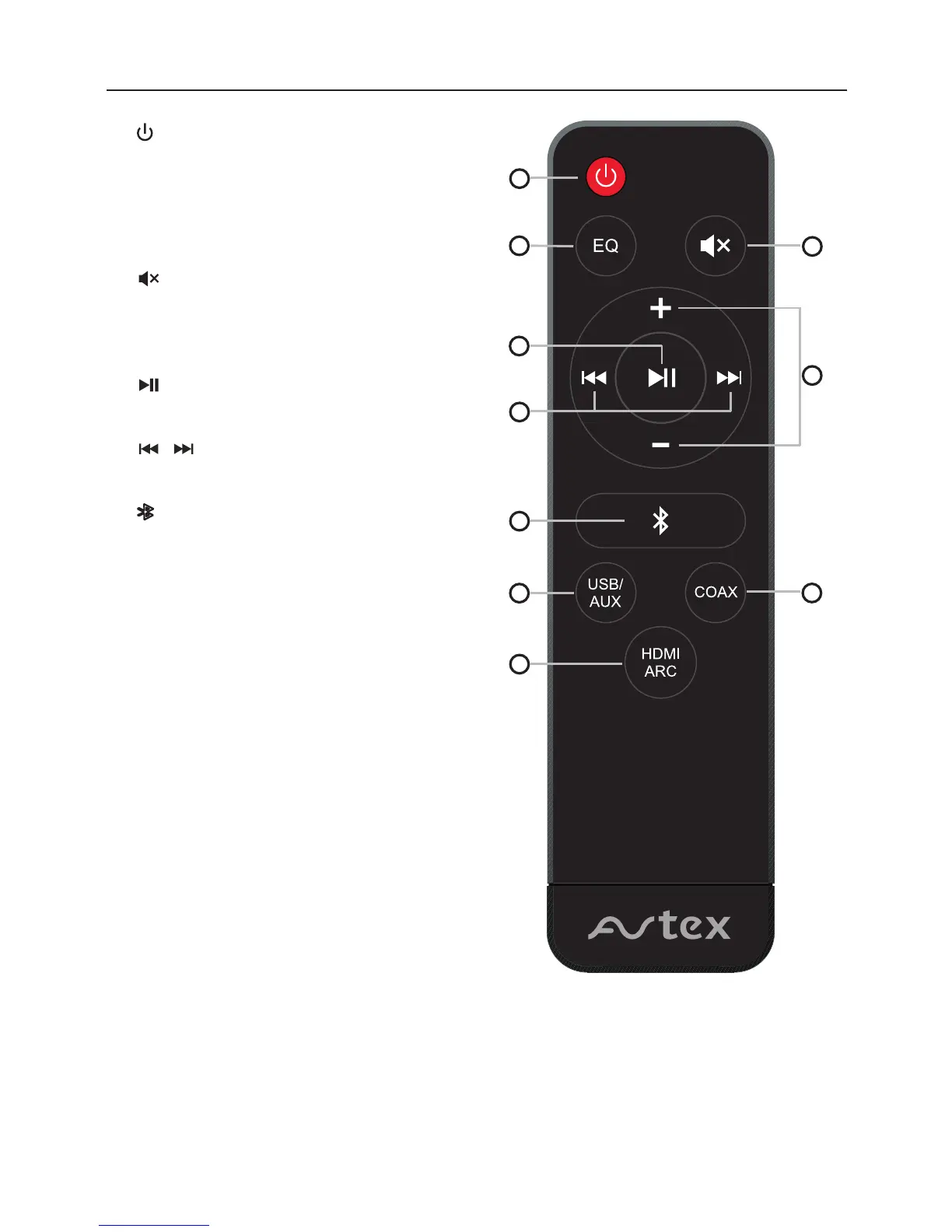
1.
• To switch the unit between ON and
STANDBY mode.
2. EQ
• Press to select a preset sound effect.
Default EQ is MUSIC, press to switch to
NEWS, NORMAL and MUSIC as recycle.
3.
• Press to mute or resume the sound.
4. VOL+/VOL-
• Press to increase/decrease the volume
level.
5.
• Press to play/pause in Bluetooth and
USB.
6.
• Press to select previous/next track in
Bluetooth and USB.
7.
• Press to switch audio source to bluetooth.
• Press and hold to activate the pairing
function in blueooth and/or disconnect
the existing paired bluetooth deivce.
8. USB/AUX
• Toggle button to switch between audio USB and
AUX
9. COAX
• Press to switch audio source to COAXIAL.
10. HDMI ARC
• Press to switch audio source to HDMI ARC.
• To allow the TV remote control to power on/off
the soundbar press and hold HDMI ARC button
until display shows “ON”. (Default setting is OFF)
/
10
1
2
6
7
8
Remote Control
3
4
9
7
5


 To Next Page
 Loading...