23
4
5
6
7
89
1
0
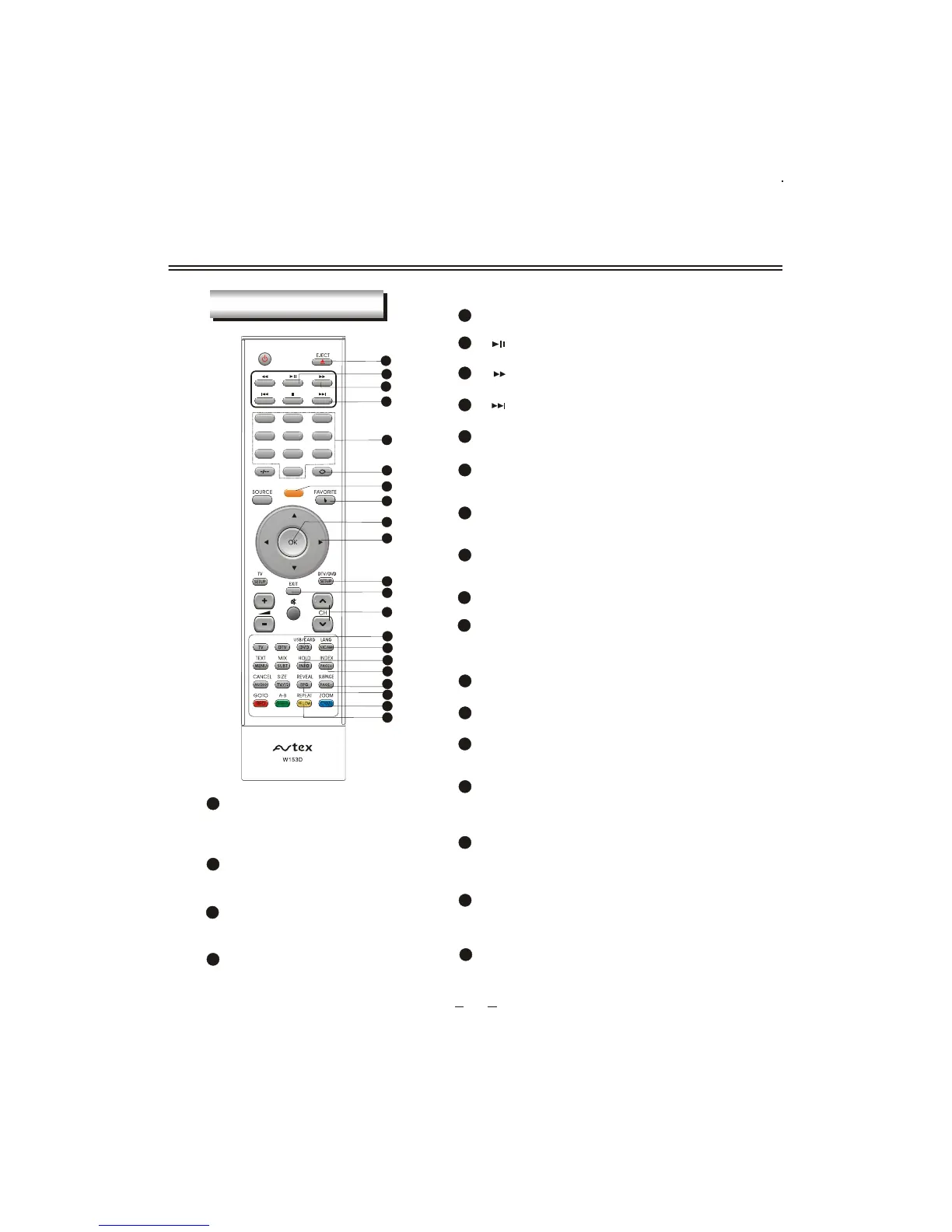
REMOTE CONTROLLER
5
REMOTE BUTTONS
EJECT
1
Disc in/out in DVD.
Number button
5
To select program number.
OK button
9
To confirm the selections.
17
INDEX/PAGE+
To display main content page when display the
teletext in TV; Browse the next page of favorite
table in DTV.
18
SUBPAGE/PAGE-
To display the subpage of the teletext
in TV; Browse the previous page of
favorite table in DTV.
19
REVEAL/EPG
Display the hidden teletext information;
in DTVTo display the program guide .
20
ZOOM/CYAN
To zoom in or zoom out the picture in
DVD; Teletext CYAN button in TV/DTV.
DTV/DVD SETUP
11
Enter or exit setup menu.
EXIT
12
To exit current menu except MUTE menu.
LANG/NICAM
Switch in NICAM,A2 and mono channel (It is
effective in TV signal input with NICAM or A2
function); To switch the output language in DVD.
15
14
DVD/USB/CARD
To directly switch to DVD source at other sour-
ce or switch between the USB mode, card rea-
der, and DVD mode in DVD source .
1
2
3
4
5
8
9
15
13
11
18
14
7
10
6
12
16
17
19
20
21
7
Long press(more than 3 seconds) the button
to start auto scan in TV/DTV.
TUNE/AQT
13
CHANNEL+/-
To increase or decrease program number in
TV/DTV.
To play normally or pause playing in DVD .
[ ] button
2
3
To fast-forwards DVD playback in DVD .
[ ] button
[ ] button
4
To select the next chapter or track in DVD.
10
Left/Right cursor(menu adjustment )
To move leftward/ rightward or adjust the
selected item in the menu, or adjust sound
volume (invalid in DVD and DTV).
16
HOLD/INFO
To hold teletext on current page in TV; To disp-
lay the current playing program information in
DVD/DTV.
21
REPEAT/YELLOW
To repeat playback in DVD; Teletext
YELLOW button in TV/DTV.
6
RETURN
To exchange channel between the previous
program and the current program in TV/DTV .
8
FAVORITE/Q-PLAY
Display your favorite channel list in DTV;
Play DVD directly in DVD .
TUNE
AQT



 To Next Page