Need help?
Do you have a question about the Awareness Technology Stat Fax 1904 Plus and is the answer not in the manual?
Overview of the instrument's uses, summary of functions, and fundamental operating principles.
Explains safety symbols and defines key safety terms used in the manual.
Covers reading instructions, servicing, PPE, operating, power, grounding, installation, and ventilation precautions.
Addresses precautions for fuse use, circuitry, dust, failures, wet conditions, atmospheres, and biohazards.
Covers unpacking, mounting, power, cords, grounding, and voltage selection.
Details power requirements, fuse specifications, and printer paper installation.
Outlines the procedure to verify proper instrument installation and function.
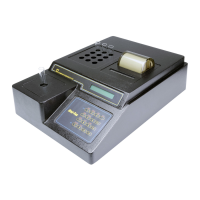
Identifies and labels the major parts and controls of the instrument.
Explains the functions of each key on the instrument's keyboard.
Details measurement range, accuracy, stability, light source, wavelengths, filters, and tube size.
Covers temperature, warm-up times, lamp saver, speed, display, printer, keyboard, modes, power, enclosure, dimensions, and weight.
Specifies recommended temperature, humidity, and optional accessories.
Covers startup, navigating the ALT menu, and basic operations.
Details setting time, lamp warm-up, and temperature control for block and cell.
Guides on selecting modes of operation and filter wavelengths.
Discusses bichromatic readings, blanking, and essential tips for reading tubes.
Lists the available unit codes for concentration labeling.
Details setting ranges for interpretation and configuring printer output.
Describes the lamp saver feature and explains flags and error messages.
Discusses instrument calibration and linearity verification.
Explains how to read and print sample absorbances at selected wavelengths.
Describes calculating concentrations using a single standard.
Explains how to calculate concentrations using a predetermined factor.
Details how to create a standard curve using multiple standards.
Describes calculating results as a percentage of the first calibrator.
Explains how to determine concentration by measuring the rate of absorbance change.
Details Fixed Time Kinetic and Batch Mode operations within the Rate Mode.
Explains how to run multiple samples in batch mode.
Describes the built-in menu of 30 pre-programmed assays.
Covers first use, saving, and recalling tests from the menu.
Guides on creating custom user tests not found in the pre-programmed menu.
Explains how to edit saved tests and delete stored tests from memory.
Provides instructions for restoring electronic calibration if data is lost.
Offers precautions to minimize operator error and ensure quality results.
Provides advice on installation and operating conditions to prevent issues.
Offers guidelines for isolating and correcting common instrument problems.
Addresses issues like incorrect answers, poor reproducibility, and printing problems.
Describes the Mosquito™ aspiration cell accessory.
Describes the REDI-CHECK® photometer check set.
Lists engineering data source.
Lists information source for REDI-CHECK kit.
Displays sample printouts for Absorbance, Factor, and Standard Modes.
Displays sample printouts for Multipoint and Multipoint %Abs Modes.
Shows sample printouts and plots for the Rate Mode.
Displays sample printouts for Batch Mode and Fixed Time Mode operations.
Provides a template for logging user-defined tests and parameters.
Information on contacting the instrument dealer for support.
Contact details for support staff at Awareness Technology.
 General
| Type | Microplate Reader |
|---|---|
| Incubator | No |
| Display | LCD |
| Interface | RS-232 |
| Light Source | Tungsten Halogen Lamp |
| Photometric Range | 0-3.0 OD |
| Printer | Optional |
| Read Mode | Kinetic |
| Plate Type | 96-well |
| Weight | 7 kg |
| Power Supply | 50/60 Hz |
| Aspiration Volume | Not applicable |

 To Next Page