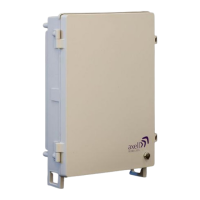
Axell BSF-3302 61-200001 Series Repeater
Product Description and User’s Manual
© Axell Wireless Ltd Doc. No. PN 3302 61-200001 Series-UM Rev. 1.0 3
4.7.3.2 Verifying LEDs ................................................................................................... 34
4.8 Closing and Securing the Repeater .................................................................................. 34
5 BSF-3302 Commissioning................................................................................................. 35
5.1 Open a Session to the BSF-3302 via the OMU II ............................................................. 35
5.2 BSF-3302 Optical Loss Adjustment (OLA) ....................................................................... 36
5.3 RF Balancing .................................................................................................................... 38
5.3.1 Manual RF Balancing ............................................................................................ 38
5.3.2 Automatic BSF-3302 RF Balancing ....................................................................... 40
5.4 Integration into the Axell Element Manager (AEM) .......................................................... 41
5.5 What Next? ....................................................................................................................... 41
6 BSF-3302 Full GUI Description ......................................................................................... 42
6.1 Opening a Direct Web Session ........................................................................................ 42
6.1.1 Connecting Locally ................................................................................................ 42
6.1.2 Remote Connection and Login .............................................................................. 43
6.2 Navigating the Web Interface ........................................................................................... 44
6.2.1 Management Options Buttons ............................................................................... 45
6.2.2 Home Screen Overview ......................................................................................... 46
6.2.3 Configuration Screen Overview ............................................................................. 47
6.3 Configuring General Parameters ...................................................................................... 48
6.3.1 Site Information – BSF-3302 Identification ............................................................ 48
6.3.2 Date & Time ........................................................................................................... 49
6.3.3 Configure External Alarms ..................................................................................... 49
6.3.4 IP Address ............................................................................................................. 50
6.4 Remote Communication Setup ......................................................................................... 51
6.4.1 TCP/IP and Ethernet .............................................................................................. 51
6.4.2 Modem Setup ........................................................................................................ 52
6.4.2.1 Packet Switched Modem Configuration (GSM/GPRS) ...................................... 52
6.4.2.2 Circuit Switched Modem (PSTN/GSM) .............................................................. 53
6.4.2.3 SIM-card Using Single Numbering Scheme ....................................................... 53
6.5 SNMP Support .................................................................................................................. 54
6.5.1 SNMP Traps Parameters ....................................................................................... 54
6.5.2 Activating and Configuring the SNMP Agent ......................................................... 54
6.6 User Accounts .................................................................................................................. 55
6.6.1 Default User Accounts ........................................................................................... 55
6.6.2 User Access Levels ............................................................................................... 56
6.6.3 Change Password ................................................................................................. 56
6.7 Reboot .............................................................................................................................. 57
6.8 Axell Shell (Command Line Interface) .............................................................................. 57
6.9 Attribute Reference ........................................................................................................... 58
7 Monitoring, Fault Sourcing and Maintenance ................................................................. 59
7.1 Cautions and General Statements ................................................................................... 59
7.2 Monitoring Via the BSF-3302 Home Screen .................................................................... 60
7.2.1 General Page Area ................................................................................................ 61
7.2.2 Detailed view of the BSF-3302 RF Status ............................................................. 61
7.2.3 Detailed view of Fiber Optic Unit ........................................................................... 62
7.2.4 Subsystems ........................................................................................................... 62
7.3 Logs Screen ..................................................................................................................... 63
7.4 Module LEDs .................................................................................................................... 64
7.4.1 Control Module LEDs ............................................................................................. 65
7.4.2 F/O Converter LEDs .............................................................................................. 66
7.4.3 Power Supply LEDs ............................................................................................... 67
Appendix A - Specifications ........................................................................................................ 68
Appendix B - F/O Cleaning Procedure ........................................................................................ 69


 To Next Page