6
5. COARSE(MAIN) CURRENT REGULATOR
Adjust output current of the DC power supply and delivered.
6. FINE CURRENT REGULATOR
This is a fine control. Adjust output current of the DC power supply and delivered.
7. C.C. INDICATOR
Constant current mode indicator
8. C.V. INDICATOR
Constant voltage mode indicator
9. POWER ON/OFF SWITCH
This is main power switch of the instrument.
10. NEGATIVE OUTPUT TERMINAL
11. GROUND OUTPUT TERMINAL
12. POSITIVE OUTPUT TERMINAL
13. POINT METER ZERO (only pointer meter display)
Each pointer meter has a mechanical screw adjustment for setting the zero point. Using a small
screwdriver, turn off the power and adjust the screw under the meter respectively to read zero.
There is only pointer meter model.
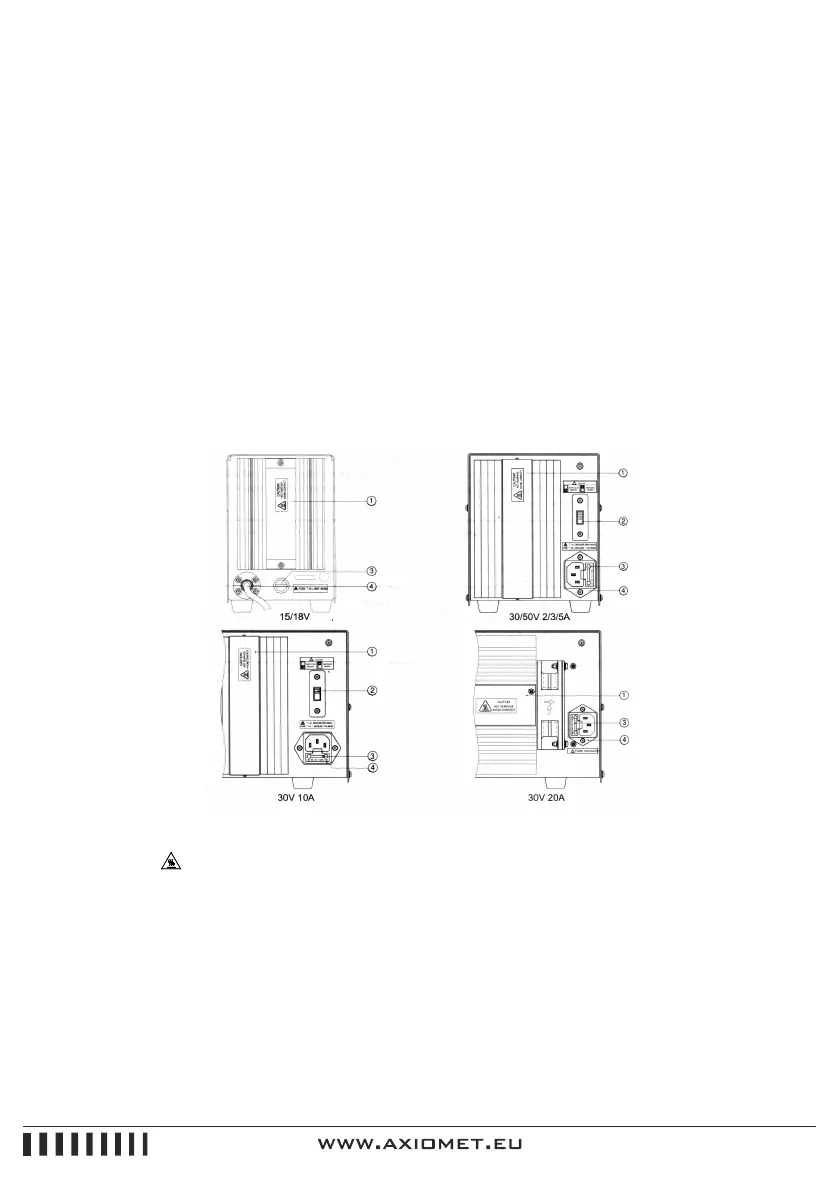
Instrument Back Panel
Figure 1-2
1. HEAT SINK
There is an on the heat sink. It indicates "caution! Hot surface avoid contact".
2. POWER SELECT SWITCH
Two kinds of power 220VAC and 110VAC 50Hz/60Hz can be supplied to the instrument. According to
user’s needs, setting it
3. FUSES
There are two fuses in the AC power input socket. One is in use and the other is for spare part.
The fuse of The DC power supply series as follows:


 To Next Page