AXISCameraStationS9002MkIIDesktopTerminal
Productoverview
7
Ethernet(RJ45)1GbE
8
MiniDisplayPort™
9
Powerconnector
10
SystempowerLED
11
On/offbutton
12
DriveactivityLED
13
Universalaudiojack
14
USB2.0
15
USB2.0
16
USB3.1
17
USB3.1Type-C
Specications
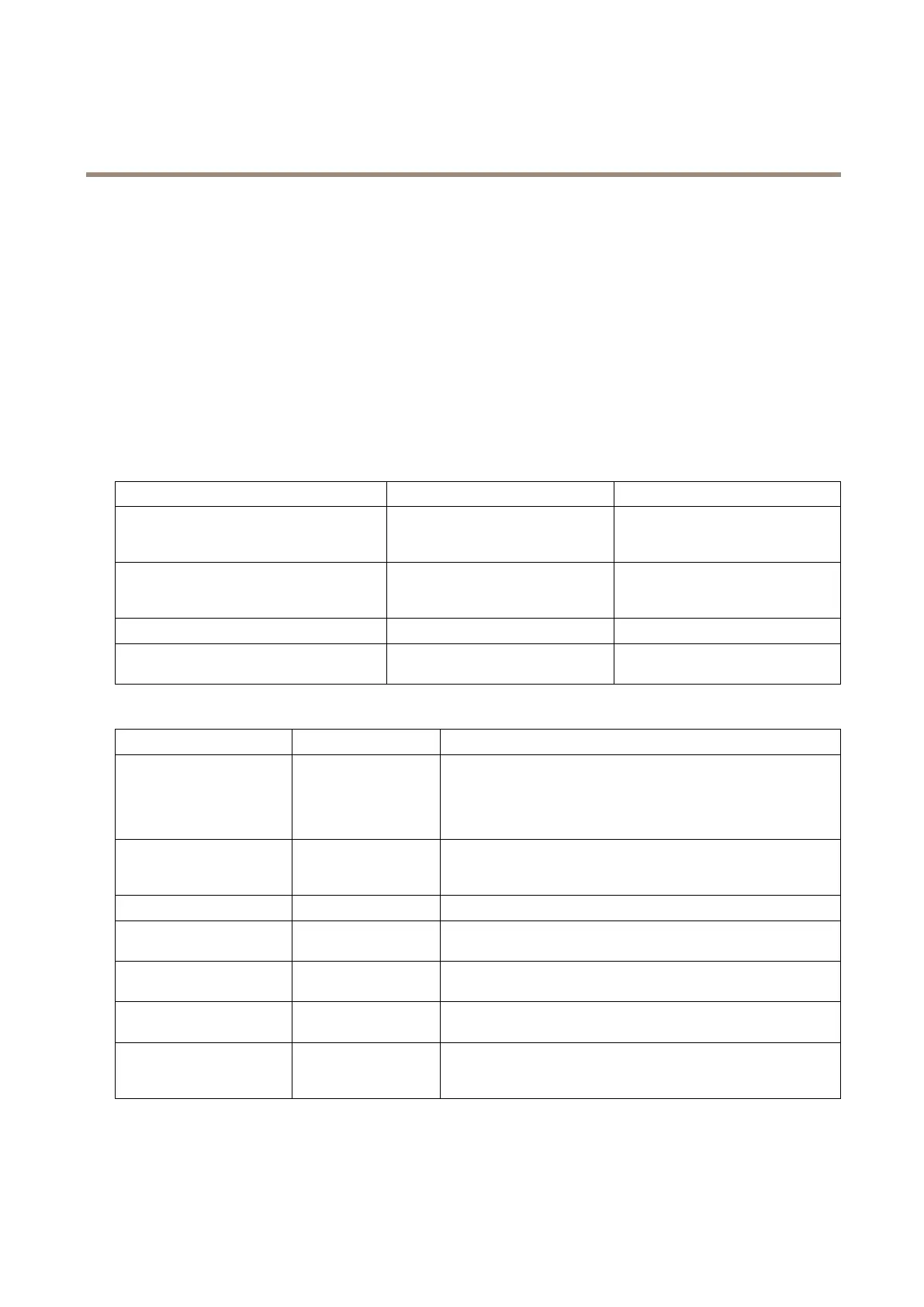
SystemhealthandIDindicators
LEDDescriptionAction
BluesolidThesystemisturnedon,systemis
healthyandsystemIDmodeisnot
active.
PressthesystemhealthandsystemID
buttontoswitchtosystemIDmode.
BlueblinkingThesystemIDmodeisactive.Pressthesystemhealthandsystem
IDbuttontoswitchtosystemhealth
mode.
AmbersolidThesystemisinfail-safemode.
-
AmberblinkingThesystemisexperiencingafault.
Checkthesystemeventlogforthe
specicerrormessage.
IDRACquicksync2indicator
LEDDescriptionAction
Off(defaultstate)
TheiDRACQuickSync2
featureisturnedoff.
PresstheiDRACQuickSync2buttontoturnontheiDRACQuick
Sync2feature.
IftheLEDfailstoturnon,resettheleftcontrolpanelexcableand
checkagain.
Whitesolid
TheiDRACQuick
Sync2isreadyto
communicate.
PresstheiDRACQuickSync2buttontoturnoff.
IftheLEDfailstoturnoff,restartthesystem.
BlinkswhiterapidlyDatatransferactivity
-
BlinkswhiteslowlyFirmwareupdateisin
progress.
-
Blinkswhitevetimesrapidly
andthenturnsoff
TheiDRACQuickSync2
featureisdisabled.
CheckifiDRACQuickSync2featureisconguredtobedisabledby
iDRAC.
AmbersolidThesystemisinfail-safe
mode.
Restartthesystem.
Amberblinking
TheiDRACQuickSync
2hardwareisnot
respondingproperly.
Restartthesystem.
NICindicators
25



 To Next Page
 Loading...








