AXISD4100-ENetworkStrobeSiren
Specifications
Specifications
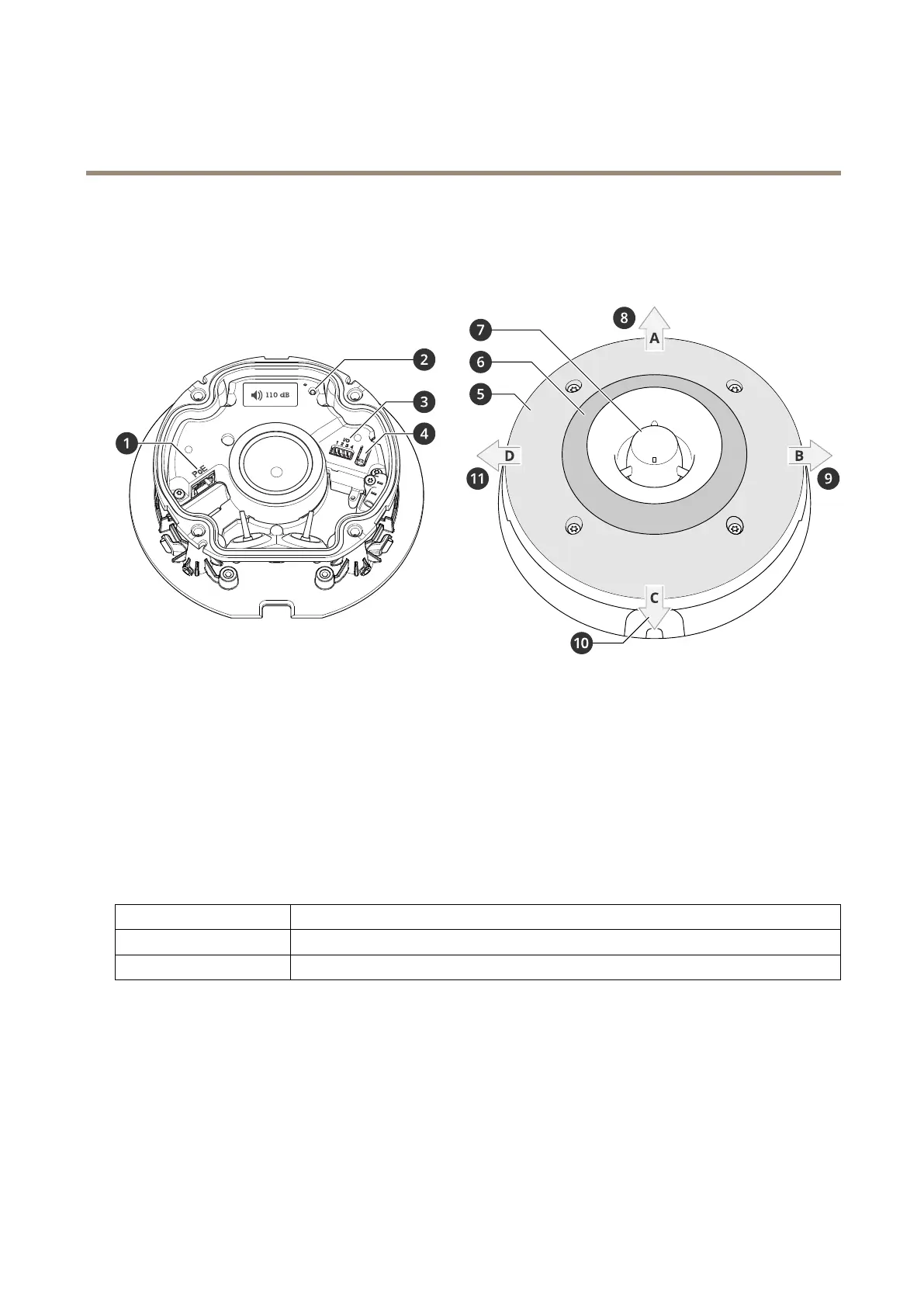
Productoverview
1
NetworkconnectorPoE
2
StatusLEDindicator
3
I/Oconnector
4
Controlbutton
5
WhiteLEDs
6
RGBA(red,blue,green,amber)LEDs
7
Siren
8
LightdirectionA
9
LightdirectionB
10
LightdirectionC
11
LightdirectionD
LEDindicators
StatusLED
Indication
GreenShowssteadygreenfor10secondsfornormaloperationafterstartupcompleted.
Amber
Steadyduringstartup,duringresettofactorydefaultorwhenrestoringsettings.
Buttons
Controlbutton
Thecontrolbuttonisusedfor:
•Resettingtheproducttofactorydefaultsettings.SeeResettofactorydefaultsettingsonpage34.
•Connectingtoaone-clickcloudconnection(O3C)serviceovertheinternet.Toconnect,pressandholdthebutton
forabout3secondsuntilthestatusLEDashesgreen.
29



 To Next Page